Category: Software Comparisons

Side-by-side reviews and comparisons of business software for pressure washing, soft washing, and window cleaning companies, with real prices checked against official pricing pages.

  • Jobber Pricing 2026: What Each Plan Really Costs a Pressure Washing Business

    Jobber Pricing 2026: What Each Plan Really Costs a Pressure Washing Business

    Disclosure: PowerWashPal may earn a commission if you buy through links on this page, at no extra cost to you. We don’t accept payment for rankings. Read how we make money.

    Updated November 2026. Prices checked on getjobber.com on November 19, 2026.

    If you run a pressure washing, soft washing or window cleaning business, Jobber is probably on your shortlist. The question most owners actually ask isn’t “is Jobber good?” It’s “how much does Jobber cost, which plan do I need, and what will I end up paying once I add my crew?”

    Here’s the short version: a solo operator can run on Core at $29 a month (billed annually). Most growing exterior cleaning companies land on Connect or Grow, because that’s where automatic quote follow-ups, payment reminders

    and QuickBooks sync live. Below is every plan, what it costs with extra users, and how to avoid paying for features you won’t touch.

    Still deciding between Jobber and Housecall Pro? See our head-to-head comparison by crew size — it breaks down which one is cheaper for solo operators versus 2–5 person crews.
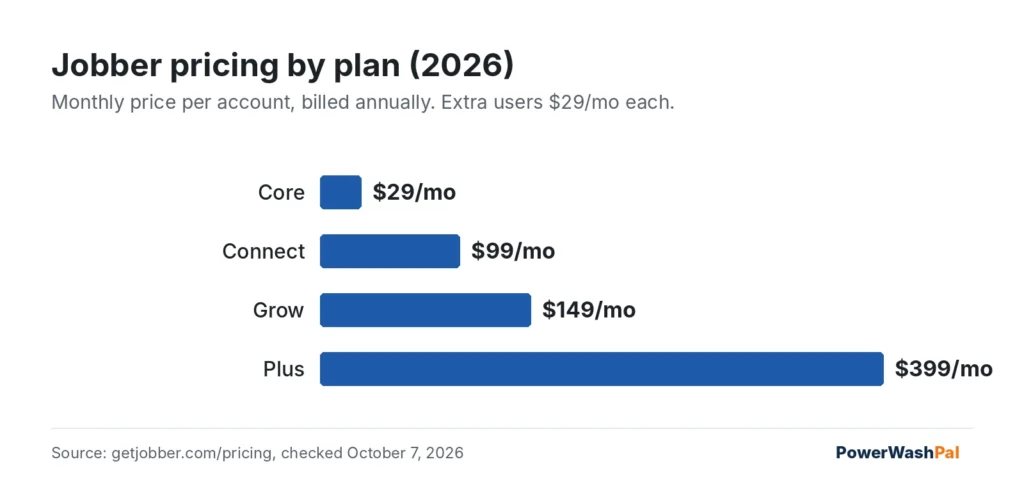
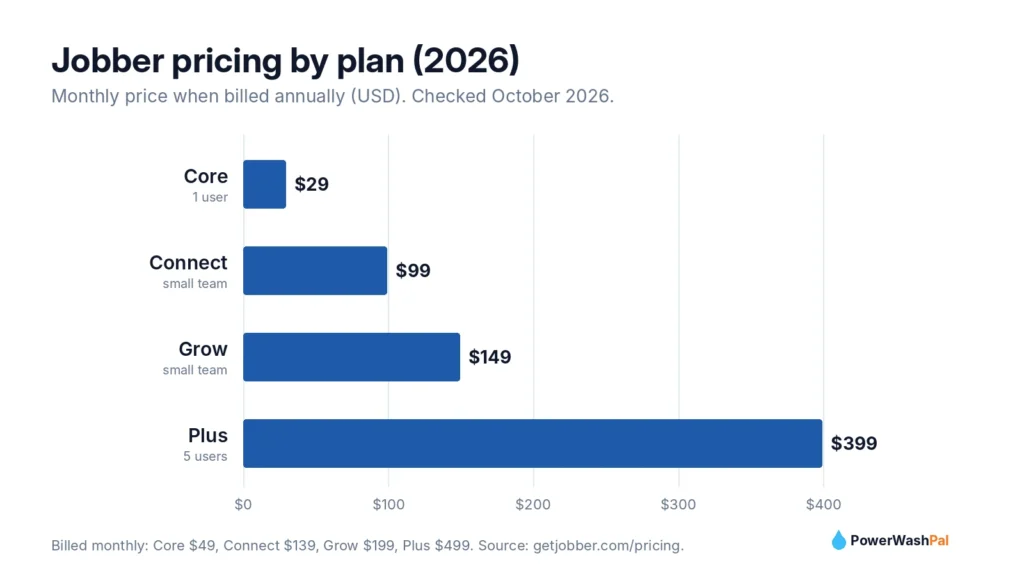
    Bar chart of Jobber plan prices in 2026: Core $29, Connect $99, Grow $149, Plus $399 per month billed annually
    Jobber’s four plans, monthly price when billed annually. Monthly billing is $20 to $100 more.

    Jobber pricing plans at a glance (2026)

    Plan Billed annually Billed monthly Users included Best for
    Core $29/mo $49/mo 1 Solo owner-operators just getting organized
    Connect $99/mo $139/mo 1 Owners who lose jobs to slow follow-up
    Grow $149/mo $199/mo 1 Companies selling bigger tickets and upsells
    Plus $399/mo $499/mo 5 Multi-crew operations
    Connect and Grow also come in 5-, 10- and 15-user bundles (Connect, 5 users: $149/mo annual or $199 monthly; Grow, 5 users: $229 or $299). Users beyond your bundle cost $29 per month. Monthly billing with a one-year commitment sits in between (Core: $39/mo). Source: Jobber pricing page, November 2026.

    Every plan comes with a 14-day free trial, and you don’t need a credit card to start it.

    Start a free Jobber trial

    What you get on each plan

    Core ($29/mo annual): the basics, done well

    Core covers the daily loop of a small pressure washing business: online booking, scheduling, professional quotes, invoices and online payments. If you’re running a truck by yourself and still writing quotes in your notes app, Core alone will make you look more professional on day one.

    What Core doesn’t do is chase people for you. There are no automated quote follow-ups or payment reminders, and no QuickBooks sync. You’ll do that part by hand.

    Connect ($99/mo annual): the plan most crews should start on

    Connect adds automated client reminders, automatic payment collection and QuickBooks Online sync. In this trade, that matters more than it sounds. A homeowner asks for a house wash quote on a Saturday, gets three bids and forgets about all of them by Wednesday. The company that sends a polite follow-up on Thursday usually gets the job.

    If you send more than a handful of quotes a week, Connect tends to pay for itself with one recovered house wash.

    Grow ($149/mo annual): built for upsells

    Grow lets you build quotes with photos, reviews and optional line items, so a customer can tick “add gutter brightening” or “add patio” right on the quote. It also adds job costing and custom workflow automations. For soft washing and roof cleaning companies where a single job can run $500 to $1,500, the add-on revenue from optional line items is the main reason to upgrade.

    Plus ($399/mo annual): multi-crew operations

    Plus includes five users, crew scheduling, the Marketing Suite, unlimited photo and video storage and Jobber’s AI receptionist. This is for companies running several rigs with a dispatcher, not for someone adding their first helper.

    Two workers on ladders cleaning and prepping the siding of a two-story house

    Jobber cost calculator: what you’ll pay with your team

    The sticker price is per account, but users are where the bill grows. Core is one user only. Connect and Grow come in 1-, 5-, 10- and 15-user bundles, Plus starts at five users, and each user beyond your bundle is $29 a month. Here’s what a typical exterior cleaning company would pay on annual billing:

    Your setup Plan Monthly cost Yearly cost
    Solo owner Core $29 $348
    Owner + 1 tech Connect + 1 user $128 $1,536
    Owner + 2 techs Grow + 2 users $207 $2,484
    Owner + office + 3 techs Plus (5 users) $399 $4,788

    Our math from Jobber’s published prices, October 2026. Taxes and payment processing fees are extra.
    Comparing at the same crew size? Our Jobber vs Housecall Pro comparison lines up both companies’ prices side by side.

    Watch the bundles. Grow with four extra users would be $265 a month, but the 5-user Grow bundle is $229, so at four or five people a bundle is cheaper. Compare it against Plus ($399 for five users), which adds crew scheduling.

    Add-ons that change the bill

    • Marketing Suite ($99/mo, included on Plus): email campaigns, review requests and referral tools. Worth a look once you have a few hundred past customers to win back each spring.
    • AI Receptionist ($29/mo on plans that don’t include it): answers calls and texts when you’re on a roof or behind a surface cleaner.
    • Card processing: Jobber Payments charges a per-transaction fee, like every field service tool. Factor it into your pricing rather than your software budget.

    Monthly vs. annual billing: is the discount worth it?

    Annual billing saves $240 a year on Core, $480 on Connect and $600 on Grow. That’s real money, but pressure washing is seasonal in a lot of the country. If you’re in Ohio or Michigan and you slow down from December to March, a monthly plan you can downgrade in the off season may cost about the same. In the Sun Belt, where you wash year-round, annual is usually the better deal. There’s also a middle option: monthly billing with a one-year commitment (Core $39, Connect $119, Grow $169 for one user).

    Jobber vs. Housecall Pro on price

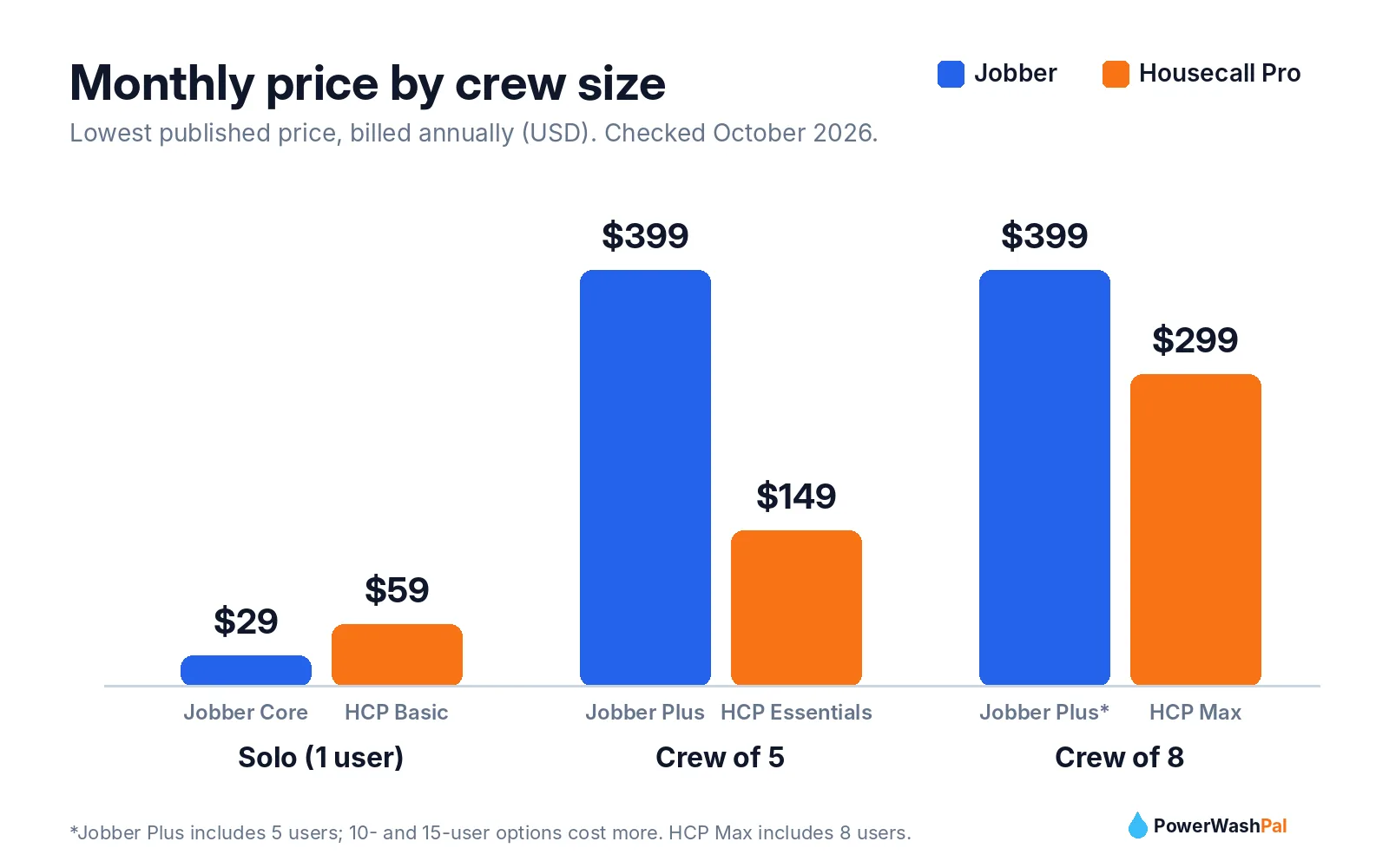
    Housecall Pro’s entry plan is $59 a month annually, twice Jobber Core. Its Essentials plan ($149) includes five users, and Jobber’s 5-user Connect bundle is also $149 a month on annual billing. So for a crew of three to five it’s close to a tie on price, and a solo operator will almost always pay less on Jobber. We break that down in our full Jobber vs Housecall Pro comparison.

    Team size Jobber (annual) Housecall Pro (annual)
    1 person $29 (Core) $59 (Basic)
    3 people, with follow-ups and QuickBooks $149 (Connect, 5 users) $149 (Essentials)
    5 people $149 (Connect, 5 users) $149 (Essentials)
    Calculated from both companies’ published US prices, November 2026.
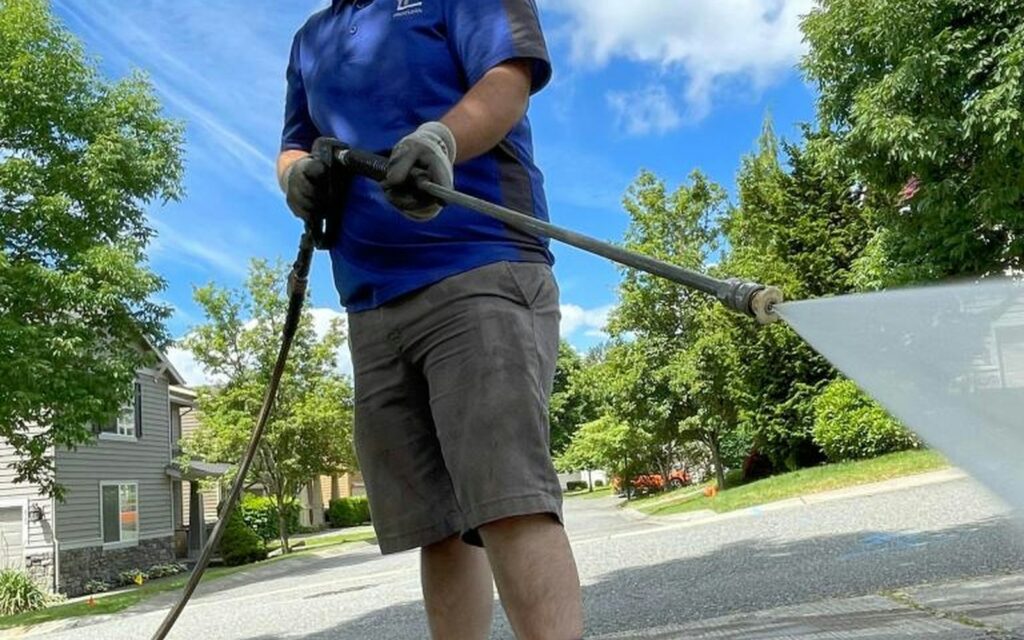
    Worker using a pressure washer wand to clean an outdoor area

    Which Jobber plan should you choose?

    • Just starting, working alone: Core. Upgrade the month you notice quotes going cold.
    • One or two trucks, sending 10+ quotes a week: Connect. Automated follow-ups are the feature that pays you back.
    • Selling roof washes, gutter brightening and sealing: Grow, for optional line items and photo quotes.
    • Three or more crews with a dispatcher: Plus, and compare it against Housecall Pro Max.

    Not sure software is worth it yet? Our guide on how to start a pressure washing business covers what to set up first, and our pricing guide helps you build the price book you’ll load into Jobber.

    To price a specific job in seconds, use our free pressure washing estimate calculator.

    Try Jobber free for 14 days Read our full Jobber review

    If Jobber’s price is the sticking point, see our list of Jobber alternatives with real 2026 prices.

    Comparing costs? Our Housecall Pro pricing guide breaks down its plans, card processing fees and what it really costs per year.

    Comparing invoicing and card fees? See our guide to the best field service invoice software, including what fees cost on a $300 job.

    Quoting landscape or lawn care jobs too? Compare the best landscaping estimating software, from free tools to LMN and SynkedUP.

    Tracking crew hours? See our picks for the best time tracking software for landscaping and outdoor crews, with GPS and geofencing.

    Browse all of our software comparisons

    FAQ

    How much does Jobber cost per month?

    Jobber costs $29 to $399 a month when billed annually, or $49 to $499 billed monthly, as of October 2026. Extra users are $29 a month each.

    Is Jobber free?

    No. Jobber offers a 14-day free trial with no credit card required, but there’s no free-forever plan.

    How much does the Jobber app cost?

    Nothing extra. The iPhone and Android apps are free to download and come with every plan, so your monthly Jobber cost is just the plan price plus any extra users or add-ons.

    Is Jobber worth it for a small pressure washing business?

    For most owners, yes, once you’re sending regular quotes. Core at $29 a month is less than the profit on one small driveway job. The bigger payoff comes from Connect’s automated follow-ups.

    Can I switch Jobber plans later?

    Yes. You can move up or down between plans, so starting small and upgrading when you hire is a sensible approach.

    Does Jobber work outside the US?

    Yes. Jobber is available in the US, Canada, the UK, Australia, New Zealand, Ireland and South Africa. Housecall Pro is US and Canada only.

    Sources: Jobber pricing and Housecall Pro pricing, both checked October 7, 2026. Prices change; confirm on the vendor’s site before you buy.
  • Jobber Review 2026: Pricing, Features, Pros & Cons for Pressure Washing

    Jobber Review 2026: Pricing, Features, Pros & Cons for Pressure Washing

    Disclosure: PowerWashPal may earn a commission if you sign up through some links on this page, at no extra cost to you. It never changes our verdict. How we make money.

    Updated October 2026. Prices and plan details come from Jobber’s official pricing page and help center. Review scores were checked on October 6, 2026.

    Jobber is the field service app we recommend most often to pressure washing and window cleaning businesses, and it’s the one most new owners end up shortlisting. This review covers what it actually costs, what each plan includes, how it handles exterior cleaning work, and where it falls short, so you can decide before you start the free trial.

    Jobber review: the short version

    • Best for: solo operators and growing crews that want quoting, scheduling, invoicing, and payments in one easy app.
    • Price: from $29/month billed annually (Core, 1 user) up to $399/month billed annually (Plus, 5 users).
    • Standout features: quotes with optional add-ons, automatic quote and invoice follow-ups, a customer self-service Client Hub, and a highly rated mobile app.
    • Watch out for: some of the best automation sits on Connect and Grow, and review requests are a paid add-on.
    • Our rating: 4.6/5 for exterior cleaning businesses.

    Try Jobber free for 14 days

    Pressure washing pro cleaning a storefront sidewalk with a surface cleaner

    What is Jobber?

    Jobber is field service management software for home service businesses. It was founded in 2011 in Edmonton, Canada, and says it’s used by more than 400,000 service pros across 50+ industries, from lawn care and HVAC to pressure washing and window cleaning. It runs on the web, iPhone, and Android, and handles the full job cycle: request, quote, schedule, job, invoice, and payment.

    Jobber also builds resources specifically for this trade, including a pressure washing software page, a window cleaning version, and free estimate and invoice templates for both.

    Jobber pricing in 2026

    Plan Billed annually Billed monthly Users Best for
    Core $29/mo $49/mo 1 Solo operators starting out
    Connect $99/mo $139/mo Small team Owners who want automatic follow-ups
    Grow $149/mo $199/mo Small team Selling add-ons and tracking job profit
    Plus $399/mo $499/mo 5 Established multi-crew companies

    Optional add-ons include the Marketing Suite ($99/month: review requests, email campaigns, referrals) and an AI Receptionist ($29/month). Both are included on Plus. Every plan starts with a 14-day free trial, no credit card required.

    Payment processing (US): 2.9% + 30¢ per card payment, 2.7% + 30¢ for Tap to Pay, and 1% for ACH bank payments. Instant payouts to a debit card cost an extra 1%.

    Bar chart of Jobber pricing by plan in 2026: Core $29, Connect $99, Grow $149, Plus $399 per month billed annually

    Features that matter for pressure washing and window cleaning

    Quotes that sell add-ons

    This is Jobber’s biggest strength for exterior cleaning. On Grow, quotes can include optional line items with photos, so a driveway customer can tick “house wash” or “gutter brightening” right on the quote. Jobber says pressure washing pros using optional line items earn over $300 more per quote on average. Even on Core, you get clean, branded quotes customers approve online.

    Automatic follow-ups

    Many washing quotes go quiet after you send them. From the Connect plan, Jobber follows up automatically on unanswered quotes and sends invoice reminders, so you stop chasing people by text.

    Client Hub

    Every customer gets a self-service portal to request work, approve quotes, see upcoming visits, and pay invoices. It saves phone tag and makes a small company look established.

    Scheduling and routes

    Drag-and-drop scheduling makes rain-day reschedules quick, and “on my way” texts keep customers informed. According to Jobber’s help center, route optimization is available on Connect, Grow, and Plus.

    Recurring work and payments

    Recurring jobs suit quarterly window cleaning and monthly storefront washes. Automatic payments (Connect and up) can charge a card on file, which is ideal for recurring commercial accounts.

    QuickBooks Online and reporting

    QuickBooks Online sync starts on Connect. Grow adds job costing, which shows whether a job made money after labor and chemicals.

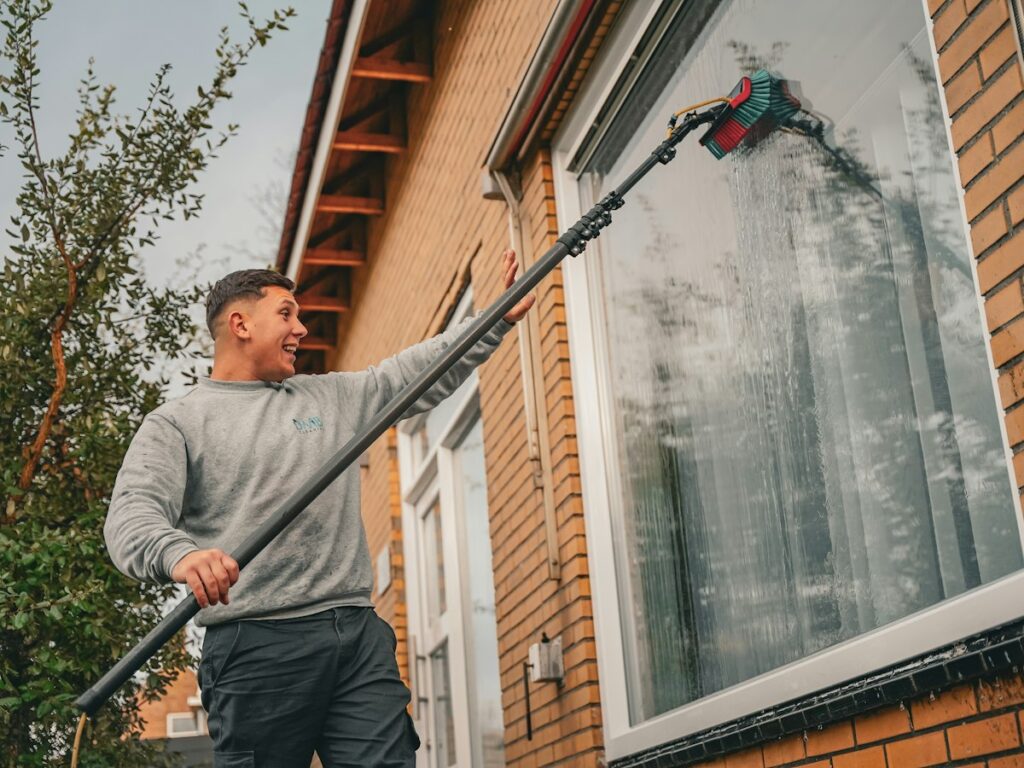
    Window cleaner using a water-fed pole on a brick home

    Jobber reviews: what users say

    Platform Rating Reviews
    Apple App Store 4.8/5 About 21,000
    Capterra 4.6/5 1,487
    G2 4.6/5 530
    Google Play 4.4/5 About 6,800
    Trustpilot 4.2/5 231

    Checked October 6, 2026. Reviewers most often praise having quoting, scheduling, invoicing, and payments in one place, how quickly crews learn the app, the Client Hub, and responsive support. The most common complaints are limited reporting on lower plans, routing that isn’t as detailed as dedicated mapping tools, key features locked behind higher tiers, and some Android stability issues.

    Jobber pros and cons

    Pros Cons
    Cheapest way to get a full system as a solo operator ($29/mo) Review requests need the $99 Marketing Suite unless you’re on Plus
    Quotes with optional add-ons raise average ticket size Optional line items and job costing require Grow
    Automatic quote and invoice follow-ups (Connect+) Reporting is basic on lower plans
    Client Hub for online approvals and payments Prices have risen over time
    Excellent mobile app, easy for crews Some Android users report crashes
    Works in the US, Canada, UK, Australia, NZ, Ireland, South Africa Moving your data out later takes effort

    Which Jobber plan should you choose?

    • Just starting, solo: Core. Get quotes, scheduling, invoicing, and online payments for $29/month (annual).
    • Sending 10+ quotes a week: Connect. The automatic follow-ups alone usually win back the extra cost.
    • Selling lots of add-ons (house wash + gutters + windows): Grow, for optional line items and job costing.
    • Multiple crews and an office: Plus, which includes the Marketing Suite and AI Receptionist plus 1-on-1 support.

    Jobber vs alternatives

    The main alternative is Housecall Pro, which includes review requests on every plan and gives US crews of 2–5 more users for the money (Essentials, $149/month annually for 5 users). It isn’t available outside the US and Canada. See our full Jobber vs Housecall Pro comparison or the list of the best pressure washing software.

    Shopping around? We compared seven Jobber alternatives with real prices, from Housecall Pro to washing-only apps.

    Support

    Jobber offers live chat, email, and phone support (1-888-721-1115), with live agents Monday to Friday, 7am–9:30pm ET, plus an AI assistant after hours. Plus customers get 1-on-1 onboarding and priority support.

    Technician pressure washing a residential driveway on a sunny day

    Our verdict

    Jobber is the best all-around choice for most pressure washing and window cleaning businesses. It’s affordable when you’re solo, easy enough to learn in an afternoon, and it grows with you through automatic follow-ups, add-on quoting, and recurring payments. If review requests are your top priority and you’re a US crew of three or more, compare it with Housecall Pro before you decide.

    The easiest test: start the 14-day trial, enter three real jobs (a house wash, a driveway, and a recurring window account), and send yourself a quote from your phone.

    Start your free Jobber trial

    Quoting landscape or lawn care jobs too? Compare the best landscaping estimating software, from free tools to LMN and SynkedUP.

    Frequently asked questions

    How much does Jobber cost per month?

    Jobber costs $29–$399 per month billed annually, or $49–$499 billed monthly, depending on the plan. The Core plan for one user is $29/month on an annual plan.

    Is Jobber a CRM?

    Yes, though it’s more than that. Jobber keeps a record of every client, property, note and past job (the CRM part), then adds quoting, scheduling, invoicing and payments on top. For a washing business, that means you can pull up last year’s price for the same house in about two taps.

    What is Jobber software used for?

    Running the day-to-day of a home service business: sending quotes, booking and routing jobs, sending invoices and collecting payments. Pressure washing and window cleaning companies use it most for recurring routes, follow-ups on unanswered quotes and getting paid on site.

    Does Jobber have a free trial?

    Yes. Jobber offers a 14-day free trial with no credit card required.

    Is Jobber good for pressure washing?

    Yes. Optional line items, photo quotes, automatic follow-ups, and recurring jobs fit pressure washing well, and Jobber publishes pressure-washing-specific templates and guides.

    Does Jobber work with QuickBooks?

    Yes. QuickBooks Online sync is included from the Connect plan.

    What are Jobber’s payment processing fees?

    In the US, card payments cost 2.9% + 30¢, Tap to Pay costs 2.7% + 30¢, and ACH bank payments cost 1%.

  • Best Window Cleaning Software in 2026 (US Prices Compared)

    Best Window Cleaning Software in 2026 (US Prices Compared)

    Disclosure: PowerWashPal may earn a commission if you sign up through some links on this page, at no extra cost to you. It never changes how we rank software. How we make money.

    Updated October 2026. Prices come from each company’s official pricing page, checked this month.

    Window cleaning runs on routes. The money is in recurring customers you visit every month or quarter, priced per window or per pane, scheduled around the weather. The right software keeps those routes full, reminds customers before you show up, and charges their card when the job’s done.

    Here is the best window cleaning business software for US companies in 2026, from all-in-one platforms to tools built only for window cleaners.

    The quick answer

    • Best overall: Jobber. Recurring jobs, route optimization, automatic payments, and a customer portal, from $29/month.
    • Best for US crews: Housecall Pro. Five users for $149/month with review requests built in.
    • Best window-cleaning-specific tool: The Customer Factor. One plan with unlimited users for $44.95/month.
    • Best for satellite measuring: QuoteIQ. Measure homes from the map and quote without a site visit.
    • Best for UK window cleaners: Squeegee. Built around rounds, GoCardless, and HMRC.
    Window cleaner pulling a squeegee through soapy glass

    What window cleaning business software needs to do

    • Recurring rounds. Set a customer to every 4, 8, or 12 weeks once, and the visits keep appearing.
    • Route planning. Group nearby stops so you clean more windows and drive less.
    • Per-window or per-pane pricing. A price book with your rates (inside, outside, screens, tracks) makes quotes fast and consistent.
    • Weather rescheduling. Move a rained-out day with a few taps and text customers automatically.
    • Card on file. Charge recurring customers automatically so you don’t chase checks under the doormat.

    Window cleaning software compared

    Software Starting price Users Free trial Best for
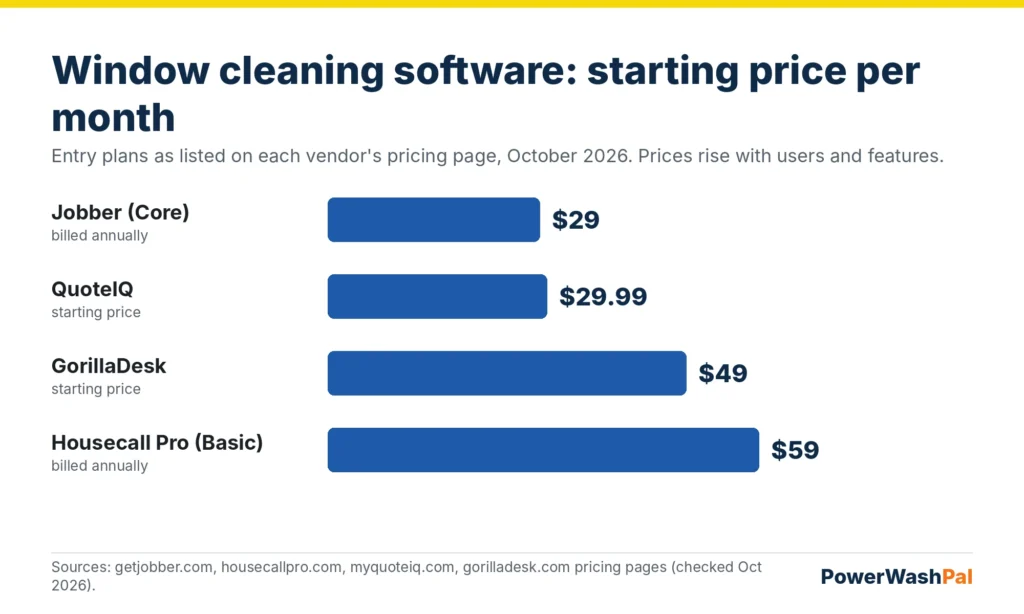
    Jobber $29/mo (annual) 1 on Core 14 days, no card Most window cleaning businesses
    Housecall Pro $59/mo (annual) 1 on Basic, 5 on Essentials 14 days US crews of 2–8
    The Customer Factor $44.95/mo Unlimited 30-day risk-free Window-cleaning-focused owners
    QuoteIQ $29.99/mo 1 on Essentials 14 days Quoting from satellite maps
    GorillaDesk $49/mo Unlimited admins Yes Dense recurring routes
    Squeegee From £15.83/mo + VAT Varies by plan Check site UK window cleaners
    Bar chart of window cleaning software starting prices per month: Jobber, QuoteIQ, GorillaDesk, Housecall Pro

    1. Jobber: best overall window cleaning software

    Jobber gives window cleaners everything needed to run recurring routes from one app, and it publishes a dedicated window cleaning software page plus free window cleaning estimate templates.

    • Recurring jobs and visit reminders keep monthly and quarterly customers on schedule.
    • Route optimization (Connect plan and up, per Jobber’s help center) orders your stops to save drive time.
    • Automatic payments (Connect and up) charge a card on file after each visit.
    • “On my way” texts and a Client Hub where customers approve quotes and pay online.
    • Optional line items on Grow let customers add screens, tracks, or gutter cleaning to a quote with one tap.

    Pricing: Core $29/month (annual) for 1 user, Connect $99, Grow $149, Plus $399 for 5 users. Read our full Jobber review.

    Try Jobber free for 14 days

    2. Housecall Pro: best for US window cleaning crews

    Housecall Pro is a strong fit once you have two or more cleaners on the road. The Essentials plan covers five users for $149/month billed annually, and automated review requests are included on every plan, which is powerful in a trade where homeowners pick the company with the most Google reviews.

    • Online booking from your website for standard window packages
    • GPS tracking and tech commissions on Essentials
    • Route optimization and recurring service plans on Max ($299/month, 8 users)
    • QuickBooks sync from Essentials

    Note: Housecall Pro is available only in the US and Canada.

    Try Housecall Pro free for 14 days

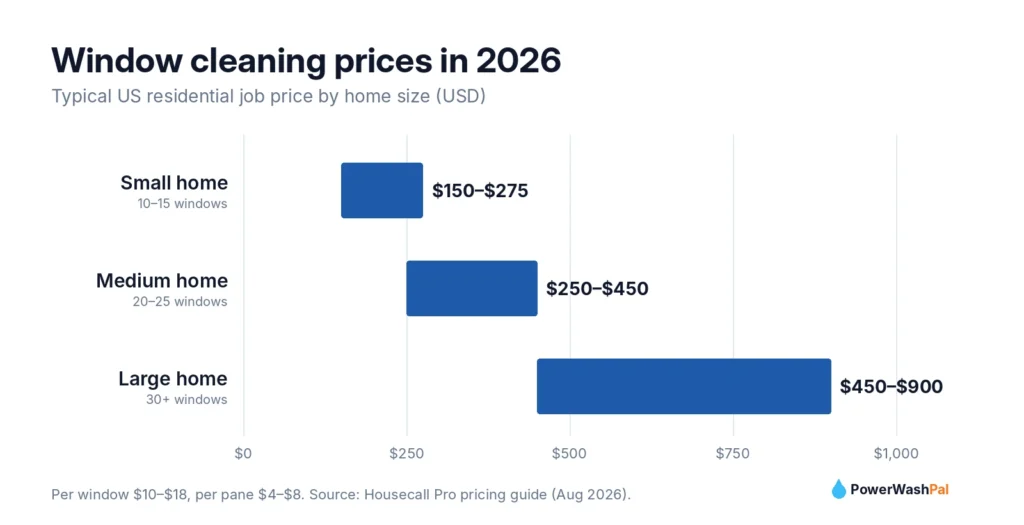
    Chart of 2026 US window cleaning prices by home size: small $150-$275, medium $250-$450, large $450-$900

    3. The Customer Factor: best window-cleaning-focused tool

    The Customer Factor has long marketed to window cleaners and other route-based services. It currently sells a single plan at $44.95/month with unlimited employees and sub-users and a 30-day risk-free period. The company says it plans to move to tiered pricing, with existing members keeping their rate. It’s a good fit for owners who want one predictable price as the team grows.

    4. QuoteIQ: best for quoting from the map

    QuoteIQ is built for exterior cleaning trades. Its MapMeasure Pro tool (from the Beginner plan, $99.99/month) measures homes from satellite imagery so you can quote window and pressure washing jobs remotely. Plans start at $29.99/month for one user. Route optimization is on the Elite plan.

    Start a free QuoteIQ trial

    5. GorillaDesk: best for dense recurring routes

    GorillaDesk comes from pest control and pool service, where dense recurring routes are everything. Plans run $49, $99, and $149 per month, with unlimited office users. Route optimization, review requests, and QuickBooks Online start on Pro ($99).

    6. Squeegee: best for UK window cleaners

    If you’re reading from the UK, Squeegee is built around window cleaning rounds, Direct Debit through GoCardless, and HMRC-ready bookkeeping, starting from £15.83/month plus VAT. It isn’t aimed at US businesses, so US readers should start with Jobber or Housecall Pro.

    Window cleaner using a water-fed pole on a brick home

    How much do window cleaners charge?

    Loading the right rates into your software’s price book matters as much as the software itself. Housecall Pro’s August 2026 pricing guide puts typical US rates at:

    Service Typical price
    Per window $10–$18
    Per pane $4–$8
    Small home (10–15 windows) $150–$275
    Medium home (20–25 windows) $250–$450
    Large home (30+ windows) $450–$900+
    Screen cleaning $2–$5 per screen
    Small storefront $40–$75 per visit
    Minimum charge $100–$150+

    Source: Housecall Pro window cleaning pricing guide. Many window cleaners also offer pressure washing and house washing. See our pressure washing price guide for those rates.

    Just getting started? Read how to start a window cleaning business.

    For per-window rates, minimums and add-on prices to put into your quotes, see our window cleaning prices guide, which includes a calculator.

    Our verdict

    For most US window cleaning businesses, Jobber is the best place to start: recurring jobs, route optimization, automatic payments, and a polished customer portal at a price that works for a one-person operation. Once you run a crew of three or more in the US, Housecall Pro often wins on value thanks to five users on Essentials and built-in review requests.

    Both have 14-day free trials. Set up your three most common recurring customers in each and see which one makes your week easier.

    Start a free Jobber trial Start a free Housecall Pro trial

    Two-story American home with a wraparound porch

    Running a lawn care, cleaning or other home service business too? See our roundup of the best field service management software for small business, with prices for a five-person team.

    Frequently asked questions

    What is the best software for a window cleaning business?

    Jobber is the best all-around choice for most window cleaning businesses thanks to recurring jobs, route optimization, and automatic payments. US crews of 2–8 often get better value from Housecall Pro.

    What is the best scheduling software for window cleaners?

    For recurring routes, Jobber and GorillaDesk are the strongest. Both let you set a job to repeat every month or quarter, group nearby stops into one day, and text customers a heads-up before you arrive. If you mostly do one-off residential jobs, Housecall Pro’s online booking is easier for customers.

    Do I need a CRM for a window cleaning business?

    You need somewhere to keep each customer’s window count, gate code, notes and price, and a spreadsheet stops working once you pass a hundred or so clients. Every app on this list includes that client database, so you don’t need a separate CRM.

    Is there free window cleaning software?

    Few full systems are free. ServiceM8 has a free plan capped at 30 jobs a month, and ResponsiBid offers a free quoting plan. Expect to pay about $29–$50 a month for a complete CRM.

    Does window cleaning software handle recurring customers?

    Yes. Jobber, Housecall Pro, GorillaDesk, and The Customer Factor all support recurring visits, which is essential for monthly and quarterly window routes.

    Can I charge customers automatically after each visit?

    Yes. Jobber’s automatic payments (Connect and up) and other tools with card-on-file billing can charge recurring customers after each completed visit.

  • 7 Best Pressure Washing Software Picks for 2026 (Real Prices)

    7 Best Pressure Washing Software Picks for 2026 (Real Prices)

    Disclosure: PowerWashPal may earn a commission if you sign up through some links on this page, at no extra cost to you. It never changes how we rank or describe software. How we make money.

    Updated October 2026. Every price below comes from each company’s official pricing page, checked this month.

    Running a pressure washing business means quoting fast, rescheduling around rain, keeping recurring customers on track, and getting paid before you’re on to the next driveway. The right software handles most of that for you. The wrong one becomes another monthly bill you resent.

    Looking for pressure washing business software (or “pressure wash software,” as many owners search for it)? We compared 7 tools that pressure washing, soft washing, and window cleaning companies actually use, from all-in-one field service platforms to quoting tools built just for exterior cleaning.

    The quick answer

    • Best overall: Jobber. The easiest all-in-one tool to start with, from $29/month for a solo operator, and it works in the US, Canada, UK, and Australia.
    • Best for US crews of 2–8: Housecall Pro. Five users for $149/month, with review requests and marketing built in.
    • Best built for exterior cleaning: QuoteIQ. Satellite measuring and pricing made for washing and window jobs.
    • Best for recurring routes: GorillaDesk. Unlimited office users and route optimization from $99/month.
    • Best budget pick: Markate. From $39.95/month for an owner-operator.
    • Best instant-quote add-on: ResponsiBid. Lets customers price their own job on your website, then hands it to Jobber or Housecall Pro.
    • Newest washing-specific option: WashOps. Square-foot quoting by surface, but still young.

    Not sure where to start? Most owners we talk to end up choosing between the top two. Our Jobber vs Housecall Pro comparison breaks that decision down by crew size.

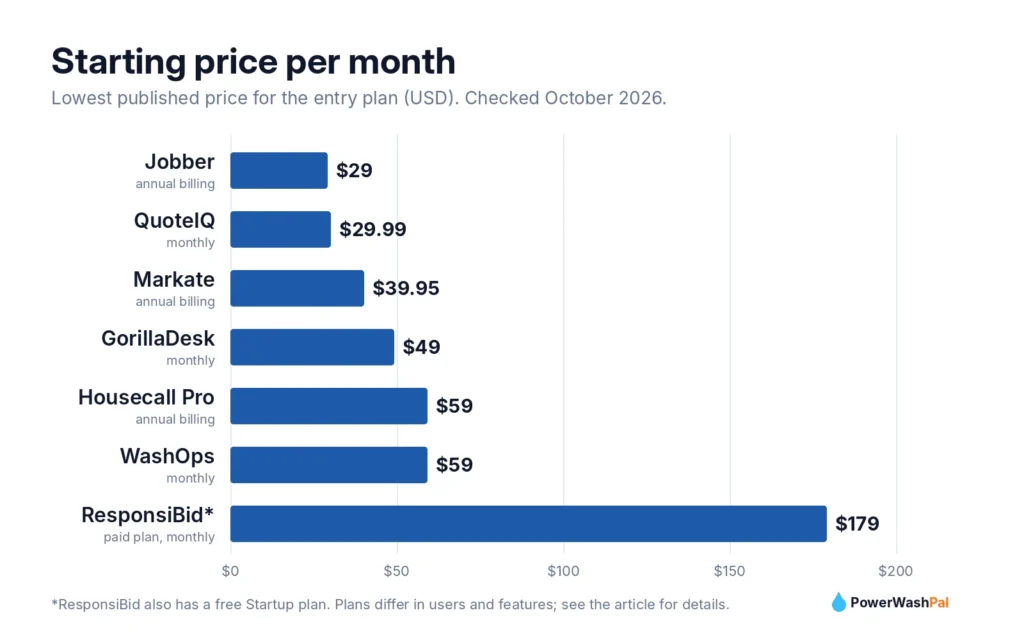
    Bar chart of starting monthly prices for pressure washing software

    Pressure washing software compared

    Software Starting price Users on entry plan Free trial Best for
    Jobber $29/mo (annual) 1 14 days, no card Most businesses, any country
    Housecall Pro $59/mo (annual) 1 14 days US/Canada crews of 2–8
    QuoteIQ $29.99/mo 1 14 days Exterior-cleaning-specific quoting
    GorillaDesk $49/mo Unlimited admins Yes Recurring routes
    Markate $39.95/mo (annual) 1 (+$5/employee) 14 days Tight budgets
    ResponsiBid Free, then $179/mo 1 admin + sub-users Free plan Website instant quotes
    WashOps $59/mo 1 14 days, no card Early adopters

    What pressure washing business software should do for you

    Before comparing brands, it helps to know which features actually earn their keep in this trade:

    • Fast, good-looking quotes. Most washing leads collect three quotes. The company that sends a clean quote first, with photos and optional add-ons, wins more of them.
    • Easy rescheduling. Rain moves your calendar every few weeks. Drag-and-drop scheduling with automatic customer texts saves hours.
    • Recurring jobs. Monthly storefronts, quarterly windows, and yearly house washes are where steady income comes from.
    • Online payments. Card-on-file and text-to-pay invoices get you paid the same day.
    • Review requests. Google reviews drive local leads. Automated review requests after each job compound over time.
    Pressure washing pro cleaning a storefront sidewalk with a surface cleaner

    1. Jobber: best overall

    Jobber is the tool we recommend to most new pressure washing and window cleaning businesses, and it’s the one many established crews grow into. It covers the whole job cycle (request, quote, schedule, invoice, payment) in an app that’s simple enough to learn in an afternoon.

    Why it stands out for exterior cleaning:

    • Quotes that sell add-ons. On the Grow plan, quotes can include optional line items and photos. A homeowner asking for a driveway can tick “house wash” or “gutter brightening” right on the quote, which raises your average ticket without a sales call.
    • Automatic follow-ups. From the Connect plan, Jobber follows up on unanswered quotes and unpaid invoices for you. In a business where many quotes go quiet, that alone can pay for the subscription.
    • Client hub. Customers approve quotes, see upcoming visits, and pay invoices online without calling you.
    • Works almost everywhere. Jobber is available in the US, Canada, UK, Australia, New Zealand, Ireland, and South Africa, so it’s the safe pick outside North America.
    • Room to grow. QuickBooks Online sync, automated reminders, and route tools are there when you add a crew.

    Pricing (billed annually / monthly): Core $29/$49 for 1 user, Connect $99/$139, Grow $149/$199, Plus $399/$499 for 5 users. Optional add-ons include the Marketing Suite ($99/mo) and an AI Receptionist ($29/mo). See our full Jobber review and Jobber vs Housecall Pro comparison.

    Keep in mind: review requests and email campaigns live in the Marketing Suite add-on, not the core plans.

    Try Jobber free for 14 days

    2. Housecall Pro: best for US crews of 2–8

    Housecall Pro is built for home service companies that want to grow, and it shines once you have a few people in the field. Its biggest advantage for washing businesses is marketing: review requests are included on every plan, which matters in a trade where most new customers come from Google Maps.

    Why it stands out for exterior cleaning:

    • Built-in reviews. Automated review requests after each job, with no add-on to buy. Over a season this can be the difference between 15 and 150 Google reviews.
    • Great value for small crews. Essentials includes 5 users for $149/month billed annually, about $30 per user.
    • Online booking and a price book. Customers can book standard services like a driveway or a one-story house wash straight from your website.
    • Team tools. GPS tracking and tech commissions on Essentials, plus route optimization and recurring service plans on Max.
    • QuickBooks sync from the Essentials plan.

    Pricing (billed annually / monthly): Basic $59/$79 for 1 user, Essentials $149/$189 for 5 users, Max $299/$329 for 8 users (+$35 per extra user).

    Keep in mind: Housecall Pro is sold only in the US and Canada.

    Try Housecall Pro free for 14 days

    Window cleaner using a water-fed pole on a brick home

    3. QuoteIQ: best built for exterior cleaning

    QuoteIQ targets pressure washing and window cleaning companies directly. Its standout is MapMeasure Pro, which measures properties from satellite imagery so you can quote driveways and roofs without driving out.

    • Plans (monthly / yearly): Essentials $29.99/$299.99 (1 user), Beginner $99.99/$999.99 (2 users), Pro $199.99/$1,999.99 (4 users), Elite $299.99/$2,999.99 (10 users), Max $699.99/$6,999.99 (20 users).
    • Good to know: MapMeasure and review automation start on Beginner, a customer self-quoting portal and QuickBooks on Pro, and route optimization on Elite.
    • Best for: owners who want trade-specific quoting and don’t mind a smaller ecosystem than Jobber or Housecall Pro.

    For plan-by-plan pricing and worked team costs, read our full QuoteIQ review.

    Start a free QuoteIQ trial

    4. GorillaDesk: best for recurring routes

    GorillaDesk grew up serving pest control and pool companies, so it’s strong at recurring route work, the same pattern as monthly storefront washes or quarterly window routes.

    • Plans (monthly / yearly): Basic $49/$539, Pro $99/$1,089, Growth $149/$1,639.
    • Good to know: unlimited admin users, and only people on the schedule need a paid seat. Route optimization, review requests, online booking, and QuickBooks Online start on Pro. Basic routing is capped at 25 stops. SMS costs extra.
    • Best for: commercial-heavy or recurring window routes.

    5. Markate: best budget pick

    Markate covers the basics (scheduling, recurring work orders, invoicing, online payments, QuickBooks, review requests) at a low price.

    • Price: $39.95/month billed annually or $49.95 monthly for the owner-operator, plus $5 per employee per month.
    • Good to know: online booking and SMS campaigns are paid add-ons. 14-day trial.
    • Best for: part-time or first-season operators watching every dollar.

    6. ResponsiBid: best instant-quote add-on

    ResponsiBid isn’t a full CRM. It’s an instant-quote engine for your website: visitors enter their house size or surfaces, see good-better-best pricing, and book on the spot. It then passes the job into Jobber, Housecall Pro, or Markate.

    • Price: Startup plan free, Scaling $179/month, Pro $229/month, month to month.
    • Best for: companies already on Jobber or Housecall Pro that get a lot of website traffic and want more after-hours bookings.

    7. WashOps: newest washing-specific option

    WashOps is a newer app made only for pressure washing. It quotes by square foot per surface (concrete, siding, roof, deck), sends before-and-after “transformation” reports by text, and charges maintenance plans to a card on file.

    • Price: Starter $59/month (1 user), Pro $119 (up to 8 users), Crew $239 (unlimited). 14-day trial, no card.
    • Keep in mind: it’s young, and we couldn’t confirm a QuickBooks integration. Test it carefully before moving your customer list.

    Run a window cleaning route? See our dedicated guide to the best window cleaning software.

    Others we looked at

    Workiz doesn’t publish prices (you have to book a demo). Kickserv (from $48/month annually, 5 users) and ServiceM8 (from $29/month, priced by job volume) are solid general field service tools but have less built for exterior cleaning. Service Autopilot suits large lawn and landscape operations more than washing crews. In the UK, window cleaners often use Squeegee, which is built around rounds and HMRC bookkeeping.

    Already on Jobber and thinking about leaving? Read our guide to the best Jobber alternatives.

    How to choose in 10 minutes

    Your situation Our pick Why
    Solo, just starting Jobber Core Lowest cost for a full system, simple to learn
    Solo, want to grow fast Jobber Connect Automatic quote and invoice follow-ups
    Crew of 2–5 in the US Housecall Pro Essentials 5 users and review requests for $149/mo
    Crew of 6–8 in the US Housecall Pro Max 8 users, route optimization, service plans
    Outside the US or Canada Jobber Housecall Pro isn’t available
    Lots of recurring commercial stops GorillaDesk Pro Route optimization, unlimited admins
    Want satellite measuring QuoteIQ Beginner MapMeasure Pro built in
    Two-story American home with a wraparound porch, ready for a soft wash

    Our verdict

    For most pressure washing and window cleaning businesses, Jobber is the best place to start: it’s affordable for one person, easy to learn, and it handles quotes, scheduling, invoicing, and payments without extra tools. Once you run a crew of three or more in the US, Housecall Pro often becomes the better value thanks to its 5-user Essentials plan and built-in review requests.

    Both offer 14-day free trials. Put the same three real jobs into each (a house wash, a driveway, and a recurring window account) and keep the one you’d enjoy opening every morning.

    Start a free Jobber trial Start a free Housecall Pro trial

    For a full breakdown of plans, card processing fees and the real yearly cost, see our Housecall Pro pricing guide.

    Running a lawn care, cleaning or other home service business too? See our roundup of the best field service management software for small business, with prices for a five-person team.

    Comparing invoicing and card fees? See our guide to the best field service invoice software, including what fees cost on a $300 job.

    Frequently asked questions

    What is the best software for a pressure washing business?

    For most businesses, Jobber is the best all-around choice because it’s affordable for solo operators and covers quoting, scheduling, invoicing, and payments. US crews of 2–8 often get better value from Housecall Pro.

    What is the best pressure washing estimating software?

    If quoting is what eats your evenings, look at QuoteIQ first. It lets you measure a driveway or roof from the satellite map and turn it into a price on the spot. ResponsiBid is the pick if you want customers to get an instant quote from your website. Jobber’s Grow plan is the middle ground: optional line items and photos on quotes, so customers can tick add-ons like gutters or a deck themselves.

    Do I need a CRM for my pressure washing company?

    Once you have more than a few dozen customers, yes. A CRM is just a record of every client, property, past job and quote, and every tool on this list includes one. Jobber and Housecall Pro go further with automatic quote follow-ups and review requests, which is where most of the extra money comes from.

    What is the best app for a pressure washing business?

    Jobber and Housecall Pro both have full iPhone and Android apps, so you can build a quote in the driveway, get it signed, and take a card payment before you roll up the hose. Try both free trials on a real job before you pick.

    Is there free pressure washing software?

    ResponsiBid has a free Startup plan for website quotes, and ServiceM8 has a free plan capped at 30 jobs a month. For a full CRM, you’ll pay roughly $29–$60 per month to start.

    Do I need software when I’m just starting out?

    Not on day one, but sooner than most people think. Once you’re sending more than a few quotes a week, automatic follow-ups and online payments usually pay for the subscription.

    Which pressure washing software has satellite measuring?

    QuoteIQ includes MapMeasure Pro from its Beginner plan, and GorillaDesk adds map-based estimating on Growth. You can also measure with free tools like Google Earth and enter square footage into Jobber or Housecall Pro quotes.

    How much should I charge once I have software set up?

    See our 2026 pressure washing price guide for per-square-foot and per-job rates you can load into your price book.

    To price a specific job in seconds, use our free pressure washing estimate calculator.

  • Jobber vs Housecall Pro: Which Is Better for Pressure Washing? (2026)

    Jobber vs Housecall Pro: Which Is Better for Pressure Washing? (2026)

    Affiliate disclosure: PowerWashPal may earn a commission if you sign up through some links on this page, at no extra cost to you. It never changes how we rank or describe software. How we make money.

    Updated October 2026. Prices checked on getjobber.com and housecallpro.com this month.

    If you run a pressure washing, soft washing, or window cleaning business, you’ve probably narrowed your software search down to the same two names everyone mentions: Jobber and Housecall Pro.

    Both will handle quotes, scheduling, invoicing, and payments. Both offer a 14-day free trial with no credit card. So when it comes down to Jobber vs Housecall Pro (or Housecall Pro vs Jobber, depending on which one you tried first), which one should you actually pay for?

    The honest answer depends on two things: how many people are on your crew and where your business is located. This guide breaks it down using each company’s published 2026 pricing, so you can pick the right one in the next ten minutes instead of the next ten weeks.

    The quick answer

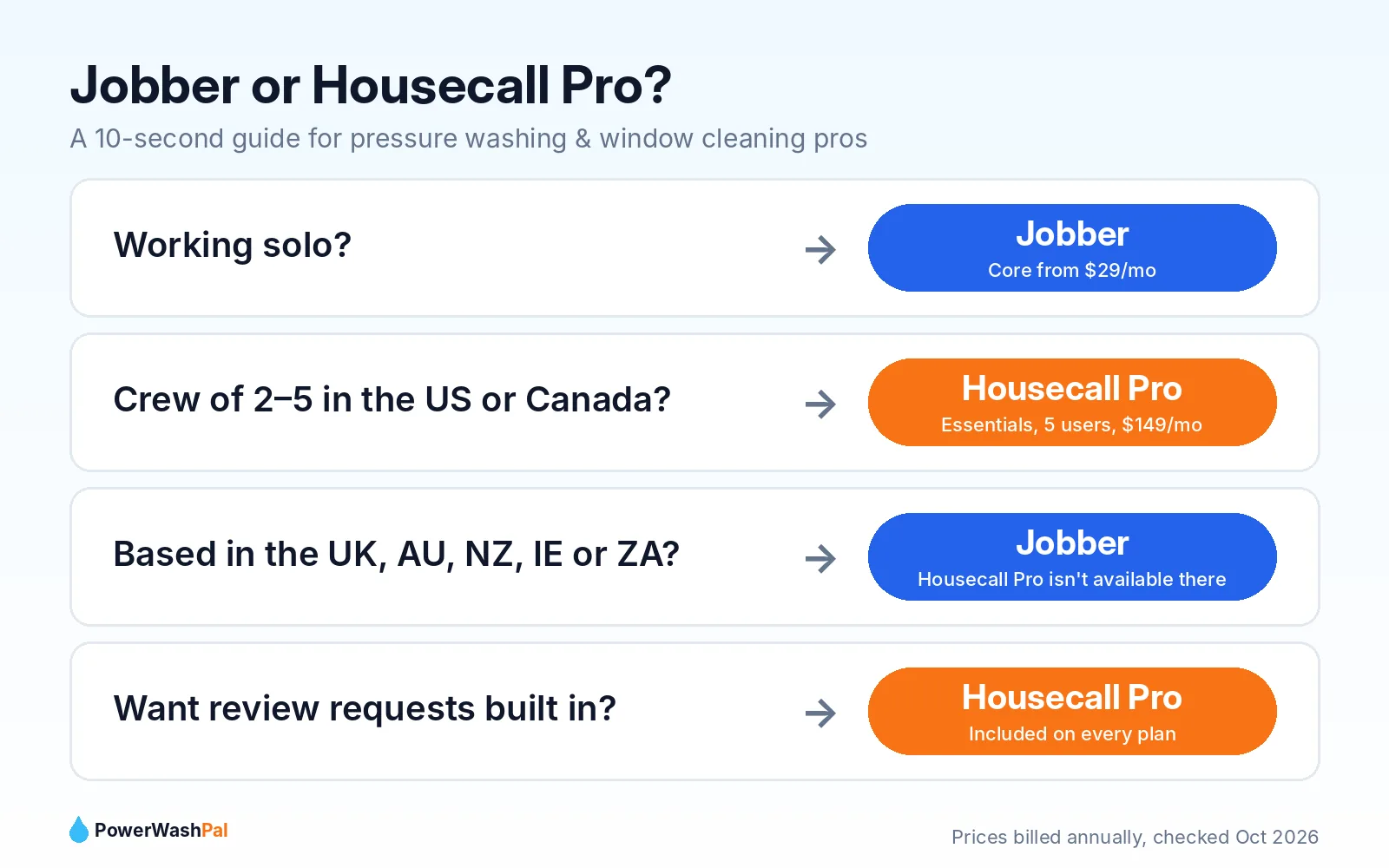
    • Solo operator or just starting out? Go with Jobber. Its entry plan starts at $29/month (billed annually), about half the price of Housecall Pro’s entry plan.
    • Running a crew of 2–5 people? Lean toward Housecall Pro Essentials. It includes 5 users for $149/month (billed annually), which is hard for Jobber to beat at that crew size.
    • Outside the US or Canada? Choose Jobber. Housecall Pro is only available in the US and Canada.

    Try Jobber free for 14 days   Try Housecall Pro free for 14 days

    Pressure washing pro cleaning a storefront sidewalk with a surface cleaner

    Jobber vs Housecall Pro at a glance

    Jobber Housecall Pro
    Starting price $29/mo (Core, billed annually)
    $49/mo month-to-month
    $59/mo (Basic, billed annually)
    $79/mo month-to-month
    Users on entry plan 1 1
    Best value for a 5-person crew Plus: $399/mo (annual), 5 users Essentials: $149/mo (annual), 5 users
    Free trial 14 days, no credit card 14 days, no credit card
    Where it works US, Canada, UK, Ireland, Australia, New Zealand, South Africa US and Canada only
    Review requests Marketing Suite add-on ($99/mo) or Plus plan Included from Basic
    QuickBooks sync From Connect plan From Essentials plan
    Contract Month-to-month available Month-to-month, no contracts

    Prices checked on each company’s pricing page in October 2026. Software prices change often, so confirm on the official site before you buy.
    Jobber vs Housecall Pro monthly price by crew size, 2026

    Pricing: what you’ll really pay in 2026

    Sticker prices are confusing because both companies show three different numbers: month-to-month, monthly with a yearly commitment, and prepaid annual. Here’s the full picture.

    Jobber pricing

    Plan Month-to-month Monthly, 1-year commitment Prepaid annual Users
    Core $49 $39 $29 1
    Connect $139 $119 $99 1 (5-user option: $199/mo)
    Grow $199 $169 $149 1 (5-user option: $299/mo)
    Plus $499 $439 $399 5 (10 and 15-user options)

    Jobber add-ons: Marketing Suite $99/mo, AI Receptionist $29/mo, Pipeline $49/mo.

    Housecall Pro pricing

    Plan Billed monthly Billed annually Users included
    Basic $79 $59 1
    Essentials $189 $149 5
    Max $329 $299 8 (extra users $35/mo each)

    What this means for a washing business

    • Solo, one truck: Jobber Core at $29–$49/mo vs Housecall Pro Basic at $59–$79/mo. Jobber saves you roughly $360 a year.
    • Owner plus 2–4 techs: Housecall Pro Essentials includes 5 users for $149–$189/mo. To get 5 users on Jobber, you’re looking at the 5-user Connect option ($199/mo month-to-month) or Plus ($399–$499/mo).
    • Want automatic review requests? Housecall Pro includes review management on every plan. On Jobber, that’s part of the $99/mo Marketing Suite unless you’re on Plus.

    Features that matter for pressure washing and window cleaning

    Exterior cleaning has its own quirks: lots of quotes that never close, weather reschedules, recurring commercial accounts, and jobs priced by the square foot or by the pane. Here’s how the two compare on the things that actually affect your week.

    Technician pressure washing a residential driveway on a sunny day

    Quoting and estimates

    Both tools let you build a price book and send professional quotes your customers can approve online. Jobber’s Grow plan adds optional line items and quotes with photos, which works well for upselling a house wash customer on gutter brightening or a window add-on. Housecall Pro includes quotes and proposals from Basic, and its Max plan adds a dedicated sales proposal tool.


    Scheduling, routes, and weather days

    Rain cancels washing jobs, so drag-and-drop rescheduling matters. Both include scheduling and dispatch on the entry plan. For routing, Housecall Pro adds routes on Essentials and full route optimization on Max. If you run tight residential routes with 6–10 stops a day, test the routing on whichever plan you’re considering during the free trial.

    Window cleaner pulling a squeegee through soapy glass

    Recurring jobs

    Recurring work (monthly storefront washes, quarterly window cleaning) is where steady income comes from. Housecall Pro lists recurring service plans on its Max plan. In Jobber, check how recurring visits and automatic invoicing work on the plan you choose, since automated reminders and invoice follow-ups start at Connect.

    Getting paid

    Both accept online payments on invoices from the entry plan. Jobber’s Connect plan adds automatic payment collection and invoice follow-ups, which helps if you chase late payments from property managers.

    Reviews and marketing

    In this business, Google reviews win jobs. Housecall Pro’s built-in review management on every plan is a real advantage for small operators. Jobber includes a basic website on Core, but review requests and campaigns sit in the Marketing Suite add-on.

    Bookkeeping

    If your accountant lives in QuickBooks Online, note that sync starts at Jobber Connect and Housecall Pro Essentials, not on the entry plans.

    Which should you choose: Jobber or Housecall Pro decision guide

    Who should choose Jobber

    • Solo pressure washers or window cleaners who want the lowest monthly cost.
    • Businesses in the UK, Australia, New Zealand, Ireland, or South Africa (Housecall Pro isn’t available there).
    • Owners who sell a lot of add-ons and want quotes with optional line items and photos (Grow plan).
    • Anyone who prefers paying annually to lock in the lowest rate ($29/mo on Core).

    Start a free Jobber trial

    Who should choose Housecall Pro

    • US or Canadian businesses with 2–5 people in the field.
    • Owners who want review requests built in without paying for an add-on.
    • Growing crews that will need route optimization and recurring service plans (Max plan).
    • Teams that want GPS tracking and commissions for techs (Essentials and up).

    Start a free Housecall Pro trial

    Surface cleaner and pressure washer setup on a driveway job

    How to test both in one week (without wasting a month)

    1. Day 1: Start both free trials. Neither asks for a credit card.
    2. Day 2: Enter the same 3 real jobs in each one: a house wash, a driveway, and a recurring window cleaning account.
    3. Day 3: Send yourself a quote from each app on your phone. Which one would you approve faster as a homeowner?
    4. Day 4: Reschedule a “rain day” and see how many taps it takes.
    5. Day 5: Send a test invoice and pay it. Check how the payment shows up.
    6. Day 6–7: Pick the one you enjoyed using. You’ll use it every day, so that matters more than any feature list.

    Our verdict

    For most new pressure washing and window cleaning businesses, Jobber is the better starting point because it costs less for a solo operator and works in more countries. Once you have a crew of 3–5 in the US or Canada, Housecall Pro Essentials becomes the better value, especially if you want review requests built in.

    The good news: you can’t really make a bad choice here. Both are proven tools used by thousands of service businesses. Start the free trials, run the one-week test above, and go with your gut.

    Frequently asked questions

    Is Jobber or Housecall Pro cheaper?

    For one user, Jobber is cheaper: $29/month on Core billed annually vs $59/month for Housecall Pro Basic billed annually. For a 5-person crew, Housecall Pro Essentials ($149/month billed annually, 5 users included) is usually cheaper.

    Housecall Pro or Jobber: which is better for a solo operator?

    Jobber, in most cases. Core is $29 a month billed annually for one user, while Housecall Pro Basic is $59. The math flips once you hire: Housecall Pro Essentials includes 5 users for $149 a month, so a growing crew often comes out ahead on Housecall Pro.

    Do Jobber and Housecall Pro have free trials?

    Yes. Both offer a 14-day free trial with no credit card required. Jobber’s trial gives you access to Grow plan features.

    Can I use Housecall Pro in the UK or Australia?

    No. Housecall Pro is available only in the US and Canada. Jobber is available in the US, Canada, the UK, Ireland, Australia, New Zealand, and South Africa.

    Which is better for a pressure washing business?

    Solo pressure washers usually get better value from Jobber. Crews of 2–5 in the US or Canada often get better value from Housecall Pro Essentials. Test both with your real jobs during the free trials before deciding.

    Do either of them sync with QuickBooks?

    Yes, but not on the entry plans. QuickBooks sync starts on Jobber Connect and Housecall Pro Essentials.

    Last updated: October 2026. Pricing and features come from each company’s official pricing page. We’ll update this comparison when plans change.