Disclosure: PowerWashPal may earn a commission if you sign up through some links on this page, at no extra cost to you. It never changes how we rank software. Read how we make money.
Updated October 2026. Prices and fees come from each company’s pricing page or help center, checked this month.
Field service invoice software lets you send an invoice from your phone the minute a job is done, take a card on the spot or by text link, and chase late payers automatically. For a small home service business (pressure washing, window cleaning, lawn care, cleaning, handyman), that’s often the difference between getting paid today and getting paid in three weeks.
There are two kinds of tools here. Full field service apps like Jobber and Housecall Pro handle quotes, scheduling and invoicing in one place. Invoice-first apps like Square Invoices and Joist are cheaper and simpler but don’t schedule your crew. Below we compare both, with real 2026 prices and what card fees cost you on a typical $300 job. We based this on official pricing pages and help centers, not hands-on testing of every app.
Quick picks
| Software | Best for | Price | Card fee (online invoice) |
|---|---|---|---|
| Jobber | Best overall: quotes, jobs and invoices in one app | From $29/mo billed yearly ($49 monthly) | Tap to Pay 2.7% + 30¢ in person |
| Housecall Pro | Crews that take most payments in person | From $59/mo billed yearly ($79 monthly) | 2.99% (2.59% card reader) |
| Square Invoices | Free invoicing, no subscription | $0, or Plus $49/mo | 3.3% + 30¢ (Plus 2.9% + 30¢) |
| Joist | Cheapest contractor estimate + invoice app | $10–$32/mo | Not published |
| ServiceM8 | Free plan for a solo operator | Free (30 jobs/mo), then $29/mo | Varies by payment setup |
| QuickBooks Online | Businesses that already live in QuickBooks | Simple Start $38/mo | Not listed on pricing page |
| Kickserv | Five users on a small budget | $60/mo for 5 users | Varies by payment setup |
What good field service invoicing looks like
- Quote to invoice in one tap. The approved quote becomes the invoice, so prices and line items don’t get retyped.
- Invoice from the job site on a phone, with photos of the finished work attached.
- Several ways to pay: card in person, a pay link by text or email, card on file and ACH bank transfer.
- Automatic reminders for unpaid invoices, so you’re not the one sending awkward texts.
- Deposits and recurring invoices for bigger jobs and maintenance customers.
- QuickBooks sync so your bookkeeper isn’t re-entering every invoice.
The best field service invoice software
1. Jobber: best overall
Jobber turns an approved quote into a job and then an invoice without retyping anything, and customers pay through its client hub by card or bank transfer. It’s the smoothest quote-to-cash flow on this list for a small home service team.
Pricing: Core $29/month billed yearly or $49 monthly (one user). Automated invoice follow-ups, automatic payment collection and QuickBooks Online sync start on Connect ($99/$139 for one user, $149/$199 for five). Extra users are $29 a month. In-person Tap to Pay costs 2.7% + 30¢ per transaction according to Jobber’s help center.
- Pros: quote, job and invoice linked; strong client hub; deposits and recurring invoices; 14-day free trial with no card.
- Cons: invoice reminders and auto-pay need Connect, not Core.
More: Jobber pricing and Jobber review.
2. Housecall Pro: best for in-person payments
Housecall Pro publishes clear processing rates, and its in-person card reader rate (2.59%) is one of the lowest here. Invoices, payments and review requests are on every plan, and consumer financing is included from Basic, which helps on bigger jobs like roof cleaning.
Pricing: Basic $59/month billed yearly or $79 monthly (one user), Essentials $149/$189 (five users), MAX $299/$329 (eight users). Processing: 2.59% card reader or Tap to Pay, 2.99% when customers pay online, 3.49% for keyed, saved, Amex and business cards, 1% ACH. Instant payouts add 1%.
- Pros: transparent fees, review requests on every plan, users bundled into Essentials and MAX.
- Cons: QuickBooks sync starts on Essentials, US and Canada only.
More: Housecall Pro pricing.
3. Square Invoices: best free invoicing
If you just need to send invoices and get paid, Square Invoices costs nothing per month. You can send invoices and recurring invoices, estimates and contracts, and customers pay by card or bank transfer. It doesn’t schedule jobs or crews.
Pricing: Free ($0/month): 3.3% + 30¢ for online card payments, 3.5% + 15¢ for card on file, 1% ACH with a $1 minimum. Plus ($49/month per location): online cards drop to 2.9% + 30¢, ACH is capped at $10, and you get payment schedules and custom invoice templates. Plus has a 30-day free trial.
- Pros: no monthly cost, fast setup, works with Square card readers you may already own.
- Cons: no scheduling or dispatch; the free plan’s online card rate is the highest here.
4. Joist: cheapest contractor invoicing app
Joist is built for contractors who mostly need good-looking estimates and invoices from a phone. Note that its old free plan is gone; the cheapest plan now limits you to five documents a month.
Pricing: Basics $10/month (5 documents a month), Pro $17 (unlimited documents, logo, photos, work orders), Elite $32 (change orders, reports, reviews), and a new Run plan with scheduling at $70 a month (introductory, regular $100). Annual billing includes two months free, and there’s a 14-day trial. Joist doesn’t publish its processing rates.
- Pros: very cheap, easy estimates with photos, homeowner financing.
- Cons: Basics is too limited for real use, scheduling only on the pricier Run plan, fees not public.
5. ServiceM8: free plan for a solo operator
ServiceM8’s free plan includes invoicing, deposits and recurring jobs for one person and up to 30 jobs a month. Paid plans are priced by job volume with unlimited users: Starter $29 (50 jobs), Growing $79 (150 jobs), Premium $149 (500 jobs). Starter adds partial and progress invoices. QuickBooks Online connects through an add-on.
- Pros: free to start, unlimited users on paid plans.
- Cons: job caps add up for high-volume, low-ticket work.
6. QuickBooks Online: if your books already live there
QuickBooks Online can send invoices, take card and bank payments through QuickBooks Payments, and send reminders, so some small businesses skip field service software entirely at first. Simple Start is $38 a month at regular price (Intuit often runs a three-month discount) for one user; Essentials is $85 for three users.
- Pros: invoices land straight in your books, your accountant already knows it.
- Cons: no quoting workflow, scheduling or crew app; Simple Start limits you to two invoices a month unless you enable QuickBooks Payments.
7. Kickserv: five users for $60
Kickserv’s Start plan ($60/month, 20% off billed yearly) includes five users, invoicing, automated reminders and QuickBooks Online integration, which makes it the cheapest way to get a small team invoicing from the field. It has fewer automations and marketing tools than Jobber or Housecall Pro. There’s a 30-day free trial.
What card fees cost you on a $300 job
The subscription is the visible cost. Card fees are the bigger one: on a typical $300 house wash, here’s what each payment method costs you at each company’s published rate.
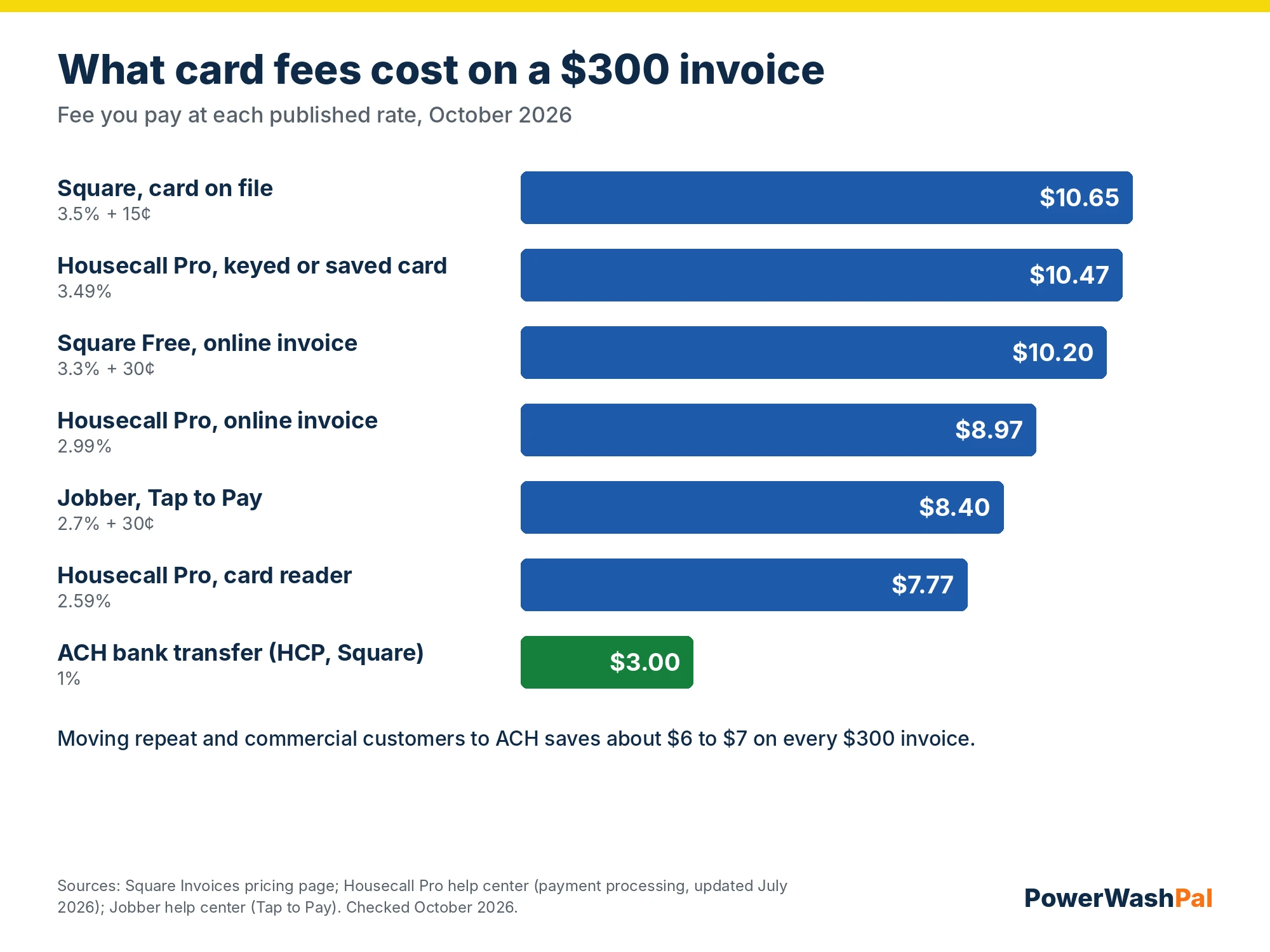
At 60% of $60,000 in yearly revenue paid by card online, the difference between 2.9% and 3.3% is about $144 a year. The bigger saving is moving commercial and repeat customers to ACH: 1% instead of roughly 3%.
How to get paid faster
- Send the invoice before you leave the driveway. Every app here can do it from a phone.
- Take a deposit on jobs over a set amount, written into your service contract.
- Turn on automatic reminders at 3, 7 and 14 days.
- Save cards on file for recurring customers and charge them automatically after each visit (with their written OK).
- Offer ACH to commercial clients and put net terms in writing.
- Check your state’s rules before adding a card surcharge. Some states restrict them.
How to choose
- You only need invoices and payments: Square Invoices (free) or Joist Pro ($17).
- Solo, want quotes, scheduling and invoicing: ServiceM8 Free or Jobber Core.
- Want automatic reminders and QuickBooks sync: Jobber Connect or Housecall Pro Essentials.
- Five people on a tight budget: Kickserv Start.
- Your accountant runs everything in QuickBooks: QuickBooks Online now, field service software when you add a crew.
For a wider comparison that includes routing and scheduling, see our best field service management software for small business and pressure washing software roundups.
Related guides
- Landscaping CRM software compared
- Best field service management software for small business
- Best pressure washing software
- Jobber vs. Housecall Pro
- Housecall Pro pricing
- Jobber pricing
- Free pressure washing contract template
- Best landscaping estimating software
- Best time tracking software for landscaping
FAQ
What is field service invoice software?
It’s software that creates invoices from completed jobs, sends them by text or email, takes card and bank payments, and tracks who has paid. Full field service apps also link the invoice to the original quote and the scheduled job.
What is the best free invoicing app for contractors?
Square Invoices has no monthly fee; you only pay processing fees. ServiceM8 has a free plan for one user and up to 30 jobs a month that includes scheduling. Joist no longer has a free plan.
How much are credit card fees on invoices?
Usually about 2.6% to 3.5% per payment. Housecall Pro charges 2.99% for online invoice payments, Square Free charges 3.3% + 30¢, and keyed or saved cards cost around 3.5% on both. ACH bank transfers are about 1%.
Can I use QuickBooks instead of field service software?
For invoicing alone, yes. QuickBooks Online doesn’t handle quotes customers approve online, scheduling or a crew app, so most companies add field service software once they have more than a few jobs a week and sync it to QuickBooks.
Which invoice software has automatic payment reminders?
Jobber (Connect and up), Housecall Pro, QuickBooks Online and Square can all remind customers about unpaid invoices. Check the exact reminder options during the free trial.