Affiliate disclosure: PowerWashPal may earn a commission if you sign up through some links on this page, at no extra cost to you. It never changes how we rank or describe software. How we make money.
If you run a pressure washing, soft washing, or window cleaning business, you’ve probably narrowed your software search down to the same two names everyone mentions: Jobber and Housecall Pro.
Both will handle quotes, scheduling, invoicing, and payments. Both offer a 14-day free trial with no credit card. So which one should you actually pay for?
The honest answer depends on two things: how many people are on your crew and where your business is located. This guide breaks it down using each company’s published 2026 pricing, so you can pick the right one in the next ten minutes instead of the next ten weeks.
The quick answer
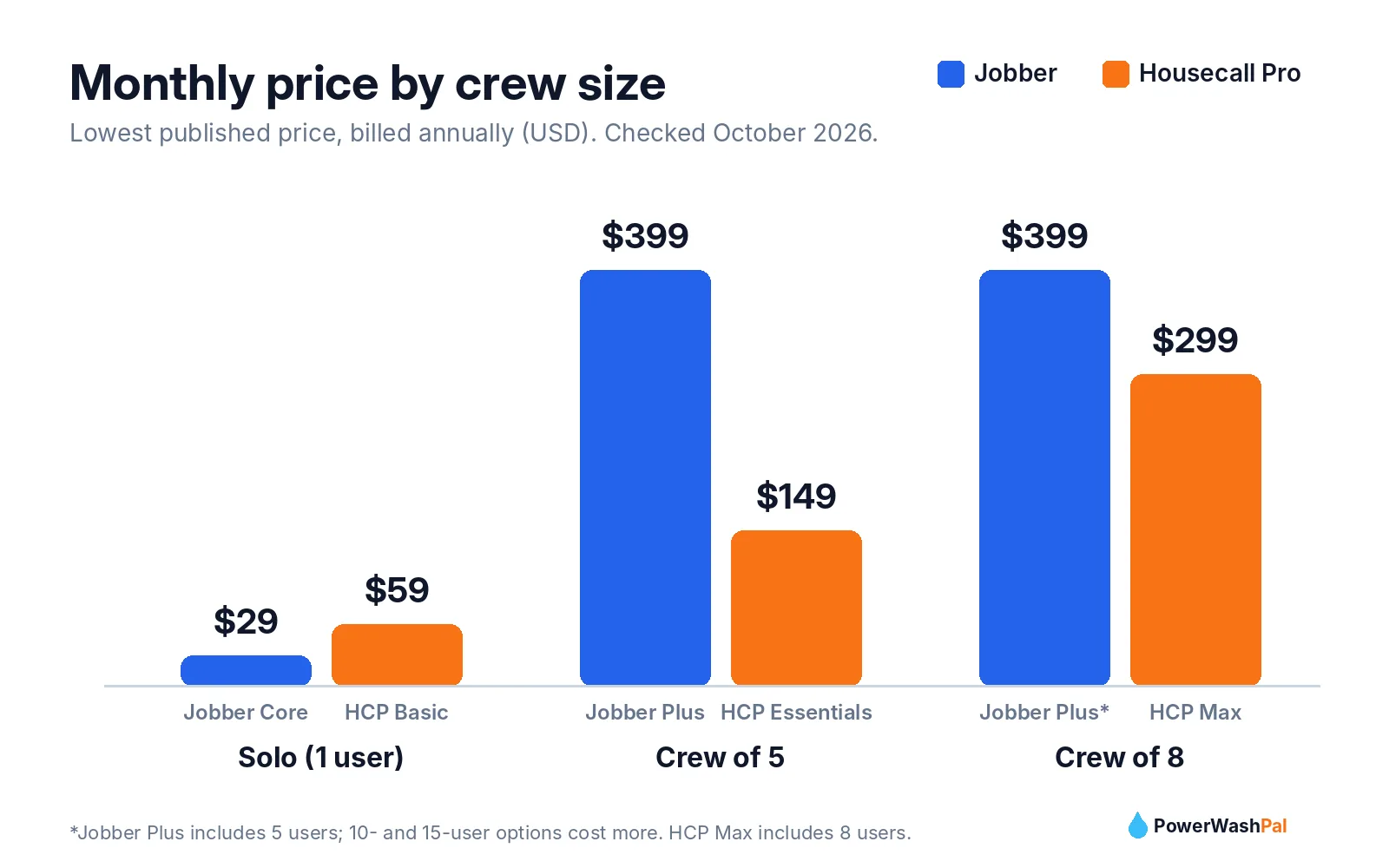
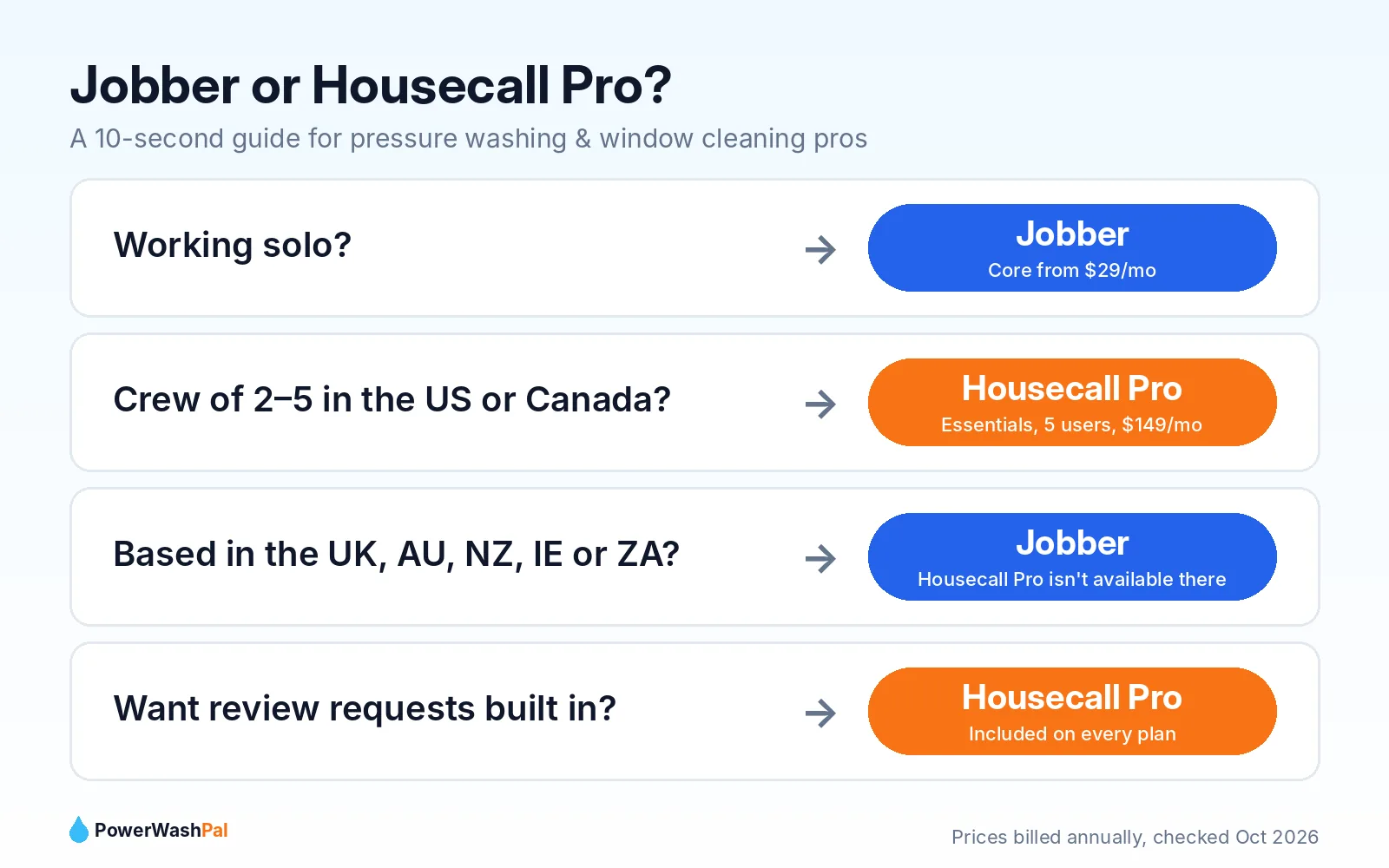
- Solo operator or just starting out? Go with Jobber. Its entry plan starts at $29/month (billed annually), about half the price of Housecall Pro’s entry plan.
- Running a crew of 2–5 people? Lean toward Housecall Pro Essentials. It includes 5 users for $149/month (billed annually), which is hard for Jobber to beat at that crew size.
- Outside the US or Canada? Choose Jobber. Housecall Pro is only available in the US and Canada.
Try Jobber free for 14 days Try Housecall Pro free for 14 days
Jobber vs Housecall Pro at a glance
| Jobber | Housecall Pro | |
|---|---|---|
| Starting price | $29/mo (Core, billed annually) $49/mo month-to-month |
$59/mo (Basic, billed annually) $79/mo month-to-month |
| Users on entry plan | 1 | 1 |
| Best value for a 5-person crew | Plus: $399/mo (annual), 5 users | Essentials: $149/mo (annual), 5 users |
| Free trial | 14 days, no credit card | 14 days, no credit card |
| Where it works | US, Canada, UK, Ireland, Australia, New Zealand, South Africa | US and Canada only |
| Review requests | Marketing Suite add-on ($99/mo) or Plus plan | Included from Basic |
| QuickBooks sync | From Connect plan | From Essentials plan |
| Contract | Month-to-month available | Month-to-month, no contracts |
Prices checked on each company’s pricing page in October 2026. Software prices change often, so confirm on the official site before you buy.
Pricing: what you’ll really pay in 2026
Sticker prices are confusing because both companies show three different numbers: month-to-month, monthly with a yearly commitment, and prepaid annual. Here’s the full picture.
Jobber pricing
| Plan | Month-to-month | Monthly, 1-year commitment | Prepaid annual | Users |
|---|---|---|---|---|
| Core | $49 | $39 | $29 | 1 |
| Connect | $139 | $119 | $99 | 1 (5-user option: $199/mo) |
| Grow | $199 | $169 | $149 | 1 (5-user option: $299/mo) |
| Plus | $499 | $439 | $399 | 5 (10 and 15-user options) |
Jobber add-ons: Marketing Suite $99/mo, AI Receptionist $29/mo, Pipeline $49/mo.
Housecall Pro pricing
| Plan | Billed monthly | Billed annually | Users included |
|---|---|---|---|
| Basic | $79 | $59 | 1 |
| Essentials | $189 | $149 | 5 |
| Max | $329 | $299 | 8 (extra users $35/mo each) |
What this means for a washing business
- Solo, one truck: Jobber Core at $29–$49/mo vs Housecall Pro Basic at $59–$79/mo. Jobber saves you roughly $360 a year.
- Owner plus 2–4 techs: Housecall Pro Essentials includes 5 users for $149–$189/mo. To get 5 users on Jobber, you’re looking at the 5-user Connect option ($199/mo month-to-month) or Plus ($399–$499/mo).
- Want automatic review requests? Housecall Pro includes review management on every plan. On Jobber, that’s part of the $99/mo Marketing Suite unless you’re on Plus.
Features that matter for pressure washing and window cleaning
Exterior cleaning has its own quirks: lots of quotes that never close, weather reschedules, recurring commercial accounts, and jobs priced by the square foot or by the pane. Here’s how the two compare on the things that actually affect your week.
Quoting and estimates
Both tools let you build a price book and send professional quotes your customers can approve online. Jobber’s Grow plan adds optional line items and quotes with photos, which works well for upselling a house wash customer on gutter brightening or a window add-on. Housecall Pro includes quotes and proposals from Basic, and its Max plan adds a dedicated sales proposal tool.
Scheduling, routes, and weather days
Rain cancels washing jobs, so drag-and-drop rescheduling matters. Both include scheduling and dispatch on the entry plan. For routing, Housecall Pro adds routes on Essentials and full route optimization on Max. If you run tight residential routes with 6–10 stops a day, test the routing on whichever plan you’re considering during the free trial.

Recurring jobs
Recurring work (monthly storefront washes, quarterly window cleaning) is where steady income comes from. Housecall Pro lists recurring service plans on its Max plan. In Jobber, check how recurring visits and automatic invoicing work on the plan you choose, since automated reminders and invoice follow-ups start at Connect.
Getting paid
Both accept online payments on invoices from the entry plan. Jobber’s Connect plan adds automatic payment collection and invoice follow-ups, which helps if you chase late payments from property managers.
Reviews and marketing
In this business, Google reviews win jobs. Housecall Pro’s built-in review management on every plan is a real advantage for small operators. Jobber includes a basic website on Core, but review requests and campaigns sit in the Marketing Suite add-on.
Bookkeeping
If your accountant lives in QuickBooks Online, note that sync starts at Jobber Connect and Housecall Pro Essentials, not on the entry plans.
Who should choose Jobber
- Solo pressure washers or window cleaners who want the lowest monthly cost.
- Businesses in the UK, Australia, New Zealand, Ireland, or South Africa (Housecall Pro isn’t available there).
- Owners who sell a lot of add-ons and want quotes with optional line items and photos (Grow plan).
- Anyone who prefers paying annually to lock in the lowest rate ($29/mo on Core).
Who should choose Housecall Pro
- US or Canadian businesses with 2–5 people in the field.
- Owners who want review requests built in without paying for an add-on.
- Growing crews that will need route optimization and recurring service plans (Max plan).
- Teams that want GPS tracking and commissions for techs (Essentials and up).
Start a free Housecall Pro trial
How to test both in one week (without wasting a month)
- Day 1: Start both free trials. Neither asks for a credit card.
- Day 2: Enter the same 3 real jobs in each one: a house wash, a driveway, and a recurring window cleaning account.
- Day 3: Send yourself a quote from each app on your phone. Which one would you approve faster as a homeowner?
- Day 4: Reschedule a “rain day” and see how many taps it takes.
- Day 5: Send a test invoice and pay it. Check how the payment shows up.
- Day 6–7: Pick the one you enjoyed using. You’ll use it every day, so that matters more than any feature list.
Our verdict
For most new pressure washing and window cleaning businesses, Jobber is the better starting point because it costs less for a solo operator and works in more countries. Once you have a crew of 3–5 in the US or Canada, Housecall Pro Essentials becomes the better value, especially if you want review requests built in.
The good news: you can’t really make a bad choice here. Both are proven tools used by thousands of service businesses. Start the free trials, run the one-week test above, and go with your gut.
Frequently asked questions
Is Jobber or Housecall Pro cheaper?
For one user, Jobber is cheaper: $29/month on Core billed annually vs $59/month for Housecall Pro Basic billed annually. For a 5-person crew, Housecall Pro Essentials ($149/month billed annually, 5 users included) is usually cheaper.
Do Jobber and Housecall Pro have free trials?
Yes. Both offer a 14-day free trial with no credit card required. Jobber’s trial gives you access to Grow plan features.
Can I use Housecall Pro in the UK or Australia?
No. Housecall Pro is available only in the US and Canada. Jobber is available in the US, Canada, the UK, Ireland, Australia, New Zealand, and South Africa.
Which is better for a pressure washing business?
Solo pressure washers usually get better value from Jobber. Crews of 2–5 in the US or Canada often get better value from Housecall Pro Essentials. Test both with your real jobs during the free trials before deciding.
Do either of them sync with QuickBooks?
Yes, but not on the entry plans. QuickBooks sync starts on Jobber Connect and Housecall Pro Essentials.
Last updated: October 2026. Pricing and features come from each company’s official pricing page. We’ll update this comparison when plans change.