Disclosure: PowerWashPal may earn a commission if you sign up through some links on this page, at no extra cost to you. It never changes our verdict. How we make money.
Updated October 2026. Prices and plan details come from Jobber’s official pricing page and help center. Review scores were checked on October 6, 2026.
Jobber is the field service app we recommend most often to pressure washing and window cleaning businesses, and it’s the one most new owners end up shortlisting. This review covers what it actually costs, what each plan includes, how it handles exterior cleaning work, and where it falls short, so you can decide before you start the free trial.
Jobber review: the short version
- Best for: solo operators and growing crews that want quoting, scheduling, invoicing, and payments in one easy app.
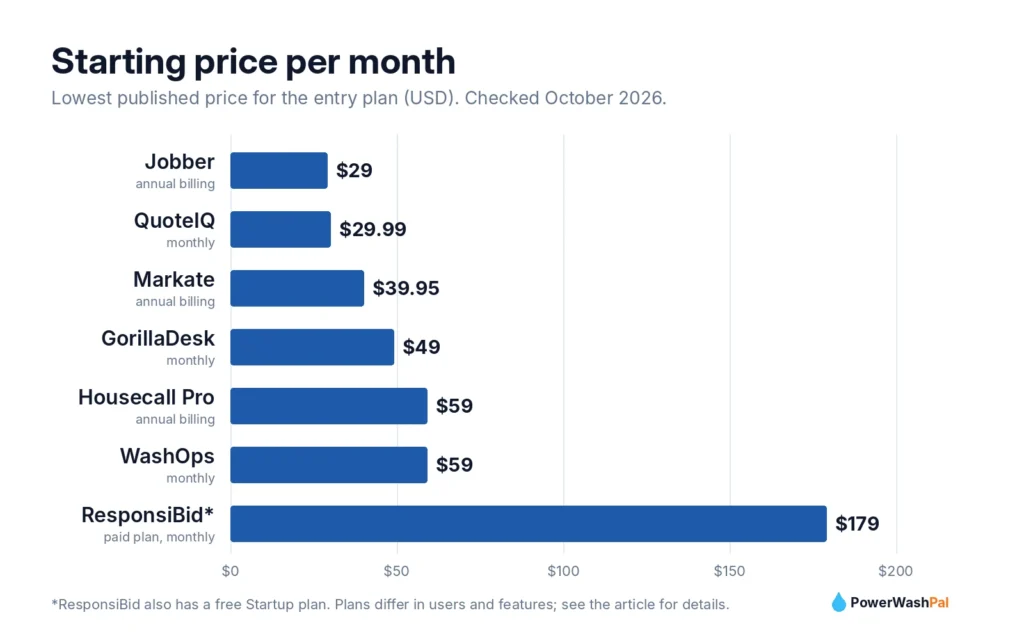
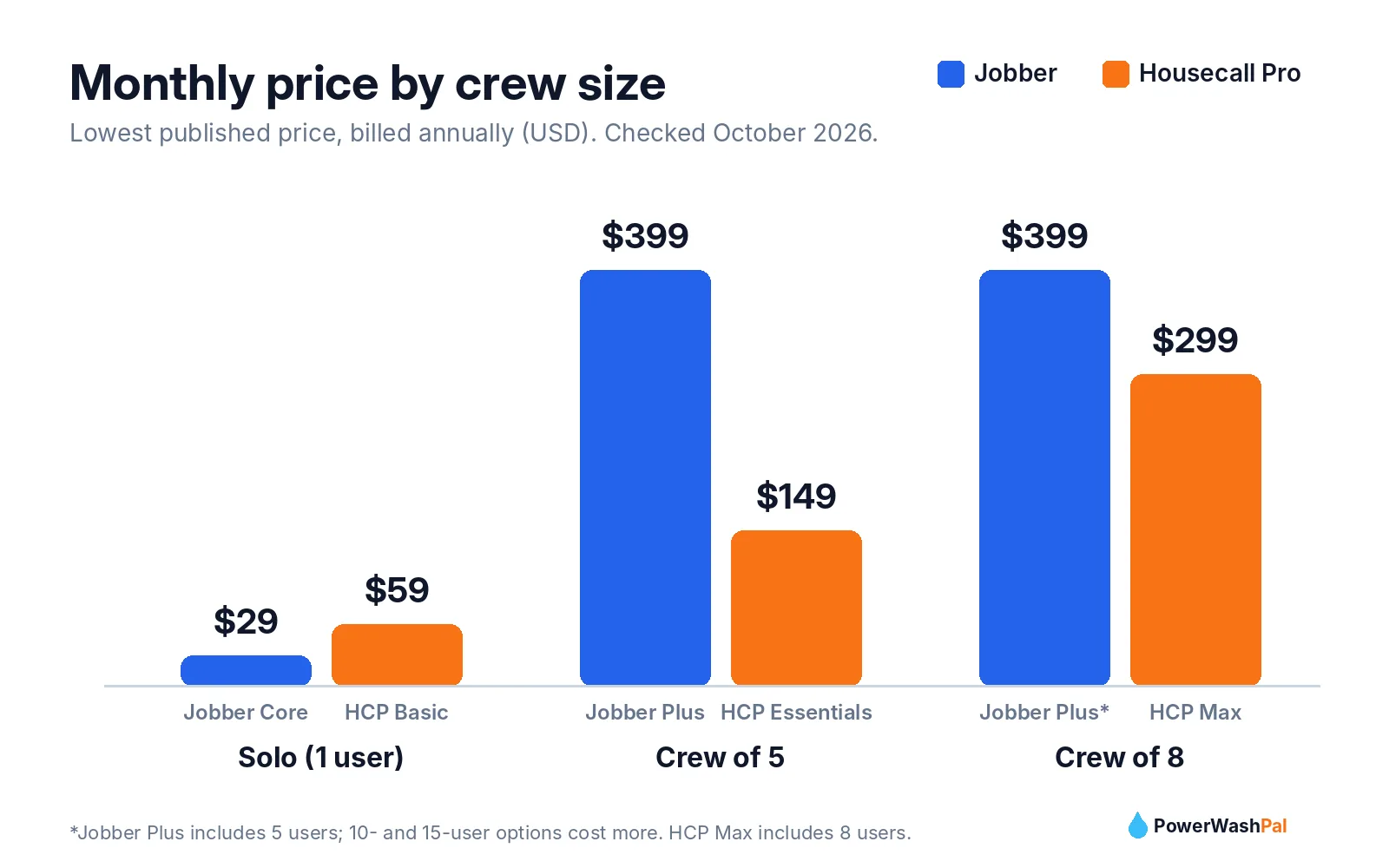
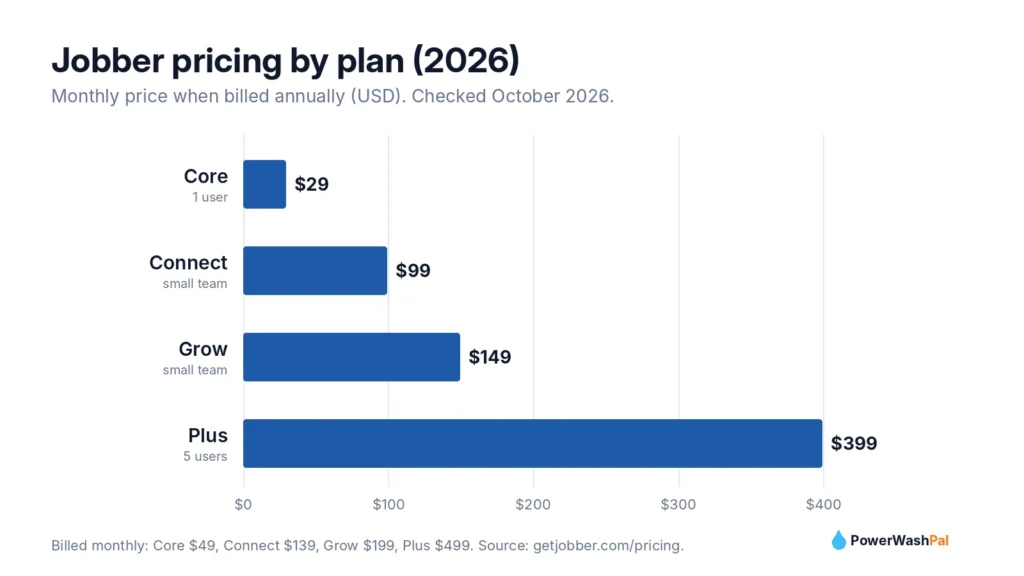
- Price: from $29/month billed annually (Core, 1 user) up to $399/month billed annually (Plus, 5 users).
- Standout features: quotes with optional add-ons, automatic quote and invoice follow-ups, a customer self-service Client Hub, and a highly rated mobile app.
- Watch out for: some of the best automation sits on Connect and Grow, and review requests are a paid add-on.
- Our rating: 4.6/5 for exterior cleaning businesses.
What is Jobber?
Jobber is field service management software for home service businesses. It was founded in 2011 in Edmonton, Canada, and says it’s used by more than 400,000 service pros across 50+ industries, from lawn care and HVAC to pressure washing and window cleaning. It runs on the web, iPhone, and Android, and handles the full job cycle: request, quote, schedule, job, invoice, and payment.
Jobber also builds resources specifically for this trade, including a pressure washing software page, a window cleaning version, and free estimate and invoice templates for both.
Jobber pricing in 2026
| Plan | Billed annually | Billed monthly | Users | Best for |
|---|---|---|---|---|
| Core | $29/mo | $49/mo | 1 | Solo operators starting out |
| Connect | $99/mo | $139/mo | Small team | Owners who want automatic follow-ups |
| Grow | $149/mo | $199/mo | Small team | Selling add-ons and tracking job profit |
| Plus | $399/mo | $499/mo | 5 | Established multi-crew companies |
Optional add-ons include the Marketing Suite ($99/month: review requests, email campaigns, referrals) and an AI Receptionist ($29/month). Both are included on Plus. Every plan starts with a 14-day free trial, no credit card required.
Payment processing (US): 2.9% + 30¢ per card payment, 2.7% + 30¢ for Tap to Pay, and 1% for ACH bank payments. Instant payouts to a debit card cost an extra 1%.
Features that matter for pressure washing and window cleaning
Quotes that sell add-ons
This is Jobber’s biggest strength for exterior cleaning. On Grow, quotes can include optional line items with photos, so a driveway customer can tick “house wash” or “gutter brightening” right on the quote. Jobber says pressure washing pros using optional line items earn over $300 more per quote on average. Even on Core, you get clean, branded quotes customers approve online.
Automatic follow-ups
Many washing quotes go quiet after you send them. From the Connect plan, Jobber follows up automatically on unanswered quotes and sends invoice reminders, so you stop chasing people by text.
Client Hub
Every customer gets a self-service portal to request work, approve quotes, see upcoming visits, and pay invoices. It saves phone tag and makes a small company look established.
Scheduling and routes
Drag-and-drop scheduling makes rain-day reschedules quick, and “on my way” texts keep customers informed. According to Jobber’s help center, route optimization is available on Connect, Grow, and Plus.
Recurring work and payments
Recurring jobs suit quarterly window cleaning and monthly storefront washes. Automatic payments (Connect and up) can charge a card on file, which is ideal for recurring commercial accounts.
QuickBooks Online and reporting
QuickBooks Online sync starts on Connect. Grow adds job costing, which shows whether a job made money after labor and chemicals.
What users say: Jobber ratings
| Platform | Rating | Reviews |
|---|---|---|
| Apple App Store | 4.8/5 | About 21,000 |
| Capterra | 4.6/5 | 1,487 |
| G2 | 4.6/5 | 530 |
| Google Play | 4.4/5 | About 6,800 |
| Trustpilot | 4.2/5 | 231 |
Checked October 6, 2026. Reviewers most often praise having quoting, scheduling, invoicing, and payments in one place, how quickly crews learn the app, the Client Hub, and responsive support. The most common complaints are limited reporting on lower plans, routing that isn’t as detailed as dedicated mapping tools, key features locked behind higher tiers, and some Android stability issues.
Jobber pros and cons
| Pros | Cons |
|---|---|
| Cheapest way to get a full system as a solo operator ($29/mo) | Review requests need the $99 Marketing Suite unless you’re on Plus |
| Quotes with optional add-ons raise average ticket size | Optional line items and job costing require Grow |
| Automatic quote and invoice follow-ups (Connect+) | Reporting is basic on lower plans |
| Client Hub for online approvals and payments | Prices have risen over time |
| Excellent mobile app, easy for crews | Some Android users report crashes |
| Works in the US, Canada, UK, Australia, NZ, Ireland, South Africa | Moving your data out later takes effort |
Which Jobber plan should you choose?
- Just starting, solo: Core. Get quotes, scheduling, invoicing, and online payments for $29/month (annual).
- Sending 10+ quotes a week: Connect. The automatic follow-ups alone usually win back the extra cost.
- Selling lots of add-ons (house wash + gutters + windows): Grow, for optional line items and job costing.
- Multiple crews and an office: Plus, which includes the Marketing Suite and AI Receptionist plus 1-on-1 support.
Jobber vs alternatives
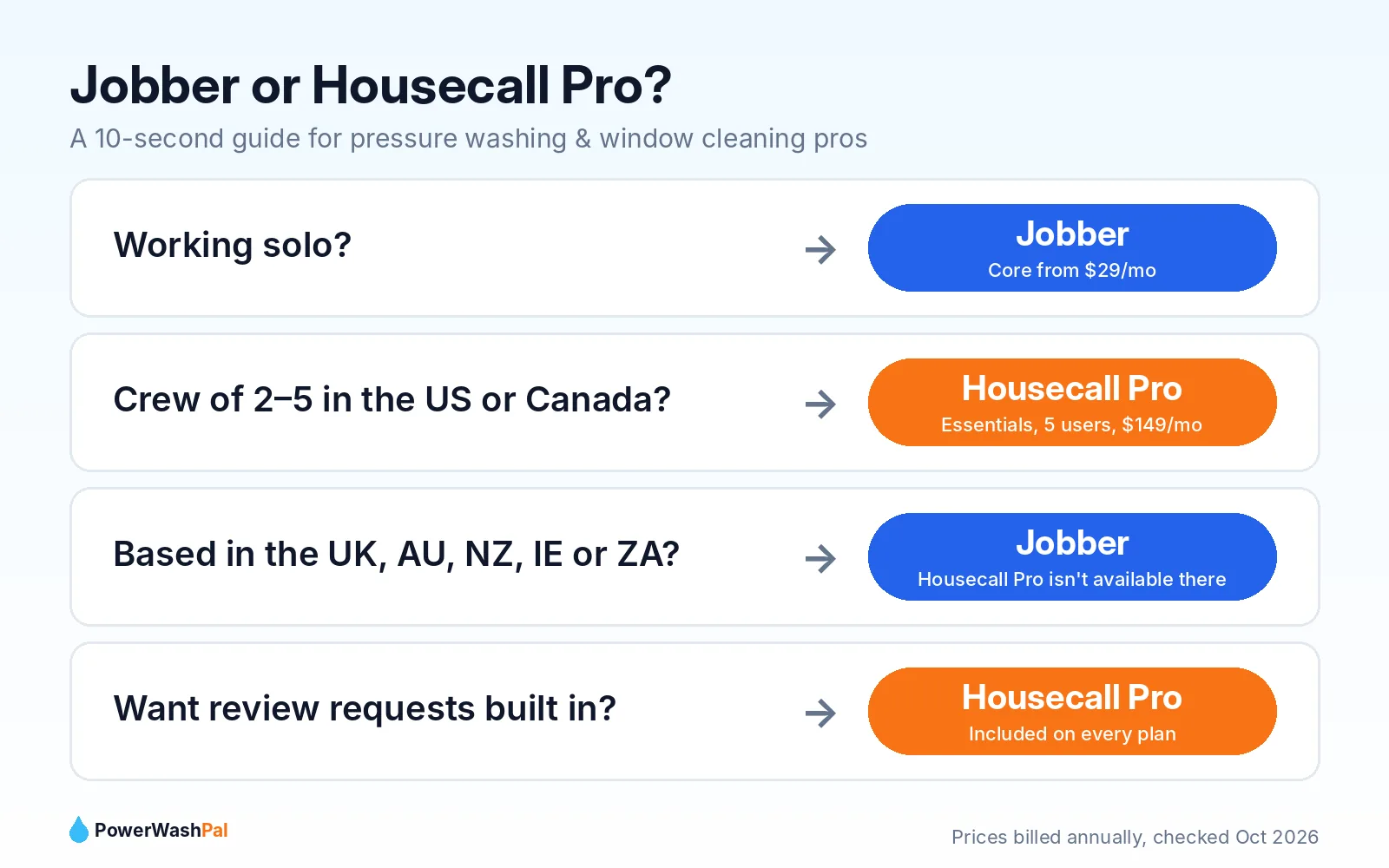
The main alternative is Housecall Pro, which includes review requests on every plan and gives US crews of 2–5 more users for the money (Essentials, $149/month annually for 5 users). It isn’t available outside the US and Canada. See our full Jobber vs Housecall Pro comparison or the list of the best pressure washing software.
Support
Jobber offers live chat, email, and phone support (1-888-721-1115), with live agents Monday to Friday, 7am–9:30pm ET, plus an AI assistant after hours. Plus customers get 1-on-1 onboarding and priority support.
Our verdict
Jobber is the best all-around choice for most pressure washing and window cleaning businesses. It’s affordable when you’re solo, easy enough to learn in an afternoon, and it grows with you through automatic follow-ups, add-on quoting, and recurring payments. If review requests are your top priority and you’re a US crew of three or more, compare it with Housecall Pro before you decide.
The easiest test: start the 14-day trial, enter three real jobs (a house wash, a driveway, and a recurring window account), and send yourself a quote from your phone.
Frequently asked questions
How much does Jobber cost per month?
Jobber costs $29–$399 per month billed annually, or $49–$499 billed monthly, depending on the plan. The Core plan for one user is $29/month on an annual plan.
Does Jobber have a free trial?
Yes. Jobber offers a 14-day free trial with no credit card required.
Is Jobber good for pressure washing?
Yes. Optional line items, photo quotes, automatic follow-ups, and recurring jobs fit pressure washing well, and Jobber publishes pressure-washing-specific templates and guides.
Does Jobber work with QuickBooks?
Yes. QuickBooks Online sync is included from the Connect plan.
What are Jobber’s payment processing fees?
In the US, card payments cost 2.9% + 30¢, Tap to Pay costs 2.7% + 30¢, and ACH bank payments cost 1%.