Disclosure: PowerWashPal may earn a commission if you sign up through some links on this page, at no extra cost to you. It never changes how we rank software. Read how we make money.
Updated October 2026. Prices come from each company’s official pricing page, checked this month.
The best field service management software for small business does four jobs well: it books and schedules work, sends quotes and invoices from a phone, collects payment on the spot, and keeps customers informed without you typing the same text twenty times a day. Most small home service companies (pressure washing, window cleaning, lawn care, cleaning, pest control, handyman) don’t need the enterprise platforms that dominate “FSM” lists. They need something a crew can learn in an afternoon at a price that makes sense for one to ten people.
We compared seven field service apps on published prices, what each plan includes, user limits and QuickBooks support. We didn’t run test accounts on every app; the comparison is based on official pricing pages, help centers and our longer reviews of Jobber and Housecall Pro.
Quick picks
| Software | Best for | Starting price (monthly billing) | Users | Free trial |
|---|---|---|---|---|
| Jobber | Most small home service businesses | $49/mo ($29 billed yearly) | 1 on Core; Connect, Grow and Plus sold in 1–15 user tiers; +$29/user | 14 days, no card |
| Housecall Pro | Crews of 3–8 that want users bundled in | $79/mo ($59 billed yearly) | 1 / 5 / 8 | 14 days, no card |
| ServiceM8 | Solo operators on a tight budget | Free (30 jobs/mo), then $29/mo | Unlimited on paid plans | 14 days |
| Kickserv | Cheapest plan for a 5-person team | $60/mo | 5 / 10 / 20 | 30 days |
| GorillaDesk | Route-based work (pest, pool, lawn) | $49/mo | Unlimited office users | Yes |
| Workiz | Phone-heavy businesses (locksmith, junk removal) | Quote only | Not published | 7 days, no card |
| Service Fusion | Growing teams that want unlimited users | $245/mo ($208 billed yearly) | Unlimited | Demo only |
What small businesses actually need from FSM software
Before comparing apps, list what you do every day. For most small field service companies, it’s this:
- Quotes that customers approve online, ideally with photos and optional add-ons.
- Scheduling and a mobile app your crew uses on site to see the job, take photos and mark it done.
- Invoices and card payments in the field, plus automatic payment reminders.
- Automated texts and emails: booking confirmations, “on my way” messages and review requests.
- Recurring jobs for maintenance customers (monthly window routes, quarterly commercial washes).
- QuickBooks sync once you have a bookkeeper.
Everything else, like inventory, purchase orders, multi-branch reporting and API access, matters later or never. Paying for it early is the most common way small businesses overspend on field service software.
The best field service management software for small business
1. Jobber: best overall for small home service businesses
Jobber is built for home service companies with one to fifteen people, and it shows. Quotes, scheduling, invoicing, payments and a client hub where customers approve work and pay are all in the cheapest plan. The mobile app is easy enough for seasonal crew members to pick up quickly.
Pricing (October 2026): Core $29/month billed yearly or $49 monthly for one user. Connect starts at $99/$139 for one user and is also sold in 5-, 10- and 15-user tiers ($149/$199 for five users). Grow starts at $149/$199 for one user, and Plus at $399/$499 for five users. Extra users are $29 a month on every plan.
- Pros: the easiest app to learn on this list, a strong client hub, QuickBooks Online sync from Connect, optional line items and photos on quotes from Grow.
- Cons: automated reminders and follow-ups start on Connect, not Core, and per-user pricing adds up past five people.
More detail: Jobber review and Jobber pricing.
2. Housecall Pro: best for crews of three to eight
Housecall Pro covers the same ground as Jobber, with a strong mobile app and built-in review requests on every plan. Its pricing bundles users: Essentials includes five and MAX includes eight, which makes it cheaper than per-user apps once you have a full crew.
Pricing: Basic $59/month billed yearly or $79 monthly (one user), Essentials $149/$189 (up to five users), MAX $299/$329 (up to eight, then $35 per user). Card processing is 2.59% in person and 2.99% online. It’s only available in the US and Canada.
- Pros: users bundled into Essentials and MAX, review requests on all plans, recurring service plans on MAX.
- Cons: QuickBooks sync starts at Essentials, several add-ons (phone, AI answering, websites) are quoted separately.
More detail: Housecall Pro pricing and Housecall Pro review.
3. ServiceM8: best free field service management software
ServiceM8 is the best answer if you’re searching for free field service management software. The free plan is for one person and caps you at 30 jobs a month, but it includes recurring jobs and deposits. Paid plans are priced by jobs per month, not by user, and every paid plan includes unlimited users.
Pricing: Free (30 jobs/month), Starter $29 (50 jobs), Growing $79 (150 jobs), Premium $149 (500 jobs), Premium Plus $349 (1,500+ jobs, then 20 cents per job).
- Pros: genuinely free to start, unlimited users on paid plans, cheap for small teams doing few but larger jobs.
- Cons: job caps hurt high-volume, low-ticket work like weekly lawn routes.
4. Kickserv: cheapest plan for a five-person team
Kickserv is a no-frills field service app with a low price per user. Its entry plan includes five users, which no other app on this list matches at that price.
Pricing: Start $60/month (5 users), Run $119 (10 users), Scale $199 (20 users), with 20% off on annual billing. Start includes automated reminders, time and expense tracking and QuickBooks Online integration. QuickBooks Desktop costs an extra $50 a month on Run. 30-day free trial.
- Pros: five users for $60, QuickBooks Online on the entry plan, long trial.
- Cons: fewer automations and marketing tools than Jobber or Housecall Pro; dispatch mapping and GPS check-ins start on Run.
5. GorillaDesk: best for route-based service
GorillaDesk started in pest control and is built around routes: recurring stops, route maps and broadcast messages to everyone on a route. It suits lawn care, pool service, pest control and recurring window routes.
Pricing: Basic $49/month or $539/year, Pro $99/month or $1,089/year, Growth $149/month or $1,639/year. Admin users are unlimited, and only people assigned to a schedule need a paid seat. Basic routing handles up to 25 stops; drive-time routing, the customer portal, online booking and QuickBooks Online sync start on Pro. Texting costs extra ($5/month for a number plus message credits).
- Pros: routing tools that general-purpose apps lack, reasonable price, unlimited office users.
- Cons: QuickBooks and online booking require Pro, SMS is an add-on, less suited to one-off project work.
6. Workiz: best for phone-heavy businesses
Workiz leans into calls and leads: its add-ons include a business phone system, AI answering and marketing campaigns, which is useful for locksmith, garage door, appliance repair and junk removal companies that live on inbound calls. It also has subcontractor management and QuickBooks on the Standard plan.
Pricing: not public in October 2026. All three plans (Standard, Pro, Ultimate) show “Request pricing.” There’s a 7-day free trial with no card.
- Pros: strong phone and lead tools, subcontractor management, automations.
- Cons: no published prices, short trial, and the add-ons that make it stand out cost extra.
7. Service Fusion: best for unlimited users
Service Fusion charges a flat monthly price with unlimited users, which gets attractive once you have ten or more people in the field. It’s a heavier, more trade-focused system (HVAC, plumbing, electrical) with inventory and job costing on higher plans.
Pricing: Starter $245/month or $208 billed yearly, Plus $382 or $325, Pro $627 or $533. All plans include unlimited users and QuickBooks integration. No free trial is listed, only a demo.
- Pros: unlimited users, no contract on monthly billing, deeper job costing and inventory.
- Cons: expensive for one to five people, more setup than the apps above.
What it costs for a five-person team
List prices are hard to compare because each company counts users differently. Here’s the cheapest monthly-billed plan that fits five users on each app with public pricing:
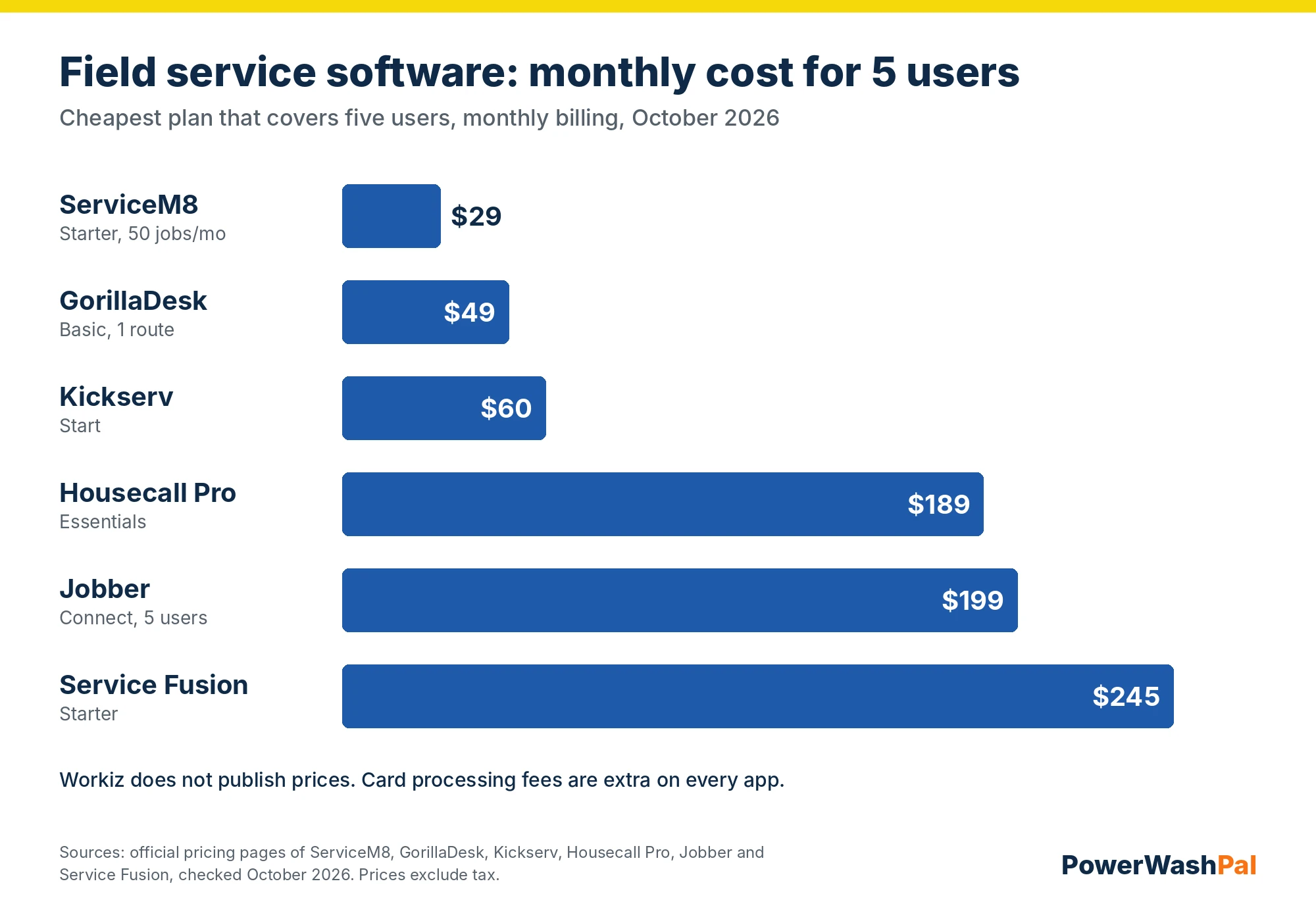
| Software | Plan for 5 users | Monthly billing | Billed yearly (per month) | QuickBooks Online |
|---|---|---|---|---|
| ServiceM8 | Starter (50 jobs/mo) | $29 | n/a | Yes (add-on) |
| GorillaDesk | Basic (1 route) | $49 | about $45 | Pro and up |
| Kickserv | Start | $60 | about $48 | Yes |
| Housecall Pro | Essentials | $189 | $149 | Yes |
| Jobber | Connect, 5 users | $199 | $149 | Yes |
| Service Fusion | Starter | $245 | $208 | Yes |
Cheapest isn’t automatically best. ServiceM8’s job cap, GorillaDesk’s route pricing and Kickserv’s simpler app all have trade-offs. Housecall Pro Essentials and Jobber Connect cost more but include the automations (reminders, follow-ups, review requests) that save a small office the most time. Also budget for card processing, which usually costs more than the software once most customers pay by card.
Field service software that integrates with QuickBooks
If you already use QuickBooks Online, check which plan unlocks the sync:
- Jobber: Connect and up.
- Housecall Pro: Essentials and up.
- Kickserv: every plan (QuickBooks Desktop is $50/month extra on Run).
- GorillaDesk: Pro and up.
- Service Fusion and Workiz: every plan.
- ServiceM8: through its QuickBooks Online add-on.
Test the sync during the free trial with a few real invoices before you move your whole customer list.
How to choose
- Solo, just starting: ServiceM8 Free or Jobber Core.
- Solo or two people who want automated reminders and QuickBooks: Jobber Connect.
- Three to eight people: Housecall Pro Essentials or MAX, or Jobber Connect/Grow in a 5- or 10-user tier.
- Recurring routes (lawn, pest, pool, window routes): GorillaDesk or Jobber with recurring jobs.
- Lots of inbound calls: Workiz (get a quote).
- Ten or more field users: Service Fusion, or compare Jobber’s 10- and 15-user tiers.
Whatever you pick, run the free trial with real jobs: quote three customers, schedule a week, collect one payment and send one review request. That shows you more than any feature list.
How we compared
We read each company’s official pricing page in October 2026 and noted the price, users included, trial and which features each plan unlocks. For Jobber and Housecall Pro we also used their help centers and our earlier reviews. We focused on what matters to small home service teams (quotes, scheduling, payments, automation, QuickBooks) rather than enterprise features. We didn’t test every app hands-on, and prices change often, so confirm on the vendor’s site before you sign up.
Related guides
- Landscaping CRM software compared
- Best pressure washing software
- Best window cleaning software
- Jobber vs. Housecall Pro
- Jobber alternatives
- Housecall Pro alternatives
- Housecall Pro pricing
- Best field service invoice software
- Best landscaping estimating software
- Best time tracking software for landscaping
FAQ
What is the best field service management software for a small business?
For most small home service companies, Jobber is the best all-around choice: easy to learn, strong quoting and client hub, and plans from $29 a month billed yearly. Housecall Pro is often cheaper for crews of five to eight because users are bundled in.
Is there free field service management software?
Yes. ServiceM8 has a free plan for one user with up to 30 jobs a month. Most other apps offer only a free trial: 14 days for Jobber and Housecall Pro, 30 days for Kickserv.
How much does field service management software cost?
For a small team, expect roughly $30 to $250 a month for the software, depending on users and features. Card processing fees, usually around 2.6% to 3.5% per transaction, are extra.
Which field service software integrates with QuickBooks?
All seven apps here do on at least some plans. Jobber needs Connect, Housecall Pro needs Essentials and GorillaDesk needs Pro. Kickserv, Service Fusion and Workiz include it on every plan, and ServiceM8 connects through an add-on.
Do I need field service software for a one-person business?
Not on day one, but it pays off quickly. Online quotes, automatic reminders and card payments save hours a week and help you get paid faster. A free or $29-a-month plan is enough to start.
Is mobile field service management software different from regular FSM software?
Not really. Every app on this list includes iPhone and Android apps for field crews. The difference is how much the office side can do: dispatch boards, reports and automations vary more than the mobile apps do.