Disclosure: PowerWashPal may earn a commission if you buy through some links on this page, at no extra cost to you. It doesn’t change how we rank tools. Read our disclosure.
Updated October 2026
Most landscaping companies don’t lose jobs because their mowing is bad. They lose them because a lead sat in a voicemail for three days, a quote never got a follow-up, or a spring cleanup customer forgot to rebook. That’s the problem landscaping CRM software is built to fix: one place for every lead, client, property, quote and message, with reminders that don’t depend on your memory.
We compared eight tools landscapers actually use, using each vendor’s public pricing page (checked October 2026). Some are full field service apps with a CRM built in; a few are big-company platforms that only quote prices on a sales call. Here’s who each one fits.
Quick picks
| Tool | Best for | Starting price | Free trial |
|---|---|---|---|
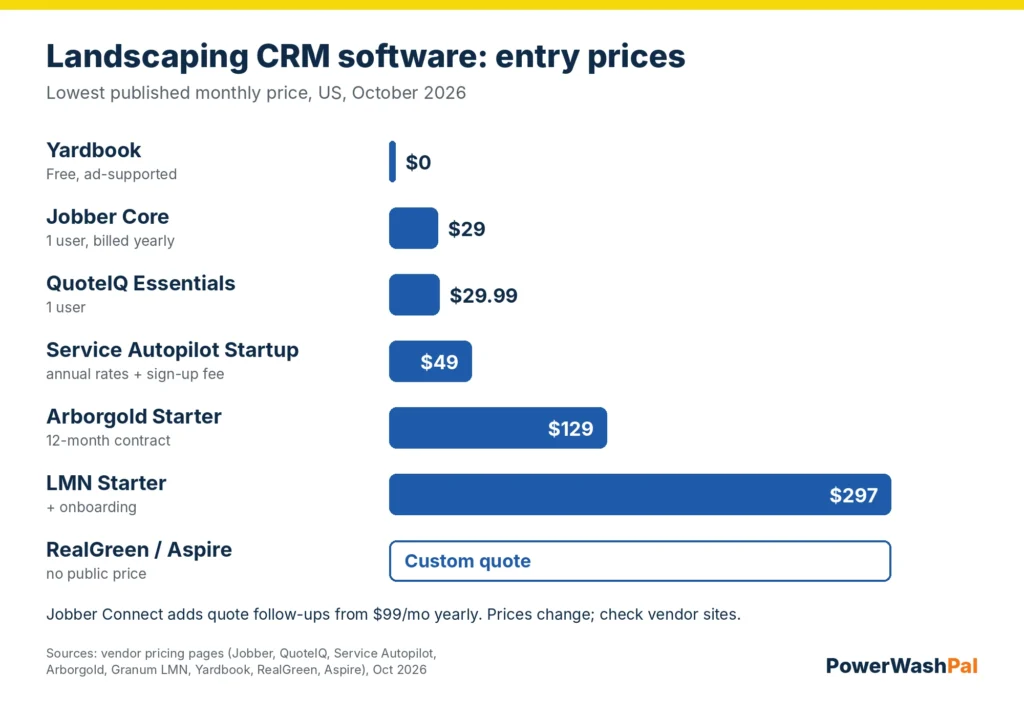
| Jobber | Small crews that want CRM, quotes, scheduling and payments in one app | $29/mo billed yearly ($49 monthly) | 14 days, no card |
| LMN (Granum) | Design/build and maintenance companies that live by their estimates | $297/mo + onboarding | Demo only |
| Arborgold | Tree care and landscape companies with multiple properties per client | $129/mo yearly ($149 monthly) | Demo only |
| Service Autopilot | Recurring lawn care routes that need heavy automation | $49/mo (annual rates) + sign-up fee | Free trial offered |
| RealGreen | Lawn care and fertilization companies with 3+ crews | Custom quote | Not listed |
| Aspire | Larger commercial landscaping firms | Custom quote | Demo only |
| QuoteIQ | Solo operators who want cheap quoting plus a basic CRM | $29.99/mo | 14 days, card required |
| Yardbook | Brand-new businesses on a $0 budget | Free (ad-supported) | N/A |
What a landscaping CRM should actually do
“CRM” gets slapped on everything now, so it helps to be specific. For a landscaping or lawn care business, a CRM is worth paying for if it handles these five jobs:
- Lead capture. Website request forms, phone leads and referrals land in one list instead of your text messages.
- Client and property records. One client can have several properties, gate codes, notes, photos and service history. Commercial accounts often have multiple contacts too.
- Quote follow-up. Automatic reminders when a quote hasn’t been approved. This one feature pays for most tools on its own.
- Recurring service and rebooking. Seasonal reminders for aeration, spring cleanup, mulch and fall leaf removal.
- Customer communication. Texts and emails for “on our way,” reminders and invoices, plus a client portal where people can approve work and pay.
If a tool does these well and connects to your scheduling and invoicing, you probably don’t need a separate sales CRM like HubSpot or Salesforce. Those are built for sales teams, not crews.
1. Jobber: best landscaping CRM for small crews
Jobber isn’t a landscaping-only product, but it’s the tool most small lawn care and landscaping companies end up on because the CRM side is simple and it covers the whole job: request, quote, schedule, invoice, payment. Every client gets a record with properties, notes, attachments and full job history, and clients can approve quotes and pay through Jobber’s client hub.
Pricing (October 2026): Core is $29/mo billed yearly or $49 monthly for one user. Connect starts at $99/mo yearly ($139 monthly) for one user, and that’s the tier that adds automated reminders, quote follow-ups and the QuickBooks Online sync. Grow starts at $149/mo yearly ($199 monthly) and adds optional line items on quotes, job costing and automatic time tracking. The 14-day trial gives you Grow features with no credit card. Jobber’s Marketing Suite (email campaigns, referrals, review requests) is a $99/mo add-on. Full breakdown in our Jobber pricing guide.
Good fit if: you’re 1–15 people, you do residential maintenance or small installs, and you want something your crew learns in a day.
Watch out for: Core is a single user with no quote follow-ups, so most growing companies land on Connect. It also doesn’t do landscape-specific estimating like LMN’s overhead-based budgets.
2. LMN (Granum): best for estimate-driven landscaping companies
LMN was built by a landscaper, and its CRM sits on top of the thing it’s best known for: budgets and estimates that account for your real overhead. The CRM includes a sales pipeline that tracks each opportunity to close, client and lead records with follow-ups, multiple contacts and jobsites per client, a customer portal for proposals and invoices, SMS (single or batched) and card/ACH payments.
Pricing (October 2026): Starter is $297/mo plus onboarding and covers 1 office license and 5 crew licenses for companies under 10 employees. Professional is $648/mo with 3 office and 15 crew licenses and adds real-time job costing. Enterprise is quote-only. There’s no self-serve trial; you book a demo.
Good fit if: you do design/build or commercial maintenance where one bad estimate costs real money. We cover the estimating side in our landscaping estimating software comparison.
Watch out for: it’s ten times the cost of Jobber Core. A two-person mowing operation won’t use most of it.
3. Arborgold: best for tree care and multi-property clients
Arborgold started in tree care and handles landscaping, lawn care and snow too. Its CRM leans into complex accounts: lots of properties, detailed site notes and long-running proposals. It also includes scheduling, estimating, invoicing and a mobile app.
Pricing (October 2026): Arborgold’s pricing page lists Starter at $129/mo on an annual contract or $149 month-to-month, Professional at $299/mo ($343 monthly) and Enterprise at $499/mo ($573 monthly). Office and mobile users are priced separately, and seat counts aren’t listed, so confirm how many users each plan covers before you sign. Annual plans require a 12-month contract. No public trial; you request a demo.
Good fit if: you run tree work or plant health care alongside landscaping and need detailed property records.
Watch out for: data migration and training are offered as services but their prices aren’t published.
4. Service Autopilot: best for automating recurring lawn routes
Service Autopilot is built for recurring lawn care and landscaping maintenance. Its strength is automation: you can set rules that send emails, texts and tasks when something happens (a lead comes in, a job is skipped, an invoice goes past due). That makes it a strong CRM for companies with hundreds of weekly stops.
Pricing (October 2026): Startup is $49/mo (1 mobile license, 1 business user), Pro $199/mo (2 mobile, 1 business user), Pro Plus $499/mo (5 mobile, 1 business user), and Elite is quote-only (8 mobile, 2 business users). Service Autopilot says all pricing is based on annual subscription rates, and there’s a sign-up fee whose amount isn’t listed. A free trial is offered.
Good fit if: you have dense recurring routes and someone in the office who’ll actually build the automations.
Watch out for: the jump from Startup to Pro is big, and the setup takes real time. It’s more powerful than Jobber but less friendly.
5. RealGreen: best for lawn care and fertilization companies
RealGreen (formerly Service Assistant) has been around a long time in lawn care, especially fertilization, weed control and pest programs. Every plan includes what RealGreen calls “full CRM,” plus scheduling, routing and marketing tools aimed at recurring lawn programs.
Pricing (October 2026): Three plans (Small Business, Professional, Enterprise), with no public prices. RealGreen says pricing depends on usage and users, and you get a custom quote. Small Business is described as ideal for 3 crews or more; Enterprise has unlimited licenses. No trial is listed.
Good fit if: your revenue is mostly recurring lawn applications and you’re past the startup stage.
Watch out for: no published prices, so get the full quote (including setup and payment processing) in writing.
6. Aspire: best for larger commercial landscaping firms
Aspire targets established commercial landscaping companies that want CRM, estimating, job costing, purchasing and payroll-ready time in one system. It’s the heaviest tool on this list.
Pricing (October 2026): Not published. Aspire says pricing varies by company size and complexity, billed as a monthly license fee. Expect a demo, an implementation project and a contract.
Good fit if: you have multiple divisions, a dedicated office staff and commercial maintenance contracts.
Watch out for: it’s overkill for most small companies. If you’re under ten people, start with Jobber or LMN.
7. QuoteIQ: best budget pick for solo operators
QuoteIQ is popular with lawn care and pressure washing owner-operators. It has a CRM, quoting with satellite measuring (MapMeasure Pro on Beginner and up), scheduling and invoicing.
Pricing (October 2026): Essentials $29.99/mo ($299.99/yr) for 1 user, Beginner $99.99/mo for 2 users, Pro $199.99/mo for 4 users with QuickBooks, Elite $299.99/mo for 10 users with routing, and Max $699.99/mo for 20 users. Extra users are $25. The 14-day trial requires a card.
Good fit if: you’re solo, price-sensitive and want fast satellite quotes.
Watch out for: QuickBooks sync and routing are on the pricier tiers, which erases the cost advantage once you grow.
8. Yardbook: best free option
Yardbook is free, supported by ads. You get customer records, scheduling, estimates and invoicing, which is enough to get off paper.
Pricing (October 2026): $0. Yardbook charges a 1% fee on online payments on top of Stripe’s processing fee.
Good fit if: you’re in your first season and want to organize clients without a monthly bill.
Watch out for: no quote follow-up automation, limited support, and ads in the interface. Most owners move off it once they hire.
Landscaping CRM vs. a general CRM like HubSpot
General CRMs are great at email sequences and sales pipelines. They’re weak at the stuff landscapers need daily: properties, recurring visits, crew schedules, route order, job photos and invoices. You’d end up paying for a CRM plus a field service app and gluing them together.
A field service app with a built-in CRM (Jobber, Service Autopilot, Arborgold) keeps the lead, the quote, the job and the invoice in one record. That’s why we didn’t rank general sales CRMs here. If you want the broader picture, see our guide to field service management software for small businesses.
How to choose
- Solo or 2–3 people, mostly residential: Jobber Core or Connect, or QuoteIQ Essentials if budget is tight. Yardbook if you need $0.
- 4–15 people, maintenance plus installs: Jobber Connect or Grow. Move to LMN if estimating accuracy is your biggest problem.
- Recurring lawn routes with lots of stops: Service Autopilot or RealGreen.
- Tree care or complex properties: Arborgold.
- Commercial firm with multiple divisions: Aspire or LMN Professional/Enterprise.
Whatever you pick, check three things during the trial or demo: can it send automatic quote follow-ups, can clients approve and pay online, and does it sync with your accounting. If you also need crew hours, see our time tracking software for landscaping comparison.
How we compared
We didn’t get paid placements and we didn’t run these tools on live crews. We compared each vendor’s public pricing and feature pages in October 2026, focused on the CRM jobs above (lead capture, client and property records, quote follow-up, rebooking, communication), and weighed price against company size. Where a vendor doesn’t publish prices, we say so instead of guessing. Prices change often, so confirm on the vendor’s site before you buy. More on our process on the How We Compare page.
Related guides
- Landscaping estimating software compared
- Time tracking software for landscaping
- Field service invoice software
- Jobber review
- Jobber alternatives
FAQ
What is the best CRM for a landscaping business?
For most small landscaping and lawn care companies, Jobber is the best all-around pick because the CRM is tied to quoting, scheduling and payments. Larger estimate-driven companies often prefer LMN, and big commercial firms look at Aspire.
How much does landscaping CRM software cost?
From $0 (Yardbook) to about $30–$50 a month for solo plans (Jobber Core, QuoteIQ Essentials, Service Autopilot Startup), to $297+ a month for LMN. RealGreen and Aspire only give custom quotes.
Is there a free CRM for landscapers?
Yes. Yardbook is free and ad-supported, with a 1% fee on online payments. It’s fine for a first season but lacks automated follow-ups.
Do I need a separate CRM if I use Jobber?
Usually not. Jobber already stores leads, clients, properties, quotes and job history, and Connect adds automated quote follow-ups. A separate CRM mostly makes sense if you run outbound sales to commercial accounts.
Which landscaping CRM works with QuickBooks?
Jobber (Connect and up) and QuoteIQ (Pro and up) sync with QuickBooks Online, and LMN, Arborgold, Service Autopilot and Aspire advertise QuickBooks integrations too. Ask which QuickBooks version (Online or Desktop) and which plan you need.