Disclosure: PowerWashPal may earn a commission if you sign up through some links on this page, at no extra cost to you. It never changes how we rank software. Read how we make money.
Updated October 2026. Prices come from each company’s official pricing page, checked this month.
Time tracking software for landscaping replaces paper timesheets and group texts with a phone app: crews clock in and out with a GPS stamp, hours land on the right job, and payroll gets the totals without anyone retyping them. For a landscape or lawn care company, labor is usually the biggest cost, so knowing how long each property really takes is how you find the jobs you’re underpricing.
We compared seven options on published prices, GPS and geofencing features, job costing and payroll connections. Some are standalone time clock apps; others are field service platforms with time tracking built in. We based this on official pricing and feature pages, not hands-on testing of every app.
Quick picks
| Software | Best for | Price | Free plan or trial |
|---|---|---|---|
| Connecteam | Best value for crews up to 30 | Basic $35/mo for first 30 users ($29 billed yearly) | Free plan (limited); 14-day trial |
| busybusy | Free GPS time tracking + equipment hours | Free; Pro $11.99/user/mo | Free plan; 14-day trial |
| QuickBooks Time | Companies that run payroll in QuickBooks | Elite $40/mo base + $12/user | 30-day trial on base fee |
| Workyard | Automatic GPS and drive-time tracking | From $6/user/mo billed yearly | 14 days, no card |
| Jobber | Time tracking inside your scheduling and invoicing app | Connect from $99/mo ($139 monthly) | 14 days, no card |
| Housecall Pro | GPS employee tracking with bundled users | Essentials $149/mo billed yearly (5 users) | 14 days, no card |
| ClockShark | Construction-style job and task tracking | Quote only; 3-year contract term | 14 days, no card |
What landscaping crews need from a time tracking app
- GPS stamps on clock-in and clock-out, so you know hours started at the job site, not the coffee shop.
- Geofences around your yard and regular properties, with reminders or automatic clock-outs.
- Time by job or property, not just by day. This is what turns timesheets into job costing.
- Drive time separated from on-site time, since route density drives profit in maintenance work.
- Crew clock-in, so a foreman can clock in three people from one phone.
- Payroll export to QuickBooks, Gusto, ADP or whatever you use, with overtime rules.
- Simple enough for seasonal workers, ideally in Spanish as well as English.
Before you roll out GPS tracking, tell employees in writing what’s tracked and when. Most apps here track location only while someone is clocked in, and several states have rules on employee location tracking, so check yours.
The best time tracking software for landscaping
1. Connecteam: best value
Connecteam prices the first 30 users as a flat bundle, which is hard to beat for a seasonal crew. Basic includes GPS stamps on clock-ins and a map of where people clocked in and out. Advanced adds up to 10 geofences; Expert adds unlimited geofences, automatic clock-out when someone leaves a geofence, and breadcrumb GPS tracking while clocked in.
Pricing: Basic $35/month for the first 30 users ($29 billed yearly), Advanced $59 ($49), Expert $119 ($99). Extra users cost $1 to $5 a month depending on plan. A free plan covers up to 30 users with one time clock and five jobs, but without GPS. 14-day trial of Expert features, no card.
- Pros: very low cost for 10 to 30 people, geofencing and breadcrumbs available without per-user pricing.
- Cons: geofencing needs Advanced or Expert; it’s an HR and operations app, not a field service app, so no quotes or invoices.
2. busybusy: best free GPS time tracking
busybusy was built for construction and outdoor crews. Its free plan includes GPS time tracking, job costing and equipment tracking (usage, location and machine hours) for unlimited users, which is unusual. Pro adds GPS breadcrumbs, supervisor tools, daily sign-offs, photos and scheduling.
Pricing: Free; Pro $11.99/user/month ($9.99 billed yearly); Premium $17.99 ($14.99). An extra admin license is listed at $40. 14-day trial on paid plans, no card.
- Pros: real free plan with GPS, equipment hours for mowers and skid steers.
- Cons: per-user pricing gets expensive for large seasonal crews on paid plans.
3. QuickBooks Time: best if payroll runs in QuickBooks
QuickBooks Time (formerly TSheets) syncs hours straight into QuickBooks Payroll and QuickBooks Online, which removes the most error-prone step for many small companies. Geofencing and GPS mileage tracking are on the Workforce Elite tier.
Pricing: Time Premium $20/month base + $10 per user; Time Elite $40 base + $12 per user (both require QuickBooks Online). Workforce Elite is $134 base + $17 per employee and includes geofencing. Intuit often discounts the base fee 50% for three months. 30-day trial on the base fee.
- Pros: tight QuickBooks and payroll integration, mature app.
- Cons: base fee plus per-user fee adds up; geofencing only on the top tier.
4. Workyard: best automatic GPS tracking
Workyard focuses on accurate GPS: it detects sites visited, separates driving and travel time and shows live crew locations. Pro adds clock-in restrictions inside geofences and arrival detection; Autopilot can allocate time to sites automatically.
Pricing: from $6 per user per month billed yearly (Starter); higher tiers aren’t priced on the page. 14-day trial, no card.
- Pros: strong drive-time and site detection, good for route-based maintenance.
- Cons: limited public pricing beyond the entry tier.
5. Jobber: best if you want one app for everything
If you already schedule and invoice in Jobber, its built-in time tracking may be all you need. Connect adds time and expense tracking; Grow adds automatic time tracking and job costing, so you can see estimated vs. actual labor on each job.
Pricing: Connect from $99/month billed yearly or $139 monthly for one user ($149/$199 for five, $229/$299 for ten). Grow from $149/$199. Extra users $29. 14-day trial, no card.
- Pros: hours tied to the same jobs you quote and invoice; no second app.
- Cons: costs more per user than a standalone time clock; fewer geofence options.
6. Housecall Pro: GPS tracking with users bundled in
Housecall Pro’s Essentials plan includes employee GPS tracking for up to five users, and MAX covers eight. Like Jobber, it’s a full field service app, so time tracking sits next to scheduling, invoicing and payments.
Pricing: Essentials $149/month billed yearly or $189 monthly (5 users); MAX $299/$329 (8 users, then $35 each). US and Canada only. More in our Housecall Pro pricing guide.
7. ClockShark: construction-style job tracking
ClockShark is popular with contractors for GPS time tracking by job and task, scheduling, and job costing on its Pro plan. Prices aren’t shown on its pricing page, and it states a three-year contract term applies to all plans, so read the agreement carefully. 14-day trial with Pro features, no card.
What it costs for an 8-person crew
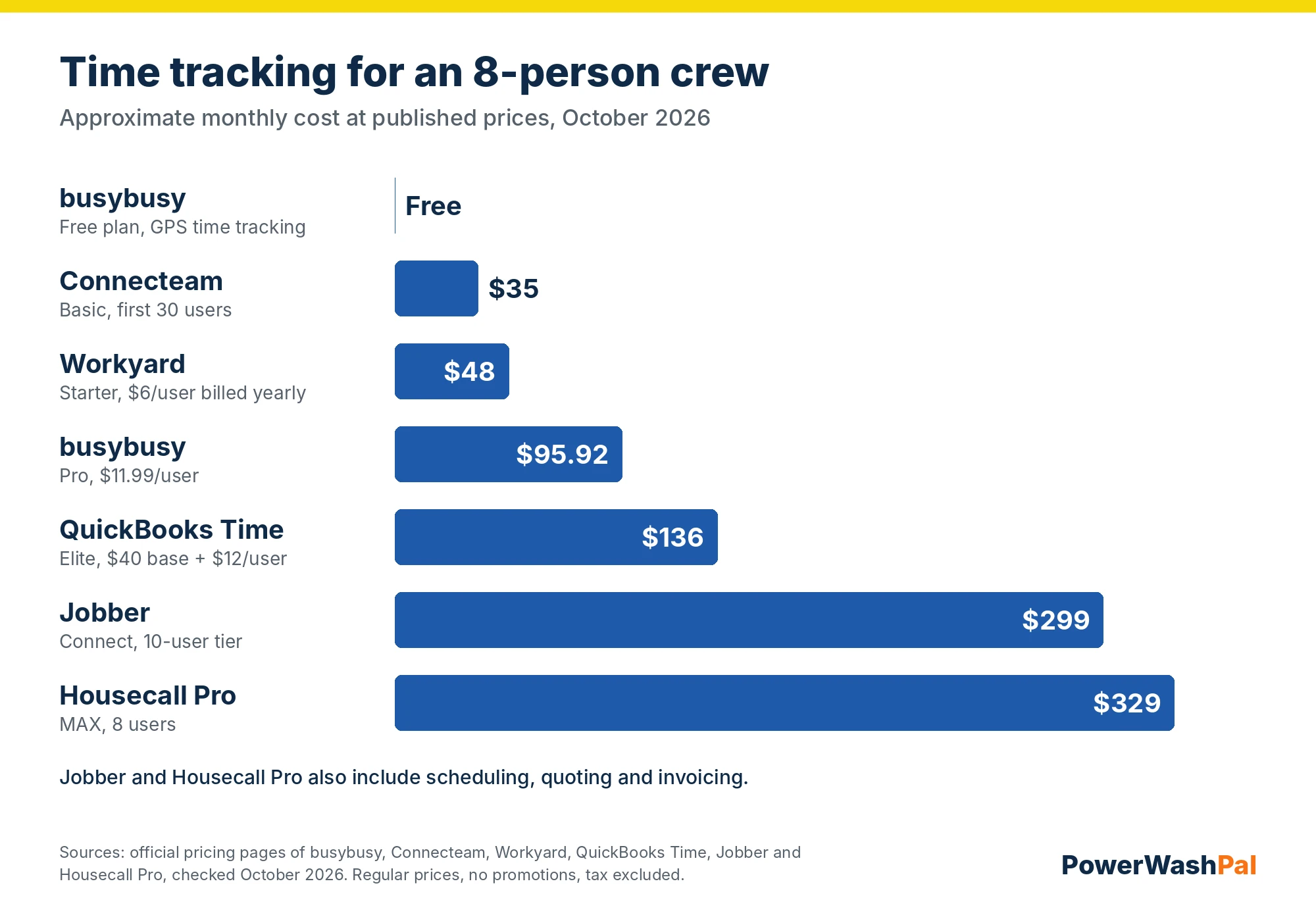
Standalone time clocks are cheaper. Field service apps cost more but replace your scheduling, quoting and invoicing tools too. Many small landscape companies run Jobber or Housecall Pro for jobs and a cheap time clock for seasonal labor, or use the field service app’s built-in time tracking until they hire their tenth person.
Turn timesheets into better prices
- Track time by property or job, not just total hours per day.
- Compare actual to estimated hours every week. Flag jobs that run 20% over.
- Separate drive time. If a route spends a third of the day driving, tighten it before you raise prices.
- Use a burdened labor rate (wage plus payroll taxes and workers’ comp) in your estimates.
- Re-price recurring properties at renewal based on real hours.
Our landscaping estimating software guide covers tools that compare estimated and actual hours automatically.
How to choose
- Tight budget, up to 30 people: Connecteam Basic, or busybusy Free.
- Payroll in QuickBooks: QuickBooks Time.
- Route-based maintenance with lots of driving: Workyard.
- Want one app for scheduling, invoicing and hours: Jobber or Housecall Pro.
- Equipment hours matter (mowers, skid steers): busybusy.
Related guides
- Landscaping CRM software compared
- Best landscaping estimating software
- Best field service management software for small business
- Best field service invoice software
- Jobber pricing
- Housecall Pro pricing
FAQ
What is the best time tracking app for landscapers?
For most small landscape companies, Connecteam is the best value for a standalone time clock, and busybusy is the best free option. If you want hours inside the same app you schedule and invoice with, use Jobber or Housecall Pro.
Is there free time tracking software for landscaping crews?
Yes. busybusy has a free plan with GPS time tracking, job costing and equipment tracking for unlimited users. Connecteam’s free plan covers up to 30 users but doesn’t include GPS.
Can a time tracking app track employees’ location?
Most landscaping time apps record GPS at clock-in and clock-out, and some track location continuously while an employee is clocked in. They generally don’t track people off the clock. Tell employees what’s tracked, and check your state’s rules.
What is geofencing in time tracking?
A geofence is a virtual boundary around a job site or your yard. Apps use it to remind workers to clock in, block clock-ins from the wrong place, or clock people out when they leave.
Does Jobber have time tracking?
Yes. Time and expense tracking starts on Jobber’s Connect plan, and automatic time tracking and job costing come with Grow.