Blog

  • How to Start a Window Cleaning Business in 2026 (10 Steps)

    How to Start a Window Cleaning Business in 2026 (10 Steps)

    Disclosure: PowerWashPal may earn a commission if you sign up through some links on this page, at no extra cost to you. How we make money.

    Updated October 2026. General information, not legal or tax advice. Licensing and insurance rules vary by state and city.

    Window cleaning may be the cheapest home service business to start. Jobber’s window cleaning guide notes you can launch for under $1,000 if you work solo and already have a vehicle, and the work is naturally recurring: clean windows get dirty again every few months. Here’s how to start a window cleaning business in 2026, step by step.

    How to start a window cleaning business: quick steps

    1. Decide on residential, commercial, or both
    2. Budget your startup costs
    3. Register your business and get an EIN
    4. Check local licenses and safety rules
    5. Get insured
    6. Buy your equipment
    7. Set your prices
    8. Set up software for routes, reminders, and payments
    9. Win your first customers
    10. Turn one-time jobs into recurring routes
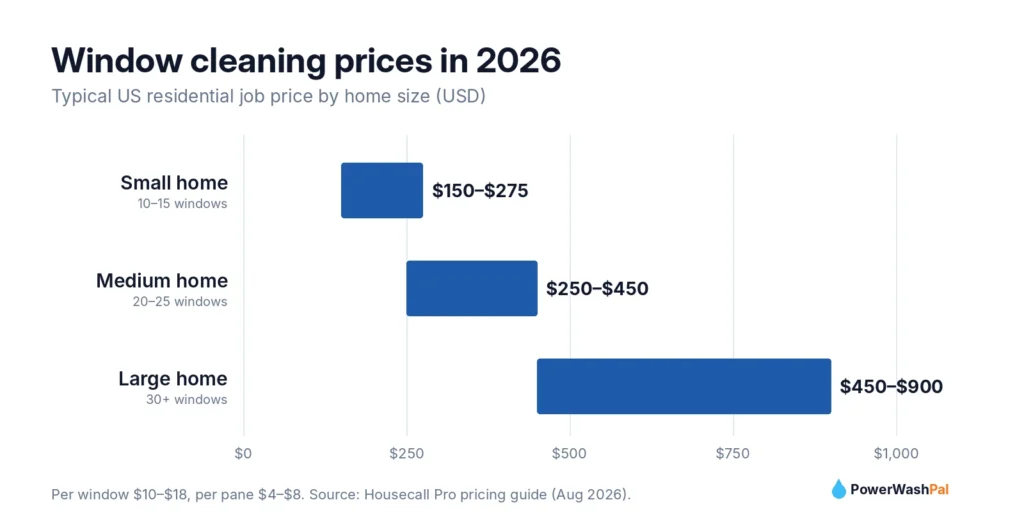
    Chart of 2026 US window cleaning prices by home size

    1. Decide on residential, commercial, or both

    Residential jobs pay more per visit (Housecall Pro puts a medium home at $250–$450) and work well with seasonal schedules. Commercial storefronts pay less per visit ($40–$75 for a small storefront) but repeat every few weeks, which fills your route on slow days. Most successful companies do both: storefronts for steady weekly income, homes for bigger tickets.

    2. Budget your startup costs

    Item Typical cost
    Hand tools (squeegees, channels, T-bar and sleeve, scrapers, buckets, microfiber) A few hundred dollars
    Extension pole and ladder $150–$500
    Water-fed pole system (optional, for 2–3 story homes) $1,000+
    LLC filing (optional) $50–$500 depending on state
    General liability insurance About $44–$103/month for exterior cleaning trades
    Software $29–$59/month
    Door hangers, yard signs, business cards $100–$300

    Without a water-fed pole, a lean solo start can come in under $1,000 to $2,000 if you already own a vehicle. Insurance range from MoneyGeek for exterior cleaning businesses.

    3. Register your business and get an EIN

    Many owners form an LLC to separate personal and business liability (see the SBA’s guide). Get a free EIN from the IRS and open a business bank account.

    4. Check local licenses and safety rules

    There’s usually no state “window cleaning license,” but you’ll typically need a city or county business license. Ask your local licensing office about any rules for ladders on commercial buildings and working near power lines with extension poles. Never take high-rise rope or lift work until you’re trained and insured for it.
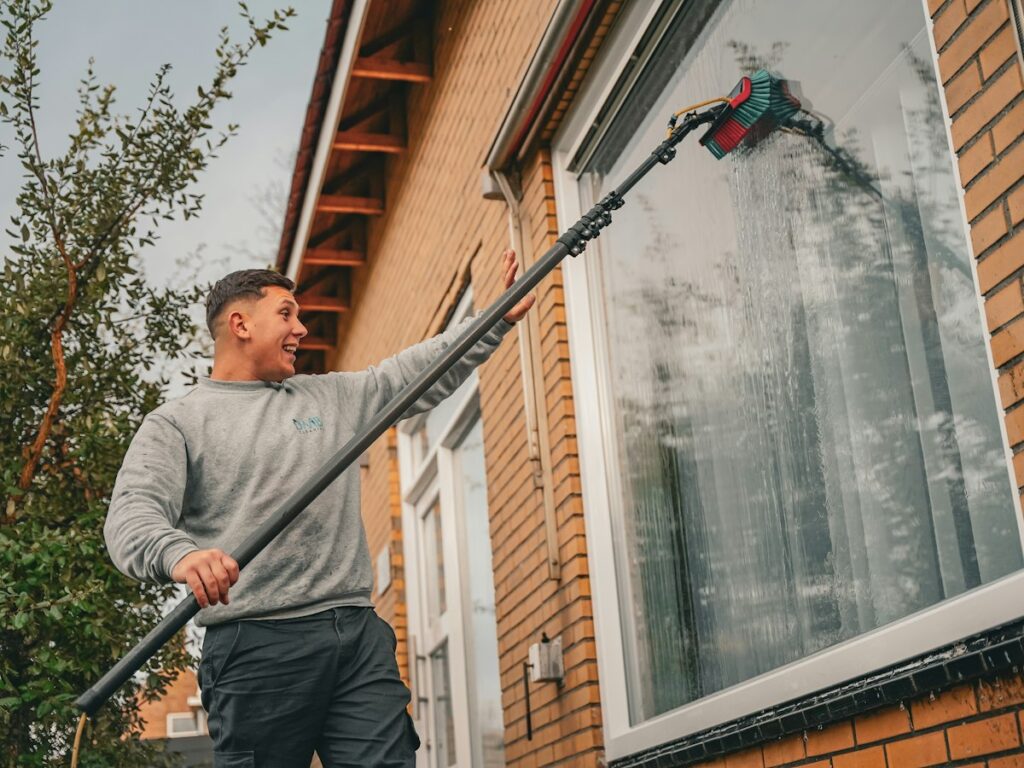
    Window cleaner using a water-fed pole on a brick home
    Photo by Joshua Bowers on Unsplash

    5. Get insured

    General liability is essential: a dropped ladder through a skylight costs far more than a year of premiums. Add workers’ compensation when you hire (required in most states), commercial auto if you drive for work, and specialized coverage before doing multi-story commercial work. Commercial clients will ask for a certificate of insurance.

    6. Buy your equipment

    • Squeegees and channels in a few sizes (12″, 14″, 18″)
    • T-bar with microfiber sleeve for applying solution
    • Scrapers for paint specks and stickers (use carefully on tempered glass)
    • Bucket with belt holster and a quality window cleaning solution
    • Extension pole and a stable ladder with stabilizer
    • Water-fed pole system (optional): pure water and a brush on a long pole, so you can clean second- and third-story windows from the ground

    Many window cleaners add gutter cleaning and pressure washing later. Our pressure washing equipment list covers that gear.

    7. Set your prices

    Service Typical US price
    Per window $10–$18
    Per pane $4–$8
    Small home (10–15 windows) $150–$275
    Medium home (20–25 windows) $250–$450
    Large home (30+ windows) $450–$900+
    Screens $2–$5 each
    Minimum charge $100–$150+

    Source: Housecall Pro window cleaning pricing guide (August 2026). Jobber reports an average residential job of about $310. Offer a lower per-visit rate for customers who sign up for quarterly or monthly service.

    8. Set up software for routes, reminders, and payments

    Window cleaning lives and dies on recurring routes, so software pays off early. The right tool reminds customers before each visit, groups nearby stops, and charges cards automatically after the job.

    • Jobber is our top pick for new window cleaners: recurring jobs, a Client Hub for online approvals and payments, and route optimization and automatic payments from the Connect plan. Core starts at $29/month (annual). Jobber also publishes free window cleaning estimate templates. Read our Jobber review.
    • Housecall Pro fits US crews: five users for $149/month (annual) with automatic Google review requests on every plan.

    See every option in our guide to the best window cleaning software.

    Try Jobber free for 14 days Try Housecall Pro free
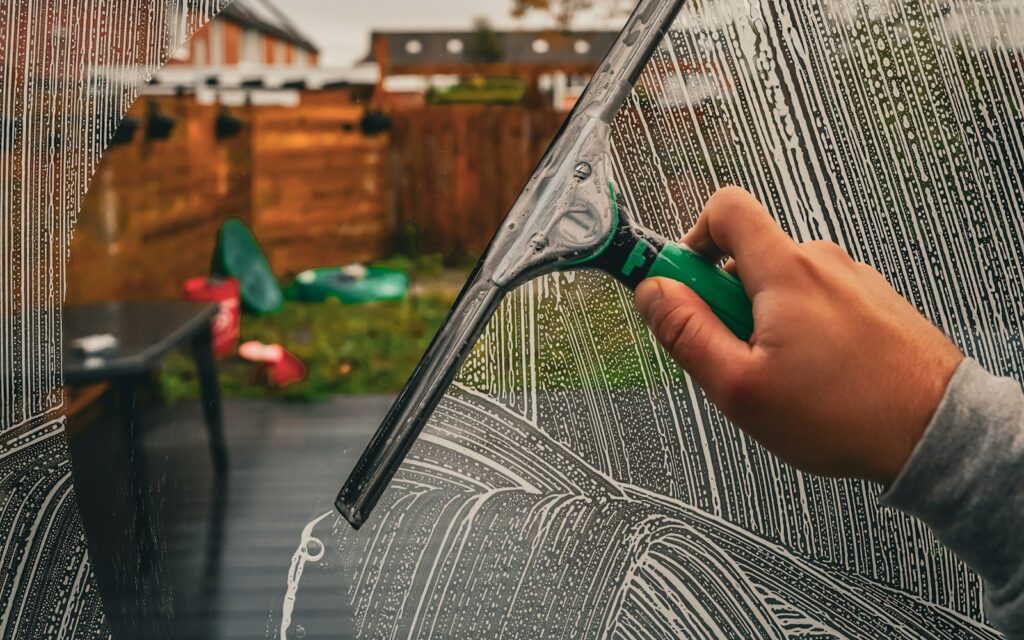
    Window cleaner pulling a squeegee through soapy glass
    Photo by Joshua Bowers on Unsplash

    9. Win your first customers

    • Door-to-door canvassing. Still one of the fastest ways to fill a route. Knock on the streets around every job.
    • Google Business Profile. Free, and where homeowners look first. Post before-and-after photos and ask for reviews.
    • Storefront walk-ins. Offer a free first clean of the front glass to downtown shops, then quote recurring service.
    • Partners. Realtors, property managers, painters, and pressure washers can all refer work.

    10. Turn one-time jobs into recurring routes

    A route of 100 customers on quarterly service gives you steady work all year. At the end of every job, offer a recurring plan with a small discount, set it up in your software on the spot, and keep the card on file. Add gutter cleaning, screen repair, and house washing to raise your average ticket.
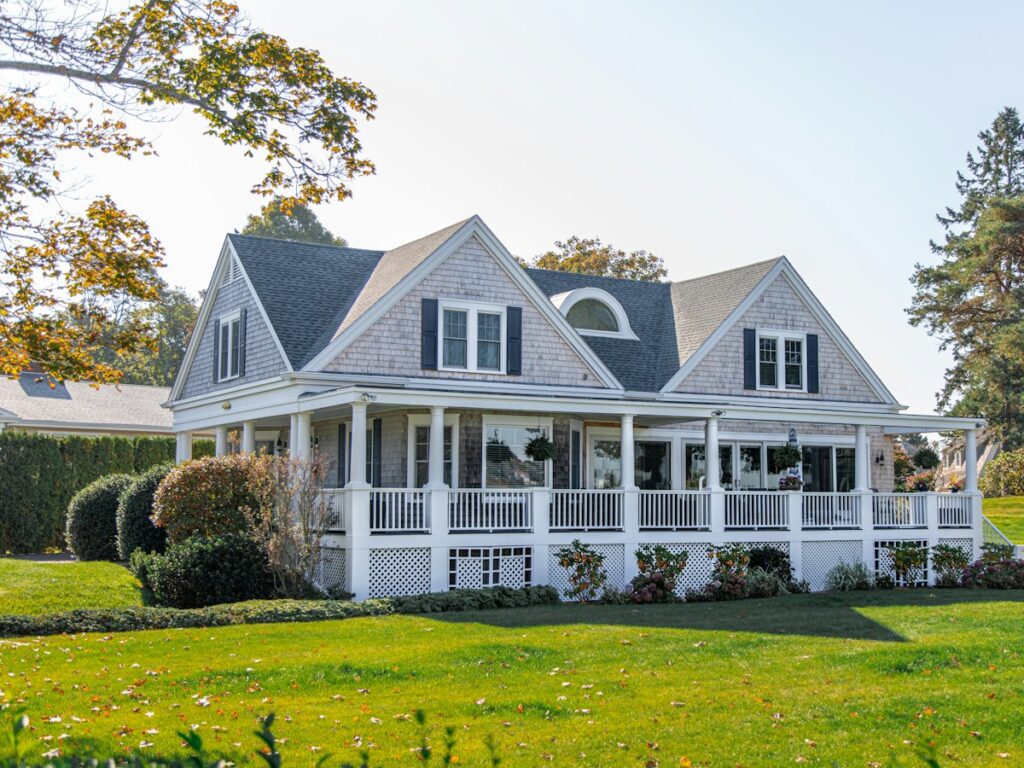
    Two-story American home with a wraparound porch
    Photo by Todd Kent on Unsplash

    Frequently asked questions

    How much does it cost to start a window cleaning business?

    A solo start with a vehicle you already own can cost under $1,000 to $2,000 for tools, insurance, and basic marketing. A water-fed pole system adds $1,000 or more.

    Do you need a license to clean windows?

    Most places don’t require a specific window cleaning license, but you’ll usually need a local business license. Check your city and county rules.

    How much do window cleaners make per job?

    Typical residential jobs run about $150–$450 for small to medium homes, with larger homes reaching $900 or more. Jobber reports an average residential job of about $310.

    What’s the best software for a new window cleaning business?

    Jobber is our top pick for most new window cleaners because it handles recurring jobs, quotes, and automatic payments from $29/month. See our window cleaning software guide.

    Is window cleaning a good business to start?

    Yes, for many people. Startup costs are low, demand is recurring, and it pairs well with pressure washing and gutter cleaning once you grow.
  • Jobber Review 2026: Pricing, Features, Pros & Cons for Pressure Washing

    Jobber Review 2026: Pricing, Features, Pros & Cons for Pressure Washing

    Disclosure: PowerWashPal may earn a commission if you sign up through some links on this page, at no extra cost to you. It never changes our verdict. How we make money.

    Updated October 2026. Prices and plan details come from Jobber’s official pricing page and help center. Review scores were checked on October 6, 2026.

    Jobber is the field service app we recommend most often to pressure washing and window cleaning businesses, and it’s the one most new owners end up shortlisting. This review covers what it actually costs, what each plan includes, how it handles exterior cleaning work, and where it falls short, so you can decide before you start the free trial.

    Jobber review: the short version

    • Best for: solo operators and growing crews that want quoting, scheduling, invoicing, and payments in one easy app.
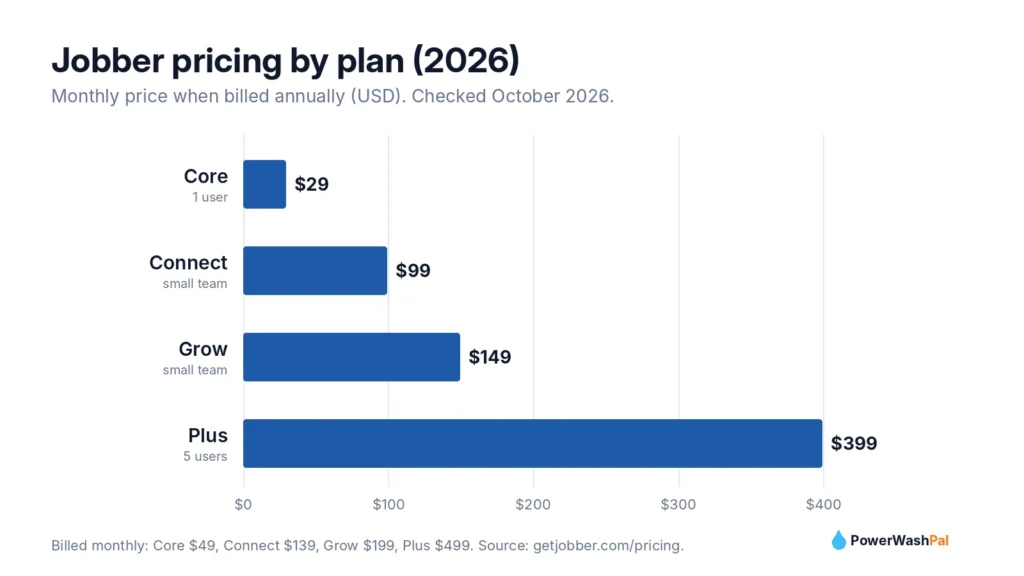
    • Price: from $29/month billed annually (Core, 1 user) up to $399/month billed annually (Plus, 5 users).
    • Standout features: quotes with optional add-ons, automatic quote and invoice follow-ups, a customer self-service Client Hub, and a highly rated mobile app.
    • Watch out for: some of the best automation sits on Connect and Grow, and review requests are a paid add-on.
    • Our rating: 4.6/5 for exterior cleaning businesses.

    Try Jobber free for 14 days

    Pressure washing pro cleaning a storefront sidewalk with a surface cleaner
    Photo by The Graphic Space on Unsplash

    What is Jobber?

    Jobber is field service management software for home service businesses. It was founded in 2011 in Edmonton, Canada, and says it’s used by more than 400,000 service pros across 50+ industries, from lawn care and HVAC to pressure washing and window cleaning. It runs on the web, iPhone, and Android, and handles the full job cycle: request, quote, schedule, job, invoice, and payment.

    Jobber also builds resources specifically for this trade, including a pressure washing software page, a window cleaning version, and free estimate and invoice templates for both.

    Jobber pricing in 2026

    Plan Billed annually Billed monthly Users Best for
    Core $29/mo $49/mo 1 Solo operators starting out
    Connect $99/mo $139/mo Small team Owners who want automatic follow-ups
    Grow $149/mo $199/mo Small team Selling add-ons and tracking job profit
    Plus $399/mo $499/mo 5 Established multi-crew companies

    Optional add-ons include the Marketing Suite ($99/month: review requests, email campaigns, referrals) and an AI Receptionist ($29/month). Both are included on Plus. Every plan starts with a 14-day free trial, no credit card required.

    Payment processing (US): 2.9% + 30¢ per card payment, 2.7% + 30¢ for Tap to Pay, and 1% for ACH bank payments. Instant payouts to a debit card cost an extra 1%.

    Bar chart of Jobber pricing by plan in 2026: Core $29, Connect $99, Grow $149, Plus $399 per month billed annually

    Features that matter for pressure washing and window cleaning

    Quotes that sell add-ons

    This is Jobber’s biggest strength for exterior cleaning. On Grow, quotes can include optional line items with photos, so a driveway customer can tick “house wash” or “gutter brightening” right on the quote. Jobber says pressure washing pros using optional line items earn over $300 more per quote on average. Even on Core, you get clean, branded quotes customers approve online.

    Automatic follow-ups

    Many washing quotes go quiet after you send them. From the Connect plan, Jobber follows up automatically on unanswered quotes and sends invoice reminders, so you stop chasing people by text.

    Client Hub

    Every customer gets a self-service portal to request work, approve quotes, see upcoming visits, and pay invoices. It saves phone tag and makes a small company look established.

    Scheduling and routes

    Drag-and-drop scheduling makes rain-day reschedules quick, and “on my way” texts keep customers informed. According to Jobber’s help center, route optimization is available on Connect, Grow, and Plus.

    Recurring work and payments

    Recurring jobs suit quarterly window cleaning and monthly storefront washes. Automatic payments (Connect and up) can charge a card on file, which is ideal for recurring commercial accounts.

    QuickBooks Online and reporting

    QuickBooks Online sync starts on Connect. Grow adds job costing, which shows whether a job made money after labor and chemicals.

    Window cleaner using a water-fed pole on a brick home
    Photo by Joshua Bowers on Unsplash

    What users say: Jobber ratings

    Platform Rating Reviews
    Apple App Store 4.8/5 About 21,000
    Capterra 4.6/5 1,487
    G2 4.6/5 530
    Google Play 4.4/5 About 6,800
    Trustpilot 4.2/5 231

    Checked October 6, 2026. Reviewers most often praise having quoting, scheduling, invoicing, and payments in one place, how quickly crews learn the app, the Client Hub, and responsive support. The most common complaints are limited reporting on lower plans, routing that isn’t as detailed as dedicated mapping tools, key features locked behind higher tiers, and some Android stability issues.

    Jobber pros and cons

    Pros Cons
    Cheapest way to get a full system as a solo operator ($29/mo) Review requests need the $99 Marketing Suite unless you’re on Plus
    Quotes with optional add-ons raise average ticket size Optional line items and job costing require Grow
    Automatic quote and invoice follow-ups (Connect+) Reporting is basic on lower plans
    Client Hub for online approvals and payments Prices have risen over time
    Excellent mobile app, easy for crews Some Android users report crashes
    Works in the US, Canada, UK, Australia, NZ, Ireland, South Africa Moving your data out later takes effort

    Which Jobber plan should you choose?

    • Just starting, solo: Core. Get quotes, scheduling, invoicing, and online payments for $29/month (annual).
    • Sending 10+ quotes a week: Connect. The automatic follow-ups alone usually win back the extra cost.
    • Selling lots of add-ons (house wash + gutters + windows): Grow, for optional line items and job costing.
    • Multiple crews and an office: Plus, which includes the Marketing Suite and AI Receptionist plus 1-on-1 support.

    Jobber vs alternatives

    The main alternative is Housecall Pro, which includes review requests on every plan and gives US crews of 2–5 more users for the money (Essentials, $149/month annually for 5 users). It isn’t available outside the US and Canada. See our full Jobber vs Housecall Pro comparison or the list of the best pressure washing software.

    Support

    Jobber offers live chat, email, and phone support (1-888-721-1115), with live agents Monday to Friday, 7am–9:30pm ET, plus an AI assistant after hours. Plus customers get 1-on-1 onboarding and priority support.

    Technician pressure washing a residential driveway on a sunny day
    Photo by The ProClean Team on Unsplash

    Our verdict

    Jobber is the best all-around choice for most pressure washing and window cleaning businesses. It’s affordable when you’re solo, easy enough to learn in an afternoon, and it grows with you through automatic follow-ups, add-on quoting, and recurring payments. If review requests are your top priority and you’re a US crew of three or more, compare it with Housecall Pro before you decide.

    The easiest test: start the 14-day trial, enter three real jobs (a house wash, a driveway, and a recurring window account), and send yourself a quote from your phone.

    Start your free Jobber trial

    Frequently asked questions

    How much does Jobber cost per month?

    Jobber costs $29–$399 per month billed annually, or $49–$499 billed monthly, depending on the plan. The Core plan for one user is $29/month on an annual plan.

    Does Jobber have a free trial?

    Yes. Jobber offers a 14-day free trial with no credit card required.

    Is Jobber good for pressure washing?

    Yes. Optional line items, photo quotes, automatic follow-ups, and recurring jobs fit pressure washing well, and Jobber publishes pressure-washing-specific templates and guides.

    Does Jobber work with QuickBooks?

    Yes. QuickBooks Online sync is included from the Connect plan.

    What are Jobber’s payment processing fees?

    In the US, card payments cost 2.9% + 30¢, Tap to Pay costs 2.7% + 30¢, and ACH bank payments cost 1%.

  • Best Window Cleaning Software in 2026 (US Prices Compared)

    Best Window Cleaning Software in 2026 (US Prices Compared)

    Disclosure: PowerWashPal may earn a commission if you sign up through some links on this page, at no extra cost to you. It never changes how we rank software. How we make money.

    Updated October 2026. Prices come from each company’s official pricing page, checked this month.

    Window cleaning runs on routes. The money is in recurring customers you visit every month or quarter, priced per window or per pane, scheduled around the weather. The right software keeps those routes full, reminds customers before you show up, and charges their card when the job’s done.

    Here are the best window cleaning software options for US businesses in 2026, from all-in-one platforms to tools built only for window cleaners.

    The quick answer

    • Best overall: Jobber. Recurring jobs, route optimization, automatic payments, and a customer portal, from $29/month.
    • Best for US crews: Housecall Pro. Five users for $149/month with review requests built in.
    • Best window-cleaning-specific tool: The Customer Factor. One plan with unlimited users for $44.95/month.
    • Best for satellite measuring: QuoteIQ. Measure homes from the map and quote without a site visit.
    • Best for UK window cleaners: Squeegee. Built around rounds, GoCardless, and HMRC.
    Window cleaner pulling a squeegee through soapy glass
    Photo by Joshua Bowers on Unsplash

    What window cleaning software needs to do

    • Recurring rounds. Set a customer to every 4, 8, or 12 weeks once, and the visits keep appearing.
    • Route planning. Group nearby stops so you clean more windows and drive less.
    • Per-window or per-pane pricing. A price book with your rates (inside, outside, screens, tracks) makes quotes fast and consistent.
    • Weather rescheduling. Move a rained-out day with a few taps and text customers automatically.
    • Card on file. Charge recurring customers automatically so you don’t chase checks under the doormat.

    Window cleaning software compared

    Software Starting price Users Free trial Best for
    Jobber $29/mo (annual) 1 on Core 14 days, no card Most window cleaning businesses
    Housecall Pro $59/mo (annual) 1 on Basic, 5 on Essentials 14 days US crews of 2–8
    The Customer Factor $44.95/mo Unlimited 30-day risk-free Window-cleaning-focused owners
    QuoteIQ $29.99/mo 1 on Essentials 14 days Quoting from satellite maps
    GorillaDesk $49/mo Unlimited admins Yes Dense recurring routes
    Squeegee From £15.83/mo + VAT Varies by plan Check site UK window cleaners

    1. Jobber: best overall window cleaning software

    Jobber gives window cleaners everything needed to run recurring routes from one app, and it publishes a dedicated window cleaning software page plus free window cleaning estimate templates.

    • Recurring jobs and visit reminders keep monthly and quarterly customers on schedule.
    • Route optimization (Connect plan and up, per Jobber’s help center) orders your stops to save drive time.
    • Automatic payments (Connect and up) charge a card on file after each visit.
    • “On my way” texts and a Client Hub where customers approve quotes and pay online.
    • Optional line items on Grow let customers add screens, tracks, or gutter cleaning to a quote with one tap.

    Pricing: Core $29/month (annual) for 1 user, Connect $99, Grow $149, Plus $399 for 5 users. Read our full Jobber review.

    Try Jobber free for 14 days

    2. Housecall Pro: best for US window cleaning crews

    Housecall Pro is a strong fit once you have two or more cleaners on the road. The Essentials plan covers five users for $149/month billed annually, and automated review requests are included on every plan, which is powerful in a trade where homeowners pick the company with the most Google reviews.

    • Online booking from your website for standard window packages
    • GPS tracking and tech commissions on Essentials
    • Route optimization and recurring service plans on Max ($299/month, 8 users)
    • QuickBooks sync from Essentials

    Note: Housecall Pro is available only in the US and Canada.

    Try Housecall Pro free for 14 days

    Chart of 2026 US window cleaning prices by home size: small $150-$275, medium $250-$450, large $450-$900

    3. The Customer Factor: best window-cleaning-focused tool

    The Customer Factor has long marketed to window cleaners and other route-based services. It currently sells a single plan at $44.95/month with unlimited employees and sub-users and a 30-day risk-free period. The company says it plans to move to tiered pricing, with existing members keeping their rate. It’s a good fit for owners who want one predictable price as the team grows.

    4. QuoteIQ: best for quoting from the map

    QuoteIQ is built for exterior cleaning trades. Its MapMeasure Pro tool (from the Beginner plan, $74.99/month) measures homes from satellite imagery so you can quote window and pressure washing jobs remotely. Plans start at $29.99/month for one user. Route optimization is on the Elite plan.

    5. GorillaDesk: best for dense recurring routes

    GorillaDesk comes from pest control and pool service, where dense recurring routes are everything. Plans run $49, $99, and $149 per month, with unlimited office users. Route optimization, review requests, and QuickBooks Online start on Pro ($99).

    6. Squeegee: best for UK window cleaners

    If you’re reading from the UK, Squeegee is built around window cleaning rounds, Direct Debit through GoCardless, and HMRC-ready bookkeeping, starting from £15.83/month plus VAT. It isn’t aimed at US businesses, so US readers should start with Jobber or Housecall Pro.

    Window cleaner using a water-fed pole on a brick home
    Photo by Joshua Bowers on Unsplash

    How much do window cleaners charge?

    Loading the right rates into your software’s price book matters as much as the software itself. Housecall Pro’s August 2026 pricing guide puts typical US rates at:

    Service Typical price
    Per window $10–$18
    Per pane $4–$8
    Small home (10–15 windows) $150–$275
    Medium home (20–25 windows) $250–$450
    Large home (30+ windows) $450–$900+
    Screen cleaning $2–$5 per screen
    Small storefront $40–$75 per visit
    Minimum charge $100–$150+

    Source: Housecall Pro window cleaning pricing guide. Many window cleaners also offer pressure washing and house washing. See our pressure washing price guide for those rates.

    Just getting started? Read how to start a window cleaning business.

    Our verdict

    For most US window cleaning businesses, Jobber is the best place to start: recurring jobs, route optimization, automatic payments, and a polished customer portal at a price that works for a one-person operation. Once you run a crew of three or more in the US, Housecall Pro often wins on value thanks to five users on Essentials and built-in review requests.

    Both have 14-day free trials. Set up your three most common recurring customers in each and see which one makes your week easier.

    Start a free Jobber trial Start a free Housecall Pro trial

    Two-story American home with a wraparound porch
    Photo by Todd Kent on Unsplash

    Frequently asked questions

    What is the best software for a window cleaning business?

    Jobber is the best all-around choice for most window cleaning businesses thanks to recurring jobs, route optimization, and automatic payments. US crews of 2–8 often get better value from Housecall Pro.

    Is there free window cleaning software?

    Few full systems are free. ServiceM8 has a free plan capped at 30 jobs a month, and ResponsiBid offers a free quoting plan. Expect to pay about $29–$50 a month for a complete CRM.

    Does window cleaning software handle recurring customers?

    Yes. Jobber, Housecall Pro, GorillaDesk, and The Customer Factor all support recurring visits, which is essential for monthly and quarterly window routes.

    Can I charge customers automatically after each visit?

    Yes. Jobber’s automatic payments (Connect and up) and other tools with card-on-file billing can charge recurring customers after each completed visit.

  • How to Start a Pressure Washing Business in 2026 (10 Steps)

    How to Start a Pressure Washing Business in 2026 (10 Steps)

    Disclosure: PowerWashPal may earn a commission if you sign up through some links on this page, at no extra cost to you. How we make money.

    Updated October 2026. This guide is general information, not legal or tax advice. Rules vary by state and city, so confirm requirements locally.

    Pressure washing is one of the easiest home service businesses to start. You don’t need a degree or a storefront, the equipment fits on a trailer, and every house, driveway, and storefront in your area gets dirty again every year. IBISWorld estimates the US pressure washing services industry at about $1.2 billion in 2026 across roughly 32,000 businesses, with the number of companies growing faster than revenue, so standing out matters.

    Here’s how to start a pressure washing business in 10 steps, with real cost ranges and the mistakes that sink new owners.

    How to start a pressure washing business: quick steps

    1. Pick your services and target customers
    2. Estimate your startup costs
    3. Choose a business structure and register
    4. Get licenses and check wastewater rules
    5. Get insured
    6. Buy the right equipment
    7. Learn safe technique
    8. Set your prices
    9. Set up software for quotes, scheduling, and payments
    10. Win your first 20 customers
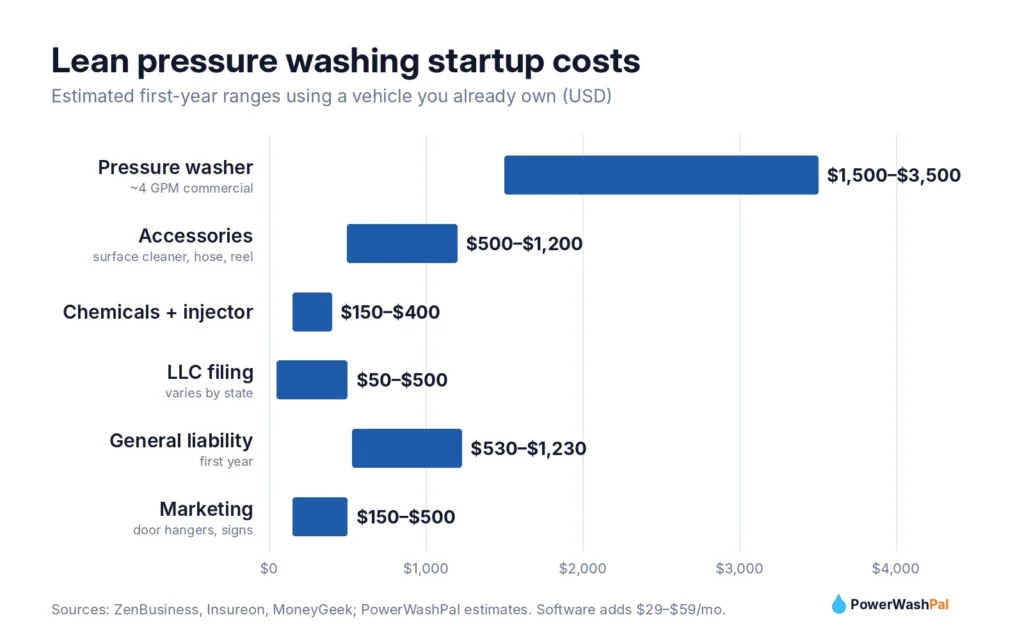
    Chart of lean pressure washing startup costs by category in 2026

    1. Pick your services and target customers

    Start with services that are easy to learn and in steady demand:

    • Driveways, sidewalks, and patios (pressure washing with a surface cleaner)
    • House washing (soft washing siding at low pressure)
    • Decks and fences

    Add roof soft washing, gutter brightening, and commercial flatwork once you’re confident. Learn the difference between the two core methods in our soft washing vs pressure washing guide. Residential customers are easier to win first. Commercial accounts (storefronts, restaurants, HOAs, property managers) bring recurring income later.

    2. Estimate your startup costs

    Costs swing widely depending on whether you buy a trailer rig on day one. ZenBusiness puts the full range at about $6,000 to $50,000+. A lean start using a vehicle you already own looks more like this:

    Item Lean start Notes
    Commercial pressure washer (about 4 GPM) $1,500–$3,500 Commercial units can run $3,000–$15,000+
    Surface cleaner, hose, reel, nozzles, gun $500–$1,200 See our equipment list
    Chemicals and soft wash injector $150–$400 Start with a downstream injector
    LLC formation $50–$500 Varies by state
    General liability insurance (first year) $530–$1,230 See step 5
    Business software $29–$59/month Free trials available
    Marketing (door hangers, yard signs, Google profile) $150–$500 Google Business Profile is free
    Estimated total about $3,000–$7,000 Our estimate for a lean start

    A trailer setup adds about $5,000, and a custom van $30,000 or more (ZenBusiness).

    3. Choose a business structure and register

    • Sole proprietorship is simplest, but your personal assets aren’t separated from the business.
    • An LLC is the most common choice for washing businesses because it separates business and personal liability. Filing fees are typically $50–$500 depending on your state. The SBA’s business structure guide compares the options.
    • Get an EIN. It’s free from the IRS, and you can apply online in minutes.
    • Open a business bank account to keep income and expenses clean for taxes.

    4. Get licenses and check wastewater rules

    Most states don’t have a dedicated pressure washing license, but you’ll usually need a city or county business license, and some places have specific rules. For example, Fort Worth, Texas requires a mobile power washer permit and bans wash water from entering storm drains, with fines up to $2,000 per violation. If you add painting, sealing, or restoration work, contractor licensing rules can apply, so check with your state licensing board.

    Wastewater matters. Under local stormwater programs tied to the Clean Water Act, most cities prohibit dirty wash water from entering storm drains. Common requirements on commercial jobs include blocking drains, recovering water with a vacuum, and filtering it. Cities like Brookhaven, Georgia publish pressure washing guidance worth reading even if you work elsewhere.

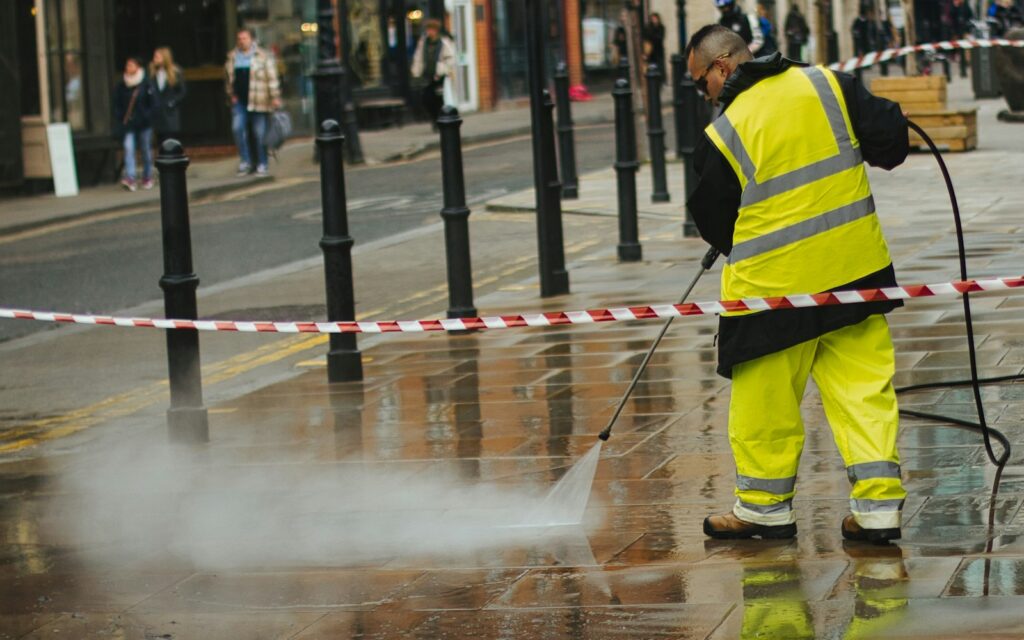
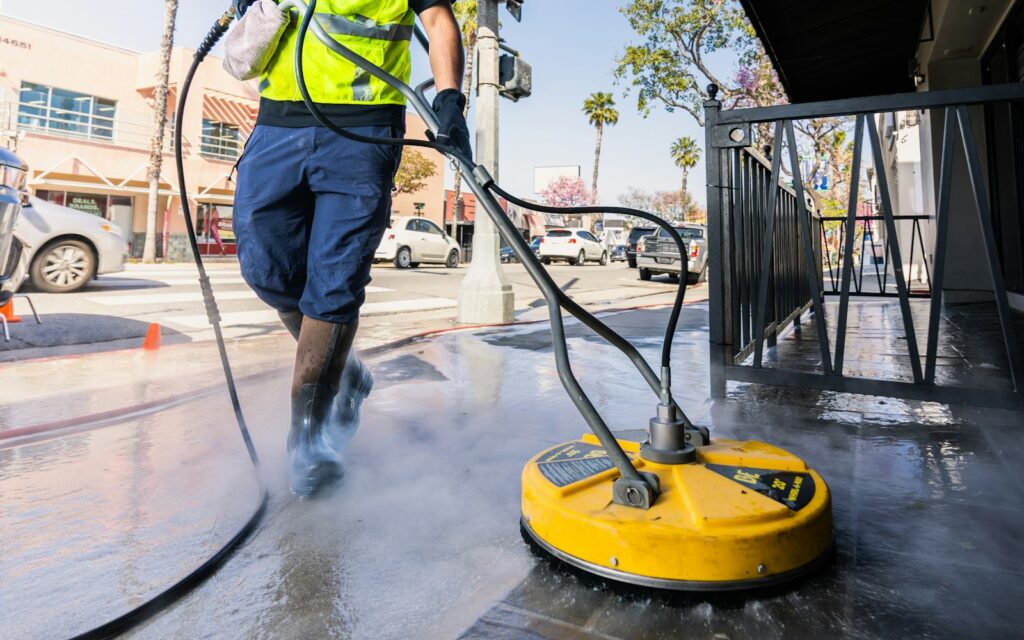
    Worker in a yellow jacket using a gas pressure washer on a sidewalk
    Photo by Adrian Raudaschl on Unsplash

    5. Get insured

    One cracked window or a slip on a wet driveway can cost more than a season’s profit. Typical costs for pressure washing businesses:

    Coverage Typical cost When you need it
    General liability About $44–$103/month (median about $73) Before your first job
    Business owner’s policy (BOP) Median about $142/month Liability plus property in one policy
    Inland marine (tools and equipment) About $31/month To cover your machine and trailer
    Commercial auto About $98–$324/month If your vehicle is used for work
    Workers’ comp About $55–$247/month per employee Usually required once you hire

    Sources: Insureon, MoneyGeek. Commercial clients will often ask for a certificate of insurance before you start.

    6. Buy the right equipment

    Buy for GPM (flow), not just PSI. A commercial machine around 4 GPM with a triplex pump will clean driveways far faster than a homeowner unit. Pair it with a 20-inch surface cleaner, 100+ feet of non-marking hose, a quality gun and nozzle set, and safety gear. Our full pressure washing equipment list covers what to buy first and what can wait.

    7. Learn safe technique

    Most damage claims come from using too much pressure on the wrong surface: etched concrete, gouged wood, water forced behind vinyl siding, or shingles stripped of granules. Practice on your own property first, and never pressure wash asphalt shingles. The Power Washers of North America (PWNA) offers certificate courses in house washing, roof cleaning, flatwork, and environmental compliance, which also help you win commercial work.

    8. Set your prices

    Typical US rates run about $0.20–$0.40 per square foot for concrete, $0.10–$0.50 for house washing, and $100–$250 minimum per visit. Price from your own costs with this formula: price = break-even cost ÷ (1 − target margin), aiming for a 20–40% margin. Our 2026 pressure washing price guide has rates by surface, job, and city.

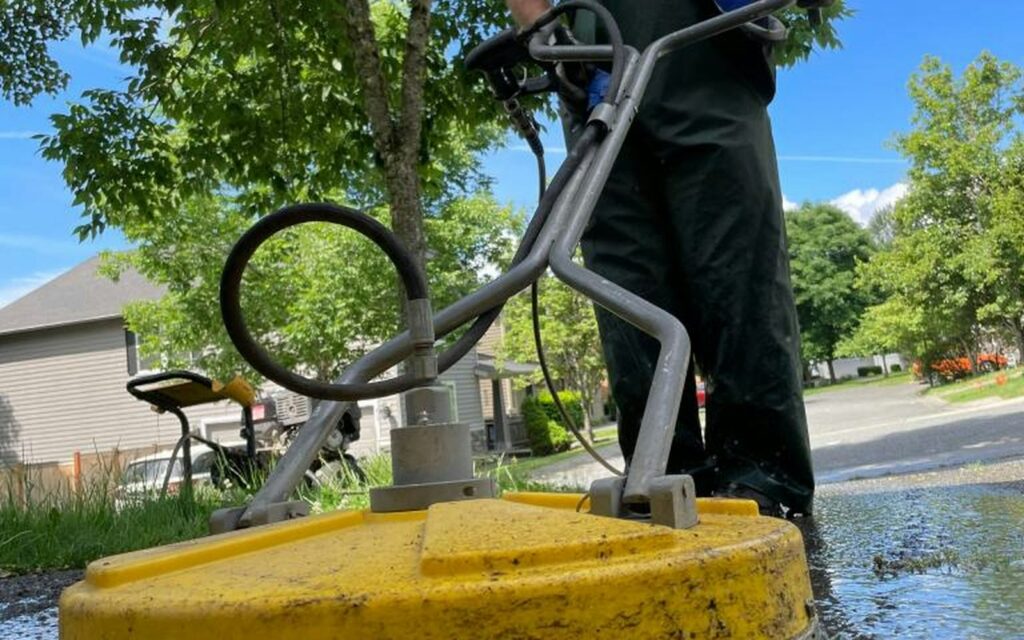
    Surface cleaner and pressure washer setup on a driveway job
    Photo by The ProClean Team on Unsplash

    9. Set up software for quotes, scheduling, and payments

    The fastest-growing new washing businesses look professional from day one: branded quotes sent within the hour, automatic reminders, and online payments. Field service software handles all of that for less than one driveway a month.

    • Jobber is our top pick for new owners. Core starts at $29/month (annual) for one user and includes quotes, scheduling, invoicing, online payments, and a customer portal. On Grow, quotes can include optional add-ons like “house wash” or “gutter brightening,” which Jobber says lifts the average pressure washing quote by over $300. Read our Jobber review.
    • Housecall Pro is the better value once you add a crew in the US: five users for $149/month (annual), with automatic review requests on every plan to build your Google rating fast.

    Compare both in our Jobber vs Housecall Pro guide or see all the best pressure washing software.

    Try Jobber free for 14 days Try Housecall Pro free

    10. Win your first 20 customers

    • Google Business Profile. Free, and it’s where most local customers find you. Add real before-and-after photos and ask every customer for a review.
    • Neighborhood marketing. After each job, drop door hangers on the five houses on either side and put a yard sign out (with permission).
    • Nextdoor and local Facebook groups. Before-and-after posts perform well, especially driveways.
    • Bundles. Offer a driveway plus house wash package to raise your average ticket.
    • Partners. Realtors, property managers, HOAs, and painters all need reliable washing.
    • Referral rewards. A $25 credit for every referred customer is cheap marketing.
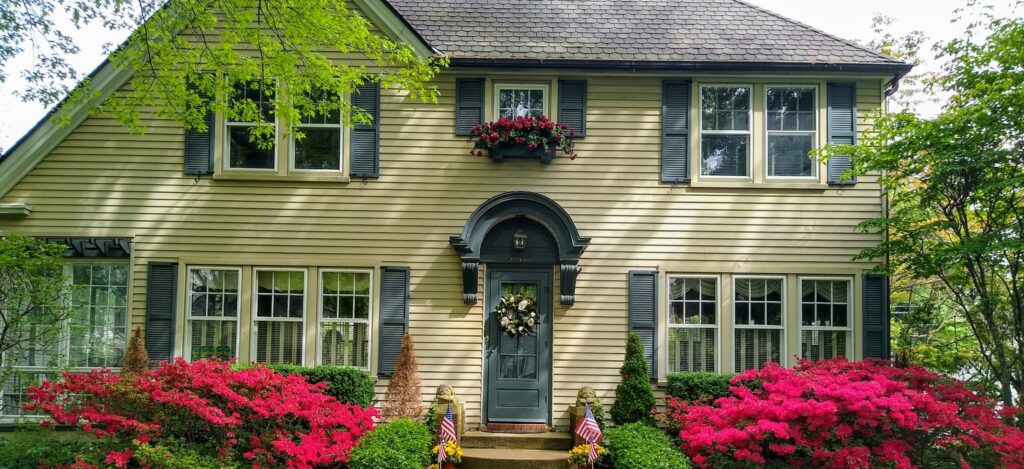
    Clean home exterior with bright azaleas and fresh siding
    Photo by Doug Vos on Unsplash

    Common mistakes to avoid

    • Underpricing to win jobs, then burning out. Set a minimum charge and stick to it.
    • Skipping insurance because “it’s just a driveway.”
    • Buying a homeowner machine that dies mid-season.
    • Letting quotes go cold. Follow up within 48 hours, or let software do it automatically.
    • Ignoring runoff rules on commercial jobs.

    Frequently asked questions

    How much does it cost to start a pressure washing business?

    A lean start with a vehicle you already own typically costs about $3,000–$7,000 for equipment, insurance, registration, and basic marketing. Full trailer or van setups can run $10,000–$50,000+.

    Do you need a license to start a pressure washing business?

    Most states don’t have a specific pressure washing license, but you’ll usually need a local business license, and some cities require permits or wastewater controls. Check your city, county, and state rules.

    Is a pressure washing business profitable?

    It can be. Typical rates of $50–$150 per hour and job minimums of $100–$250 leave healthy margins once you control chemical, fuel, and drive-time costs and build recurring customers.

    What software do pressure washing businesses use?

    Jobber and Housecall Pro are the most popular all-in-one options for quoting, scheduling, invoicing, and payments. See our best pressure washing software roundup.

    How do I get pressure washing customers fast?

    Set up a Google Business Profile, post before-and-after photos in local groups, door-hang the neighborhoods around every job, and ask every happy customer for a review and a referral.

  • Pressure Washing Equipment List: What You Need to Start (2026)

    Pressure Washing Equipment List: What You Need to Start (2026)

    Disclosure: As an Amazon Associate, PowerWashPal earns from qualifying purchases. We may also earn a commission from some software links. This never changes our picks. How we make money.

    Updated October 2026.

    You can start a pressure washing business with less gear than most YouTube channels suggest. What you can’t skimp on is the stuff that touches every job: the machine, the hose, the surface cleaner, and the safety gear that keeps you working.

    This is the equipment list we’d give a new owner: what to buy first, what can wait, and which specs actually matter. We picked the products below for their specs, pro-grade builds, and large numbers of buyer reviews. We haven’t put every item through a season ourselves, so read the specs against your own machine before buying.

    The quick list

    • Pressure washer: a gas, belt-drive or direct-drive unit with a triplex pump, around 4 GPM
    • Surface cleaner: a 20-inch model for driveways and sidewalks
    • Hose: 100+ feet of 3/8-inch non-marking pressure hose, plus a reel
    • Nozzles, gun, and wand: a full tip set and a sturdy gun with a stainless lance
    • Soft wash setup: a downstream injector to start, a 12V pump system later
    • Safety gear: chemical-resistant gloves and splash goggles, every job
    • Software: quoting, scheduling, and payments so you get paid for all that work
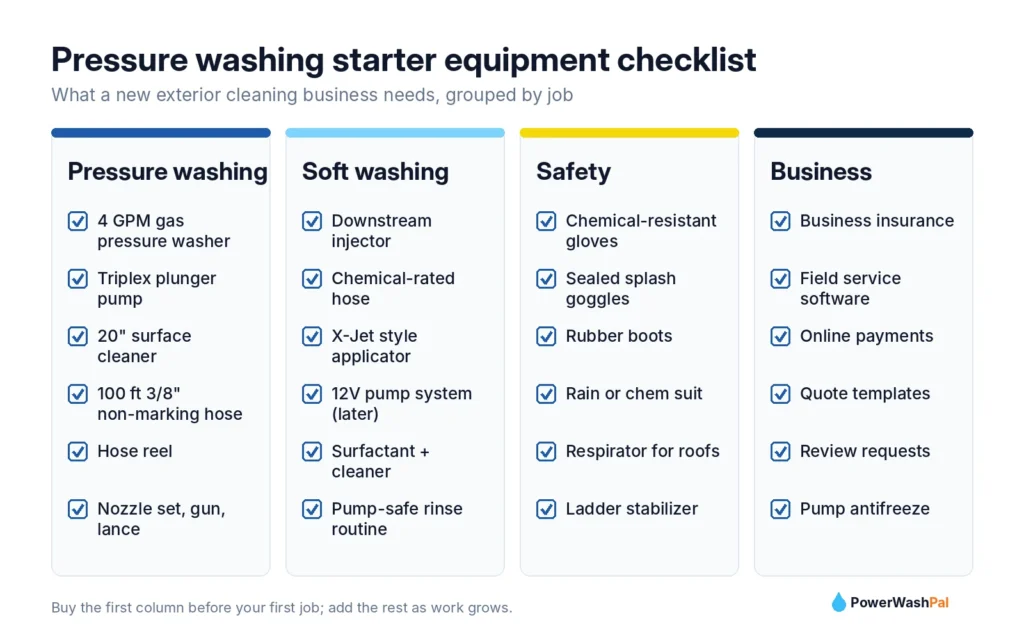
    Pressure washing starter equipment checklist grouped by job

    1. The pressure washer: buy for GPM, not just PSI

    Beginners shop by PSI. Pros shop by GPM (gallons per minute), because flow is what rinses dirt away and what spins a surface cleaner fast enough to work. For a business, look for:

    • About 4 GPM at 3,500–4,200 PSI. Homeowner machines (2–2.5 GPM) make every driveway take twice as long.
    • A triplex plunger pump (brands like General Pump, Comet, or AAA) instead of an axial pump. Triplex pumps are rebuildable and last years of daily use.
    • A commercial engine such as a Honda GX390 or similar.

    Most pros buy their main machine from a local pressure washing supplier or a big-box store’s commercial line, because they can see it, get it serviced, and pick it up the same day. Amazon is great for everything that plugs into it.

    Worker in a yellow jacket using a gas pressure washer on a sidewalk
    Photo by Adrian Raudaschl on Unsplash

    2. Surface cleaner

    A surface cleaner is the single biggest time-saver for flatwork. It spins two nozzles under a hood, so driveways come out even, without the zebra stripes a wand leaves, and in a fraction of the time.

    • Pro pick: BE Pressure Whirl-A-Way 20″ surface cleaner. A long-running pro brand rated to 4,000 PSI, simple to service. Check price on Amazon
    • Budget pick: 20″ stainless steel surface cleaner with wheels. One of Amazon’s most-reviewed options, fine for a first season. Check price on Amazon

    Tip: match the surface cleaner’s PSI and GPM rating to your machine. A 20-inch unit suits most 4 GPM washers.

    3. Hose and hose reel

    Gray non-marking hose won’t leave black streaks on light concrete, which customers notice. Go with 3/8-inch diameter (less pressure loss than 1/4-inch over long runs) and at least 100 feet.

    • YAMATIC 3/8″ x 100 ft non-marking pressure hose, steel-wire braided with swivel quick connects. Check price on Amazon
    • M MINGLE pressure washer hose reel, holds 200 ft of 3/8″ hose. Saves 10 minutes of coiling at every stop. Check price on Amazon

    4. Nozzles, gun, and wand

    • Hourleey 7-piece nozzle tip set with a holder, 1/4″ quick connect. Covers 0° through soap and turbo-style needs. Check price on Amazon
    • YAMATIC pressure washer gun with stainless steel lance, rated to 4,000 PSI, an upgrade over the plastic guns bundled with many machines. Check price on Amazon
    • RIDGE WASHER gutter cleaner attachment. A curved wand for flushing gutters from a ladder, an easy add-on service. Check price on Amazon

    Match your nozzle orifice to your machine. Tips are sized for specific GPM and PSI combinations. The wrong size either loses pressure or strains the pump.

    5. Soft wash equipment

    House washing and roof cleaning are soft wash jobs, done at low pressure with a cleaning solution (see soft washing vs pressure washing). You can start simply:

    • Downstream injector. Pulls chemical into the water line after the pump, so harsh cleaners never touch your pump. The cheapest way to start soft washing houses. The YAMATIC adjustable downstream injector kit uses 3/8″ connections. Check price on Amazon
    • X-Jet style applicator. Mounts at the end of the wand and can reach a three-story wall from the ground. Most pros buy these from specialty suppliers.
    • 12V soft wash system (pump, tank, and chemical-rated hose reel). Worth it once you’re doing roofs every week. Buy it from a pressure washing supplier that services what it sells.
    Window cleaner pulling a squeegee through soapy glass
    Photo by Joshua Bowers on Unsplash

    6. Safety gear (don’t skip this)

    Sodium hypochlorite causes serious eye damage and skin burns, and a 4,000 PSI stream can cut skin. Wear protection on every job:

    • LANON chemical-resistant nitrile gloves, long cuff, 3 pairs. Check price on Amazon
    • 3M GoggleGear 500 safety goggles with anti-fog lenses. Sealed goggles protect better than glasses against drift and splash. Check price on Amazon
    • Rubber boots, a rain jacket or chemical-resistant suit, and a respirator for strong chemical work. Follow each product’s safety data sheet.

    7. Maintenance supplies

    • JB Industries Pump Guard antifreeze and lubricant. Run it through the pump before storage or freezing nights to protect seals. Check price on Amazon
    • Spare O-rings, quick connects, and a backup nozzle set. A $2 O-ring shouldn’t end your day.

    8. The tool that gets you paid: business software

    Equipment does the work. Software makes sure you get paid for it, and fast. Once you’re sending more than a few quotes a week, a field service app pays for itself:

    • Jobber is our top pick for new owners: quotes customers approve online, automatic follow-ups on quotes and invoices (Connect plan and up), online payments, and a client hub. It starts at $29/month billed annually and works in the US, Canada, UK, and Australia.
    • Housecall Pro is the better value once you have a small crew in the US: 5 users for $149/month billed annually, with automatic review requests on every plan to grow your Google reviews.

    Both have 14-day free trials. Our Jobber vs Housecall Pro comparison breaks the choice down by crew size.

    Try Jobber free for 14 days Try Housecall Pro free

    Surface cleaner and pressure washer setup on a driveway job
    Photo by The ProClean Team on Unsplash

    What to buy first (and what can wait)

    Buy before your first job Add in your first season Add when you’re busy
    4 GPM pressure washer Hose reel 12V soft wash system
    20″ surface cleaner Downstream injector X-Jet applicator
    100 ft non-marking hose Gutter attachment Second machine or trailer setup
    Nozzle set, gun and lance Pump antifreeze Hot water unit for commercial grease
    Gloves and goggles Field service software Instant-quote website tool

    Once your gear is sorted, set your rates with our 2026 pressure washing price guide.

    Just getting started? Read our step-by-step guide on how to start a pressure washing business, then compare tools in our Jobber review.

    Frequently asked questions

    What equipment do I need to start a pressure washing business?

    At minimum: a commercial-grade pressure washer (around 4 GPM), a 20-inch surface cleaner, 100+ feet of 3/8-inch non-marking hose, a nozzle set with a solid gun and wand, and chemical-resistant gloves and goggles. Add a downstream injector to start offering soft wash house cleaning.

    Is PSI or GPM more important?

    For a business, GPM. Flow rinses dirt away and powers surface cleaners. A 4 GPM machine cleans far faster than a 2.5 GPM machine at the same PSI.

    Can I use a residential pressure washer for business?

    You can for a few weekend jobs, but homeowner machines use axial pumps that wear out quickly under daily use and run at low GPM. Plan to upgrade early.

    Do I need a soft wash system right away?

    No. A downstream injector lets you soft wash houses using your pressure washer. A dedicated 12V system becomes worth it when you’re doing roofs regularly.

    Product availability and prices on Amazon change often. Check the current listing before you buy.

  • 7 Best Pressure Washing Software Picks for 2026 (Real Prices)

    7 Best Pressure Washing Software Picks for 2026 (Real Prices)

    Disclosure: PowerWashPal may earn a commission if you sign up through some links on this page, at no extra cost to you. It never changes how we rank or describe software. How we make money.

    Updated October 2026. Every price below comes from each company’s official pricing page, checked this month.

    Running a pressure washing business means quoting fast, rescheduling around rain, keeping recurring customers on track, and getting paid before you’re on to the next driveway. The right software handles most of that for you. The wrong one becomes another monthly bill you resent.

    Looking for pressure washing business software (or “pressure wash software,” as many owners search for it)? We compared 7 tools that pressure washing, soft washing, and window cleaning companies actually use, from all-in-one field service platforms to quoting tools built just for exterior cleaning.

    The quick answer

    • Best overall: Jobber. The easiest all-in-one tool to start with, from $29/month for a solo operator, and it works in the US, Canada, UK, and Australia.
    • Best for US crews of 2–8: Housecall Pro. Five users for $149/month, with review requests and marketing built in.
    • Best built for exterior cleaning: QuoteIQ. Satellite measuring and pricing made for washing and window jobs.
    • Best for recurring routes: GorillaDesk. Unlimited office users and route optimization from $99/month.
    • Best budget pick: Markate. From $39.95/month for an owner-operator.
    • Best instant-quote add-on: ResponsiBid. Lets customers price their own job on your website, then hands it to Jobber or Housecall Pro.
    • Newest washing-specific option: WashOps. Square-foot quoting by surface, but still young.

    Not sure where to start? Most owners we talk to end up choosing between the top two. Our Jobber vs Housecall Pro comparison breaks that decision down by crew size.

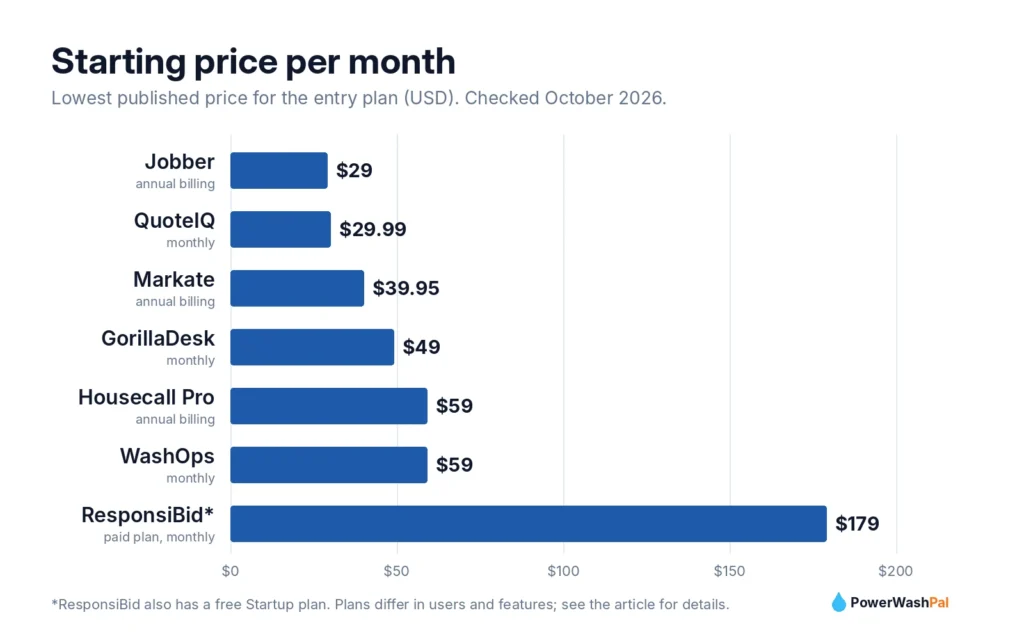
    Bar chart of starting monthly prices for pressure washing software

    Pressure washing software compared

    Software Starting price Users on entry plan Free trial Best for
    Jobber $29/mo (annual) 1 14 days, no card Most businesses, any country
    Housecall Pro $59/mo (annual) 1 14 days US/Canada crews of 2–8
    QuoteIQ $29.99/mo 1 14 days Exterior-cleaning-specific quoting
    GorillaDesk $49/mo Unlimited admins Yes Recurring routes
    Markate $39.95/mo (annual) 1 (+$5/employee) 14 days Tight budgets
    ResponsiBid Free, then $179/mo 1 admin + sub-users Free plan Website instant quotes
    WashOps $59/mo 1 14 days, no card Early adopters

    What pressure washing software should do for you

    Before comparing brands, it helps to know which features actually earn their keep in this trade:

    • Fast, good-looking quotes. Most washing leads collect three quotes. The company that sends a clean quote first, with photos and optional add-ons, wins more of them.
    • Easy rescheduling. Rain moves your calendar every few weeks. Drag-and-drop scheduling with automatic customer texts saves hours.
    • Recurring jobs. Monthly storefronts, quarterly windows, and yearly house washes are where steady income comes from.
    • Online payments. Card-on-file and text-to-pay invoices get you paid the same day.
    • Review requests. Google reviews drive local leads. Automated review requests after each job compound over time.
    Pressure washing pro cleaning a storefront sidewalk with a surface cleaner
    Photo by The Graphic Space on Unsplash

    1. Jobber: best overall

    Jobber is the tool we recommend to most new pressure washing and window cleaning businesses, and it’s the one many established crews grow into. It covers the whole job cycle (request, quote, schedule, invoice, payment) in an app that’s simple enough to learn in an afternoon.

    Why it stands out for exterior cleaning:

    • Quotes that sell add-ons. On the Grow plan, quotes can include optional line items and photos. A homeowner asking for a driveway can tick “house wash” or “gutter brightening” right on the quote, which raises your average ticket without a sales call.
    • Automatic follow-ups. From the Connect plan, Jobber follows up on unanswered quotes and unpaid invoices for you. In a business where many quotes go quiet, that alone can pay for the subscription.
    • Client hub. Customers approve quotes, see upcoming visits, and pay invoices online without calling you.
    • Works almost everywhere. Jobber is available in the US, Canada, UK, Australia, New Zealand, Ireland, and South Africa, so it’s the safe pick outside North America.
    • Room to grow. QuickBooks Online sync, automated reminders, and route tools are there when you add a crew.

    Pricing (billed annually / monthly): Core $29/$49 for 1 user, Connect $99/$139, Grow $149/$199, Plus $399/$499 for 5 users. Optional add-ons include the Marketing Suite ($99/mo) and an AI Receptionist ($29/mo). See our full Jobber review and Jobber vs Housecall Pro comparison.

    Keep in mind: review requests and email campaigns live in the Marketing Suite add-on, not the core plans.

    Try Jobber free for 14 days

    2. Housecall Pro: best for US crews of 2–8

    Housecall Pro is built for home service companies that want to grow, and it shines once you have a few people in the field. Its biggest advantage for washing businesses is marketing: review requests are included on every plan, which matters in a trade where most new customers come from Google Maps.

    Why it stands out for exterior cleaning:

    • Built-in reviews. Automated review requests after each job, with no add-on to buy. Over a season this can be the difference between 15 and 150 Google reviews.
    • Great value for small crews. Essentials includes 5 users for $149/month billed annually, about $30 per user.
    • Online booking and a price book. Customers can book standard services like a driveway or a one-story house wash straight from your website.
    • Team tools. GPS tracking and tech commissions on Essentials, plus route optimization and recurring service plans on Max.
    • QuickBooks sync from the Essentials plan.

    Pricing (billed annually / monthly): Basic $59/$79 for 1 user, Essentials $149/$189 for 5 users, Max $299/$329 for 8 users (+$35 per extra user).

    Keep in mind: Housecall Pro is sold only in the US and Canada.

    Try Housecall Pro free for 14 days

    Window cleaner using a water-fed pole on a brick home
    Photo by Joshua Bowers on Unsplash

    3. QuoteIQ: best built for exterior cleaning

    QuoteIQ targets pressure washing and window cleaning companies directly. Its standout is MapMeasure Pro, which measures properties from satellite imagery so you can quote driveways and roofs without driving out.

    • Plans (monthly / yearly): Essentials $29.99/$299.99 (1 user), Beginner $74.99/$749.99 (2 users), Pro $149.99/$1,499.99 (4 users), Elite $299/$2,990 (10 users), Max $699/$6,990 (unlimited).
    • Good to know: MapMeasure and review automation start on Beginner, a customer self-quoting portal and QuickBooks on Pro, and route optimization on Elite.
    • Best for: owners who want trade-specific quoting and don’t mind a smaller ecosystem than Jobber or Housecall Pro.

    4. GorillaDesk: best for recurring routes

    GorillaDesk grew up serving pest control and pool companies, so it’s strong at recurring route work, the same pattern as monthly storefront washes or quarterly window routes.

    • Plans (monthly / yearly): Basic $49/$539, Pro $99/$1,089, Growth $149/$1,639.
    • Good to know: unlimited admin users, and only people on the schedule need a paid seat. Route optimization, review requests, online booking, and QuickBooks Online start on Pro. Basic routing is capped at 25 stops. SMS costs extra.
    • Best for: commercial-heavy or recurring window routes.

    5. Markate: best budget pick

    Markate covers the basics (scheduling, recurring work orders, invoicing, online payments, QuickBooks, review requests) at a low price.

    • Price: $39.95/month billed annually or $49.95 monthly for the owner-operator, plus $5 per employee per month.
    • Good to know: online booking and SMS campaigns are paid add-ons. 14-day trial.
    • Best for: part-time or first-season operators watching every dollar.

    6. ResponsiBid: best instant-quote add-on

    ResponsiBid isn’t a full CRM. It’s an instant-quote engine for your website: visitors enter their house size or surfaces, see good-better-best pricing, and book on the spot. It then passes the job into Jobber, Housecall Pro, or Markate.

    • Price: Startup plan free, Scaling $179/month, Pro $229/month, month to month.
    • Best for: companies already on Jobber or Housecall Pro that get a lot of website traffic and want more after-hours bookings.

    7. WashOps: newest washing-specific option

    WashOps is a newer app made only for pressure washing. It quotes by square foot per surface (concrete, siding, roof, deck), sends before-and-after “transformation” reports by text, and charges maintenance plans to a card on file.

    • Price: Starter $59/month (1 user), Pro $119 (up to 8 users), Crew $239 (unlimited). 14-day trial, no card.
    • Keep in mind: it’s young, and we couldn’t confirm a QuickBooks integration. Test it carefully before moving your customer list.

    Run a window cleaning route? See our dedicated guide to the best window cleaning software.

    Others we looked at

    Workiz doesn’t publish prices (you have to book a demo). Kickserv (from $48/month annually, 5 users) and ServiceM8 (from $29/month, priced by job volume) are solid general field service tools but have less built for exterior cleaning. Service Autopilot suits large lawn and landscape operations more than washing crews. In the UK, window cleaners often use Squeegee, which is built around rounds and HMRC bookkeeping.

    How to choose in 10 minutes

    Your situation Our pick Why
    Solo, just starting Jobber Core Lowest cost for a full system, simple to learn
    Solo, want to grow fast Jobber Connect Automatic quote and invoice follow-ups
    Crew of 2–5 in the US Housecall Pro Essentials 5 users and review requests for $149/mo
    Crew of 6–8 in the US Housecall Pro Max 8 users, route optimization, service plans
    Outside the US or Canada Jobber Housecall Pro isn’t available
    Lots of recurring commercial stops GorillaDesk Pro Route optimization, unlimited admins
    Want satellite measuring QuoteIQ Beginner MapMeasure Pro built in
    Two-story American home with a wraparound porch, ready for a soft wash
    Photo by Todd Kent on Unsplash

    Our verdict

    For most pressure washing and window cleaning businesses, Jobber is the best place to start: it’s affordable for one person, easy to learn, and it handles quotes, scheduling, invoicing, and payments without extra tools. Once you run a crew of three or more in the US, Housecall Pro often becomes the better value thanks to its 5-user Essentials plan and built-in review requests.

    Both offer 14-day free trials. Put the same three real jobs into each (a house wash, a driveway, and a recurring window account) and keep the one you’d enjoy opening every morning.

    Start a free Jobber trial Start a free Housecall Pro trial

    Frequently asked questions

    What is the best software for a pressure washing business?

    For most businesses, Jobber is the best all-around choice because it’s affordable for solo operators and covers quoting, scheduling, invoicing, and payments. US crews of 2–8 often get better value from Housecall Pro.

    Is there free pressure washing software?

    ResponsiBid has a free Startup plan for website quotes, and ServiceM8 has a free plan capped at 30 jobs a month. For a full CRM, you’ll pay roughly $29–$60 per month to start.

    Do I need software when I’m just starting out?

    Not on day one, but sooner than most people think. Once you’re sending more than a few quotes a week, automatic follow-ups and online payments usually pay for the subscription.

    Which pressure washing software has satellite measuring?

    QuoteIQ includes MapMeasure Pro from its Beginner plan, and GorillaDesk adds map-based estimating on Growth. You can also measure with free tools like Google Earth and enter square footage into Jobber or Housecall Pro quotes.

    How much should I charge once I have software set up?

    See our 2026 pressure washing price guide for per-square-foot and per-job rates you can load into your price book.

  • How Much to Charge for Pressure Washing in 2026 (Price Chart)

    How Much to Charge for Pressure Washing in 2026 (Price Chart)

    Disclosure: PowerWashPal may earn a commission if you sign up through some links on this page, at no extra cost to you. How we make money.

    Updated October 2026. Price ranges come from published 2024–2026 cost guides (Angi, HomeAdvisor, Fixr, HomeGuide) and pricing guides from Housecall Pro and Jobber. Sources are linked throughout.

    Charge too little and you work hard for nothing. Charge too much and the phone stops ringing. This guide gives you the going rates for pressure washing in 2026, a simple formula to set your own prices, and a quick way to turn them into quotes customers say yes to.

    The quick answer

    • Concrete and driveways: about $0.20–$0.40 per square foot, or $100–$300 for a typical driveway.
    • House washing: about $0.10–$0.50 per square foot, or roughly $250–$800 for most one- and two-story homes.
    • Roof soft washing: about $0.30–$1.00 per square foot, or $350–$750 for a typical roof.
    • Hourly rate: $50–$150 per hour per tech is the common range.
    • Minimum charge: most companies set a minimum of $100–$250 per visit.
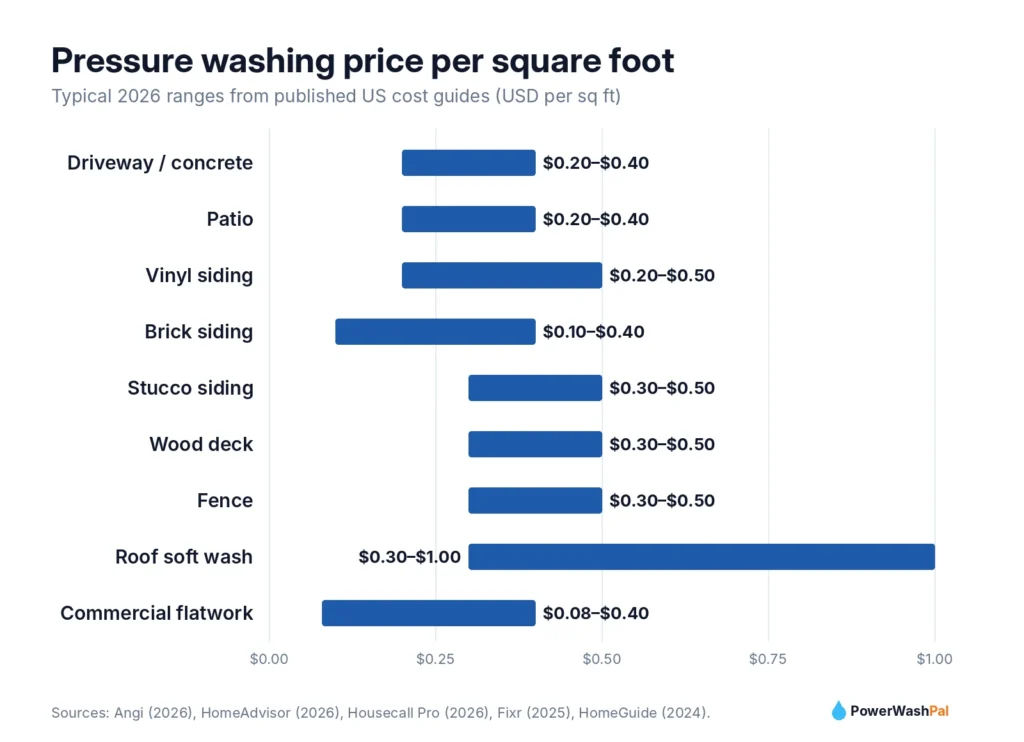
    Chart of pressure washing price per square foot by surface in 2026

    How much to charge for pressure washing per square foot

    Per-square-foot pricing is the most common method because it scales fairly with job size and is easy to explain to customers.

    Surface Typical price per sq ft Notes
    Driveway / concrete flatwork $0.20–$0.40 Oil-stained or greasy concrete sits at the top of the range
    Patio $0.20–$0.40 Pavers may need extra time or sealing
    House siding (vinyl) $0.20–$0.50 Usually soft washed
    House siding (brick) $0.10–$0.40 Go gentle on old mortar
    House siding (stucco) $0.30–$0.50 Soft wash only
    Wood siding $0.30–$0.55 Low pressure to avoid furring the wood
    Deck $0.30–$0.50 $0.50–$1.50 if you also stain or seal
    Fence $0.30–$0.50 Count both sides if you wash both
    Roof (soft wash) $0.30–$1.00 Add for steep or multi-level roofs
    Commercial flatwork $0.08–$0.40 Lower rates on large lots; recurring contracts often 15–30% less per visit

    Sources: Angi (Aug 2026), HomeAdvisor (Jun 2026), Housecall Pro (Mar 2026), Fixr (2025), HomeGuide (2024).

    How much to charge for pressure washing a driveway, house, and more

    Job Typical price range
    Driveway (2-car) $100–$300
    House wash, 1 story $150–$750 (most quotes land around $250–$500)
    House wash, 2 stories $400–$1,400 (most quotes land around $400–$800)
    House wash, 3 stories $700–$1,800
    Deck $100–$500
    Fence $150–$400
    Roof soft wash $350–$750
    Gutter cleaning $50–$300, or $0.50–$1.50 per linear foot
    Storefront or small commercial section $200–$1,200
    Parking lot (about 5,000 sq ft) $500–$1,000

    Cost guides disagree on the average house wash (Fixr reports about $700, HomeGuide about $265), which tells you how much local markets and house sizes vary. Use the ranges as a sanity check, then price from your own costs.

    Technician pressure washing a residential driveway on a sunny day
    Photo by The ProClean Team on Unsplash

    What pressure washers charge by city

    Angi’s 2026 data shows the average pressure washing job ranges from about $190 in Phoenix to $420 in Portland, Maine:

    City Typical range Average job
    Phoenix, AZ $120–$270 $190
    Denver, CO $150–$355 $250
    Dallas, TX $165–$375 $270
    Sacramento, CA $180–$425 $298
    Kansas City, MO $215–$445 $319
    Chicago, IL $245–$450 $345
    New York, NY $260–$520 $375
    Portland, OR $250–$565 $405
    Portland, ME $325–$560 $420

    Source: Angi. The easiest local check: ask three competitors for a quote on your own driveway.

    Hourly rates and minimum charges

    Most published sources put pressure washing labor at $50–$150 per hour per tech, and HomeAdvisor notes a three-person crew can run about $300 per hour. Commercial crews often bill $100–$200 per hour, and after-hours work commonly runs 1.5x–2x.

    Almost every successful company sets a minimum charge of $100–$250. Driving across town, unloading, and setting up costs you the same whether the job is a single patio or a whole driveway, so the minimum protects your day.

    A simple formula to set your own prices

    Going rates tell you what the market accepts. Your costs tell you whether you make money. Housecall Pro’s pricing guide uses a clean formula:

    Price = break-even cost ÷ (1 − target margin)

    Your break-even cost is labor, chemicals, fuel, equipment wear, insurance, and software for that job. Most washing businesses aim for a 20–40% margin.

    Example: a 600 sq ft driveway

    • Labor: 1.25 hours × $35/hour (your pay or your tech’s) = $43.75
    • Chemicals and fuel: $12
    • Equipment wear, insurance, software, and drive time share: $45
    • Break-even cost: about $101
    • Price at a 35% margin: $101 ÷ 0.65 ≈ $155 (about $0.26 per sq ft)

    That lands inside the market range for driveways, so the price is both profitable and competitive.

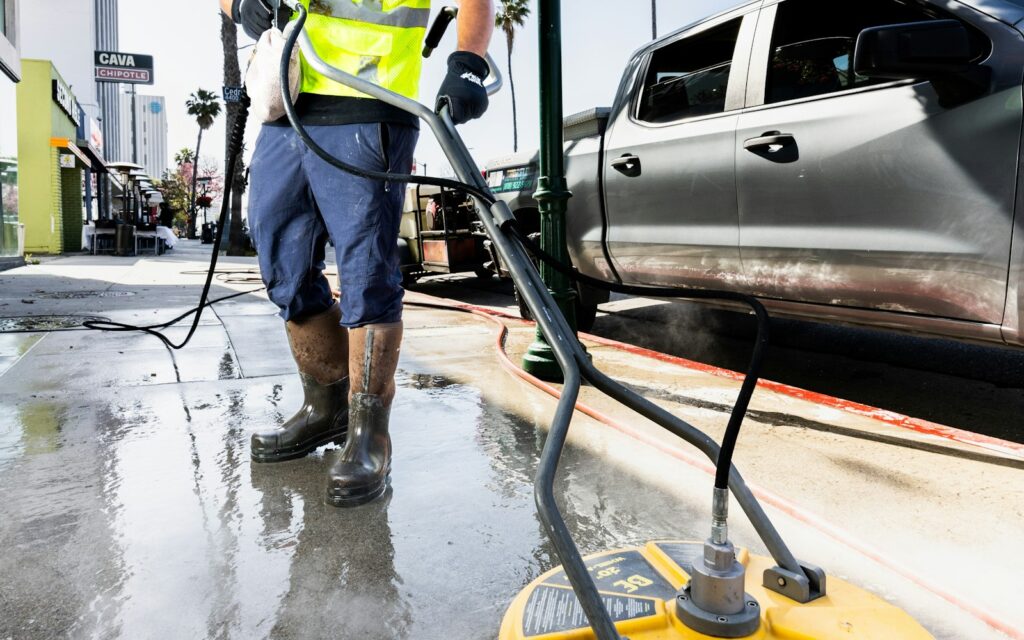
    Pressure washing crew cleaning a commercial sidewalk with a surface cleaner
    Photo by The Graphic Space on Unsplash

    What raises or lowers the price

    • Height and stories. Two- and three-story homes need more time, ladders, or extension wands.
    • Buildup. Heavy mildew, oxidation, rust, and oil stains need extra chemicals and dwell time.
    • Surface type. Stucco, wood, and roofs need soft washing and more care.
    • Access and water. Tight gates, steep yards, delicate landscaping, or no outdoor spigot all add time.
    • Timing. Same-day, weekend, or after-hours work can carry a premium.
    • Recurring work. A lower per-visit price for a yearly or quarterly plan is worth it for steady income.

    Turn your prices into quotes customers accept

    Knowing your prices is half the job. The other half is getting quotes out fast, because most homeowners collect two or three and pick the first good one. This is where field service software pays for itself:

    • Save a price book. Load your per-square-foot rates and add-ons once, then build a quote in minutes on site or from your truck.
    • Offer optional add-ons. Jobber lets you add optional line items with photos to a quote (on its Grow plan). A driveway customer can tick “house wash” or “gutter brightening” with one tap.
    • Follow up automatically. Jobber (Connect and up) chases unanswered quotes for you, and Housecall Pro lets customers approve and pay online from a text.
    • Ask for reviews. Housecall Pro sends review requests after every job on all plans, which helps you charge more over time because strong reviews justify premium prices.

    New to the trade? Start with how to start a pressure washing business. Not sure which tool fits? Read our Jobber vs Housecall Pro comparison or the full list of the best pressure washing software.

    Try Jobber free for 14 days Try Housecall Pro free

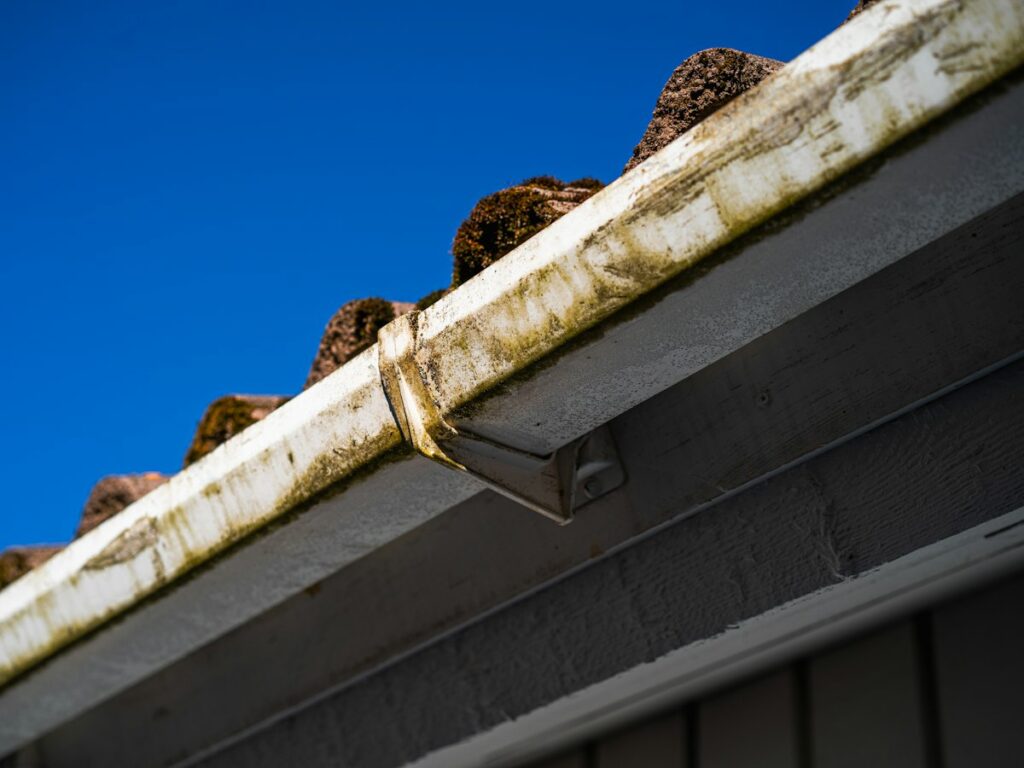
    Dirty roof gutter with moss and grime against a blue sky
    Photo by Aleksi Partanen on Unsplash

    Frequently asked questions

    How much should I charge to pressure wash a driveway?

    Most companies charge $100–$300 for a standard two-car driveway, or about $0.20–$0.40 per square foot. Charge more for oil stains or heavy buildup.

    How much should I charge to pressure wash a house?

    Typical quotes run about $250–$500 for a one-story home and $400–$800 for a two-story home, with larger or dirtier homes costing more. Per square foot, that’s roughly $0.10–$0.50.

    Should I charge by the hour or by the square foot?

    Per square foot works best for most residential jobs because customers can compare it easily and you get paid more when you work faster. Hourly pricing suits unpredictable jobs like graffiti or heavy commercial grease.

    What’s a good minimum charge for pressure washing?

    $100–$250 is common. Set yours at the price that covers your drive, setup, and at least an hour of profitable work.

    How much does roof soft washing cost?

    Most roof soft washes cost $350–$750, or about $0.30–$1.00 per square foot. Learn why roofs are soft washed instead of pressure washed in our soft washing vs pressure washing guide.

  • Soft Washing vs Pressure Washing: What’s the Difference?

    Soft Washing vs Pressure Washing: What’s the Difference?

    Disclosure: PowerWashPal may earn a commission if you sign up through some links on this page, at no extra cost to you. How we make money.

    Updated October 2026.

    Soft washing and pressure washing both get surfaces clean, but they work in opposite ways. Pressure washing blasts dirt off with force. Soft washing kills and loosens the grime with cleaning solutions, then rinses it away gently. Using the wrong one can strip granules off a roof, force water behind vinyl siding, or gouge a cedar deck.

    Here’s how the two methods differ, which surfaces need which, and what that means if you run (or are starting) an exterior cleaning business.

    The quick answer

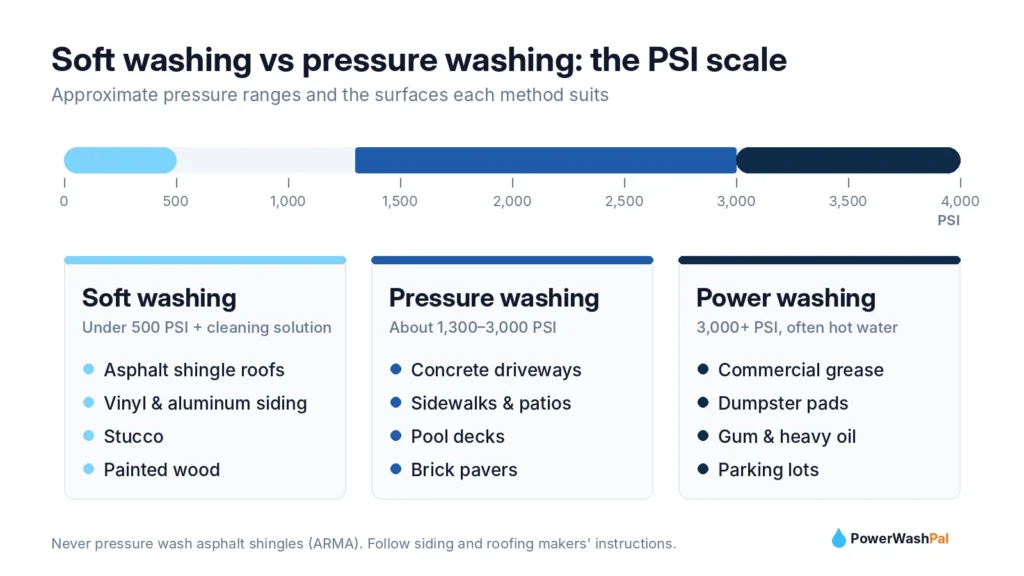
    • Pressure washing uses high-pressure water, usually 1,300–3,000 PSI, to clean hard surfaces like concrete driveways, sidewalks, and patios.
    • Soft washing uses low pressure, generally under 500 PSI, plus cleaning solutions to clean delicate surfaces like roofs, vinyl siding, stucco, and painted wood.
    • Roofs should never be pressure washed. The Asphalt Roofing Manufacturers Association says high-pressure systems are likely to damage asphalt roofing.
    PSI scale comparing soft washing, pressure washing and power washing

    What is pressure washing?

    Pressure washing uses a gas or electric pump to push water out of a narrow nozzle at high pressure, typically 1,300–3,000 PSI. “Power washing” is often used to mean the same thing, though some pros reserve the term for heated water above 3,000 PSI. The force strips away dirt, oil, gum, and grime that’s bonded to hard surfaces.

    Best for: concrete driveways, sidewalks, pool decks, patios, curbs, dumpster pads, and commercial flatwork. Most pros pair the wand with a surface cleaner, a spinning-bar attachment that cleans flat concrete evenly without stripes.

    What is soft washing?

    Soft washing applies a cleaning solution at low pressure, lets it dwell for a few minutes, then rinses at low pressure. The solution does the work: it kills the mold, mildew, and algae that cause green and black staining, instead of just knocking off the surface layer.

    Best for: asphalt shingle roofs, vinyl and aluminum siding, stucco, painted wood, and other surfaces that high pressure can damage.

    Two-story American home with a wraparound porch, ready for a soft wash
    Photo by Todd Kent on Unsplash

    Soft washing vs pressure washing at a glance

    Pressure washing Soft washing
    Pressure About 1,300–3,000 PSI Generally under 500 PSI
    What cleans Water force Cleaning solution, then a gentle rinse
    Best surfaces Concrete, brick pavers, sidewalks Roofs, vinyl siding, stucco, painted wood
    Kills mold and algae No, removes it from the surface Yes, which is why results last longer
    Main risk Etching, gouging, water intrusion Chemical runoff onto plants
    Typical equipment Gas pressure washer, surface cleaner 12V pump or downstream injector, X-Jet, chemical-rated hose

    Which surfaces need which method

    Surface Method Why
    Concrete driveway, sidewalk Pressure wash Hard surface; needs force for oil and grime
    Asphalt shingle roof Soft wash High pressure knocks off protective granules
    Vinyl siding Soft wash Pressure can drive water behind panels
    Stucco Soft wash Porous and easy to chip
    Wood deck Low pressure, or soft wash High pressure gouges soft woods like cedar
    Brick Low pressure with care Old mortar can wash out

    Vinyl siding: the Polymeric Exterior Products Association (formerly the Vinyl Siding Institute) advises following both the siding and the washer maker’s instructions, keeping the spray at eye level, and never aiming upward, which pushes water behind the panels. Source.

    Decks: Decks.com suggests starting around 1,800 PSI and warns that going much higher can strip stain and damage wood fibers. Source.

    Why roofs must be soft washed

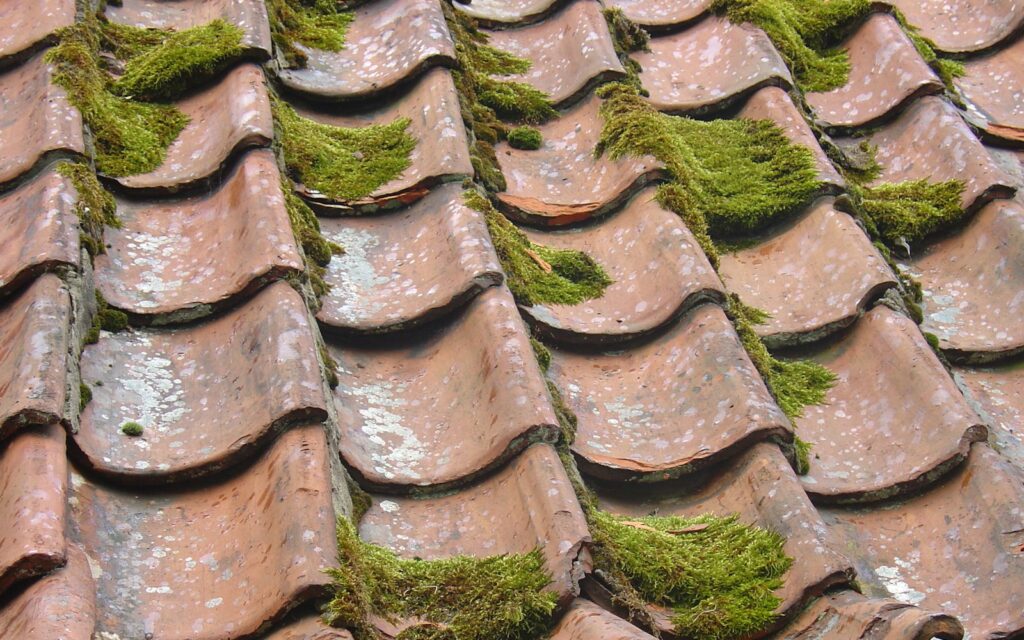
    Those black streaks on roofs aren’t dirt. They’re mostly Gloeocapsa magma, an airborne blue-green algae that forms a dark protective coating against UV light. Pressure won’t kill it, and it will damage the roof.

    The Asphalt Roofing Manufacturers Association warns not to use a power washer or any type of brush on shingles, and recommends a diluted bleach (sodium hypochlorite) and water solution followed by a gentle rinse. Owens Corning gives similar guidance, noting that high-pressure equipment loosens granules and shortens roof life. If a homeowner’s roof is under warranty, they should check the manufacturer’s cleaning instructions before any work.

    Moss and algae growing on roof shingles, a job for soft washing
    Photo by Barb McMahon on Unsplash

    Soft wash chemicals and safety

    Most soft wash mixes are built on sodium hypochlorite (the active ingredient in bleach) plus a surfactant that helps the mix cling to walls and slows drying. Trade sources commonly describe weaker mixes for siding (around 1% at the surface) and stronger mixes for roofs (around 3–6%, depending on growth). Always follow the product label and safety data sheet for anything you use.

    Safety basics every crew should follow:

    • Never mix sodium hypochlorite with acids or ammonia. Both combinations release toxic gas.
    • Wear PPE: goggles or a face shield, chemical-resistant gloves and boots, and appropriate protective clothing.
    • Protect plants: soak landscaping with water before and after application.
    • Control runoff: sodium hypochlorite is very toxic to aquatic life, so keep it out of storm drains and check local rules.
    • Watch painted surfaces: strong mixes can fade some paints and trim.

    How long do results last?

    Because soft washing kills the organisms instead of just removing the stain, results usually last longer. Some industry sources estimate a soft-washed roof stays clean for 2–5 years, while ARMA notes that algae will likely return eventually. That makes roof and house washing ideal recurring services: a reminder every 1–3 years brings customers back without new advertising.

    Cost: soft washing vs pressure washing

    • House soft wash: about $300–$850, or $0.25–$0.50 per square foot.
    • Roof soft wash: about $350–$750, or $0.30–$1.00 per square foot.
    • Driveway pressure wash: about $100–$300.

    See our full 2026 pressure washing price guide for per-square-foot rates by surface and city.

    Running both services in your business

    Most successful exterior cleaning companies offer both: pressure washing for flatwork and soft washing for houses and roofs. Bundling them raises your average ticket. A homeowner who books a driveway is a natural fit for a house wash, and a house wash customer often needs the roof done too.

    Field service software makes the bundle easy to sell and easy to repeat:

    • Quotes with options. Jobber quotes can show optional add-ons like “roof soft wash” or “gutter brightening” that customers tick to approve (Grow plan).
    • Separate price book items for soft wash and pressure wash services, so every tech quotes the same way.
    • Recurring reminders. Schedule yearly house washes or roof checks so past customers come back on their own. Housecall Pro’s Max plan adds recurring service plans.
    • Before-and-after photos attached to jobs and invoices, which help justify soft wash pricing.
    • Review requests. Housecall Pro sends them after every job, and roof transformations get great reviews.

    Try Jobber free for 14 days Try Housecall Pro free

    Clean home exterior with bright azaleas and fresh siding
    Photo by Doug Vos on Unsplash

    Just getting started? Read our step-by-step guide on how to start a pressure washing business, then compare tools in our Jobber review.

    Frequently asked questions

    Is soft washing better than pressure washing?

    Neither is better overall. Soft washing is better for roofs, siding, and stucco, while pressure washing is better for concrete and other hard surfaces.

    Can you pressure wash a roof?

    You shouldn’t pressure wash asphalt shingles. ARMA and Owens Corning both warn that high pressure damages shingles and loosens granules. Soft washing is the recommended method.

    What PSI is soft washing?

    Soft washing generally uses under 500 PSI, often closer to garden-hose pressure. The cleaning solution does most of the work.

    Does soft washing kill mold?

    Yes. The sodium hypochlorite in soft wash solutions kills mold, mildew, and algae, which is why results last longer than pressure washing alone.

    Is soft washing safe for plants?

    It can be when done properly. Pros wet plants before and after application, control runoff, and use the weakest mix that gets the job done.

  • Jobber vs Housecall Pro: Which Is Better for Pressure Washing? (2026)

    Jobber vs Housecall Pro: Which Is Better for Pressure Washing? (2026)

    Affiliate disclosure: PowerWashPal may earn a commission if you sign up through some links on this page, at no extra cost to you. It never changes how we rank or describe software. How we make money.

    If you run a pressure washing, soft washing, or window cleaning business, you’ve probably narrowed your software search down to the same two names everyone mentions: Jobber and Housecall Pro.

    Both will handle quotes, scheduling, invoicing, and payments. Both offer a 14-day free trial with no credit card. So which one should you actually pay for?

    The honest answer depends on two things: how many people are on your crew and where your business is located. This guide breaks it down using each company’s published 2026 pricing, so you can pick the right one in the next ten minutes instead of the next ten weeks.

    The quick answer

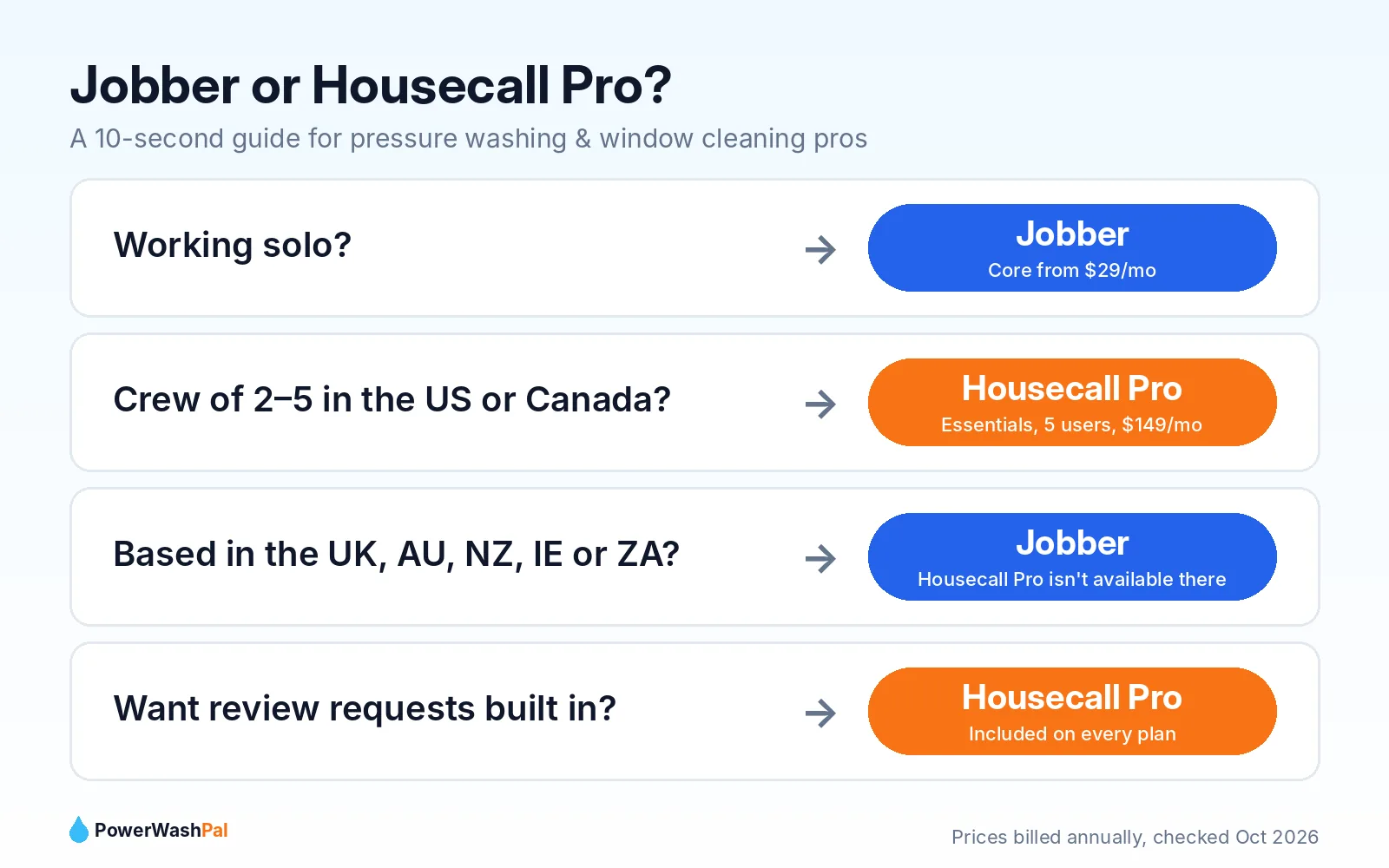
    • Solo operator or just starting out? Go with Jobber. Its entry plan starts at $29/month (billed annually), about half the price of Housecall Pro’s entry plan.
    • Running a crew of 2–5 people? Lean toward Housecall Pro Essentials. It includes 5 users for $149/month (billed annually), which is hard for Jobber to beat at that crew size.
    • Outside the US or Canada? Choose Jobber. Housecall Pro is only available in the US and Canada.

    Try Jobber free for 14 days   Try Housecall Pro free for 14 days

    Pressure washing pro cleaning a storefront sidewalk with a surface cleaner
    Photo by The Graphic Space on Unsplash

    Jobber vs Housecall Pro at a glance

    Jobber Housecall Pro
    Starting price $29/mo (Core, billed annually)
    $49/mo month-to-month
    $59/mo (Basic, billed annually)
    $79/mo month-to-month
    Users on entry plan 1 1
    Best value for a 5-person crew Plus: $399/mo (annual), 5 users Essentials: $149/mo (annual), 5 users
    Free trial 14 days, no credit card 14 days, no credit card
    Where it works US, Canada, UK, Ireland, Australia, New Zealand, South Africa US and Canada only
    Review requests Marketing Suite add-on ($99/mo) or Plus plan Included from Basic
    QuickBooks sync From Connect plan From Essentials plan
    Contract Month-to-month available Month-to-month, no contracts

    Prices checked on each company’s pricing page in October 2026. Software prices change often, so confirm on the official site before you buy.

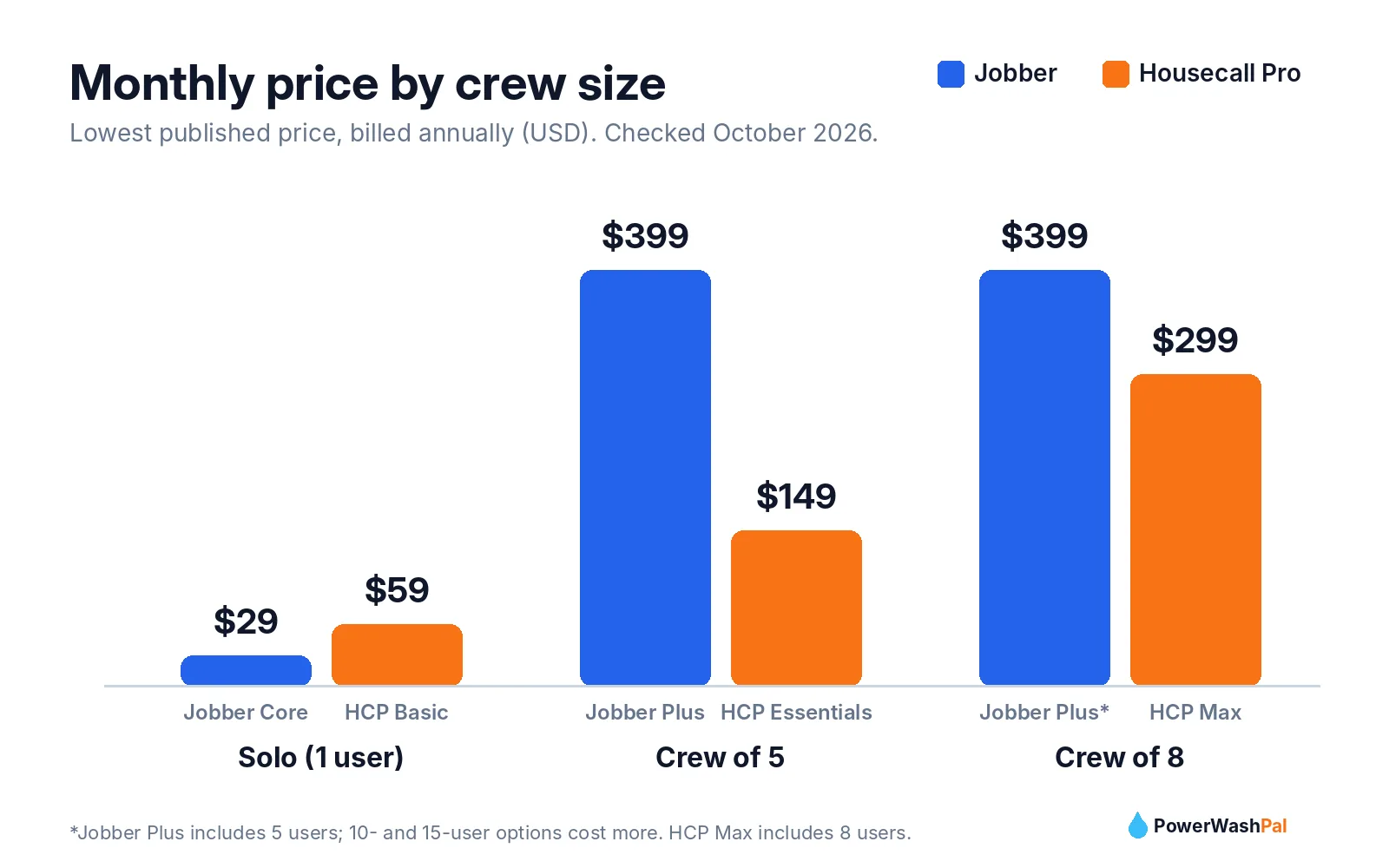
    Jobber vs Housecall Pro monthly price by crew size, 2026

    Pricing: what you’ll really pay in 2026

    Sticker prices are confusing because both companies show three different numbers: month-to-month, monthly with a yearly commitment, and prepaid annual. Here’s the full picture.

    Jobber pricing

    Plan Month-to-month Monthly, 1-year commitment Prepaid annual Users
    Core $49 $39 $29 1
    Connect $139 $119 $99 1 (5-user option: $199/mo)
    Grow $199 $169 $149 1 (5-user option: $299/mo)
    Plus $499 $439 $399 5 (10 and 15-user options)

    Jobber add-ons: Marketing Suite $99/mo, AI Receptionist $29/mo, Pipeline $49/mo.

    Housecall Pro pricing

    Plan Billed monthly Billed annually Users included
    Basic $79 $59 1
    Essentials $189 $149 5
    Max $329 $299 8 (extra users $35/mo each)

    What this means for a washing business

    • Solo, one truck: Jobber Core at $29–$49/mo vs Housecall Pro Basic at $59–$79/mo. Jobber saves you roughly $360 a year.
    • Owner plus 2–4 techs: Housecall Pro Essentials includes 5 users for $149–$189/mo. To get 5 users on Jobber, you’re looking at the 5-user Connect option ($199/mo month-to-month) or Plus ($399–$499/mo).
    • Want automatic review requests? Housecall Pro includes review management on every plan. On Jobber, that’s part of the $99/mo Marketing Suite unless you’re on Plus.

    Features that matter for pressure washing and window cleaning

    Exterior cleaning has its own quirks: lots of quotes that never close, weather reschedules, recurring commercial accounts, and jobs priced by the square foot or by the pane. Here’s how the two compare on the things that actually affect your week.

    Technician pressure washing a residential driveway on a sunny day
    Photo by The ProClean Team on Unsplash

    Quoting and estimates

    Both tools let you build a price book and send professional quotes your customers can approve online. Jobber’s Grow plan adds optional line items and quotes with photos, which works well for upselling a house wash customer on gutter brightening or a window add-on. Housecall Pro includes quotes and proposals from Basic, and its Max plan adds a dedicated sales proposal tool.


    Scheduling, routes, and weather days

    Rain cancels washing jobs, so drag-and-drop rescheduling matters. Both include scheduling and dispatch on the entry plan. For routing, Housecall Pro adds routes on Essentials and full route optimization on Max. If you run tight residential routes with 6–10 stops a day, test the routing on whichever plan you’re considering during the free trial.

    Window cleaner pulling a squeegee through soapy glass
    Photo by Joshua Bowers on Unsplash

    Recurring jobs

    Recurring work (monthly storefront washes, quarterly window cleaning) is where steady income comes from. Housecall Pro lists recurring service plans on its Max plan. In Jobber, check how recurring visits and automatic invoicing work on the plan you choose, since automated reminders and invoice follow-ups start at Connect.

    Getting paid

    Both accept online payments on invoices from the entry plan. Jobber’s Connect plan adds automatic payment collection and invoice follow-ups, which helps if you chase late payments from property managers.

    Reviews and marketing

    In this business, Google reviews win jobs. Housecall Pro’s built-in review management on every plan is a real advantage for small operators. Jobber includes a basic website on Core, but review requests and campaigns sit in the Marketing Suite add-on.

    Bookkeeping

    If your accountant lives in QuickBooks Online, note that sync starts at Jobber Connect and Housecall Pro Essentials, not on the entry plans.

    Which should you choose: Jobber or Housecall Pro decision guide

    Who should choose Jobber

    • Solo pressure washers or window cleaners who want the lowest monthly cost.
    • Businesses in the UK, Australia, New Zealand, Ireland, or South Africa (Housecall Pro isn’t available there).
    • Owners who sell a lot of add-ons and want quotes with optional line items and photos (Grow plan).
    • Anyone who prefers paying annually to lock in the lowest rate ($29/mo on Core).

    Start a free Jobber trial

    Who should choose Housecall Pro

    • US or Canadian businesses with 2–5 people in the field.
    • Owners who want review requests built in without paying for an add-on.
    • Growing crews that will need route optimization and recurring service plans (Max plan).
    • Teams that want GPS tracking and commissions for techs (Essentials and up).

    Start a free Housecall Pro trial

    Surface cleaner and pressure washer setup on a driveway job
    Photo by The ProClean Team on Unsplash

    How to test both in one week (without wasting a month)

    1. Day 1: Start both free trials. Neither asks for a credit card.
    2. Day 2: Enter the same 3 real jobs in each one: a house wash, a driveway, and a recurring window cleaning account.
    3. Day 3: Send yourself a quote from each app on your phone. Which one would you approve faster as a homeowner?
    4. Day 4: Reschedule a “rain day” and see how many taps it takes.
    5. Day 5: Send a test invoice and pay it. Check how the payment shows up.
    6. Day 6–7: Pick the one you enjoyed using. You’ll use it every day, so that matters more than any feature list.

    Our verdict

    For most new pressure washing and window cleaning businesses, Jobber is the better starting point because it costs less for a solo operator and works in more countries. Once you have a crew of 3–5 in the US or Canada, Housecall Pro Essentials becomes the better value, especially if you want review requests built in.

    The good news: you can’t really make a bad choice here. Both are proven tools used by thousands of service businesses. Start the free trials, run the one-week test above, and go with your gut.

    Frequently asked questions

    Is Jobber or Housecall Pro cheaper?

    For one user, Jobber is cheaper: $29/month on Core billed annually vs $59/month for Housecall Pro Basic billed annually. For a 5-person crew, Housecall Pro Essentials ($149/month billed annually, 5 users included) is usually cheaper.

    Do Jobber and Housecall Pro have free trials?

    Yes. Both offer a 14-day free trial with no credit card required. Jobber’s trial gives you access to Grow plan features.

    Can I use Housecall Pro in the UK or Australia?

    No. Housecall Pro is available only in the US and Canada. Jobber is available in the US, Canada, the UK, Ireland, Australia, New Zealand, and South Africa.

    Which is better for a pressure washing business?

    Solo pressure washers usually get better value from Jobber. Crews of 2–5 in the US or Canada often get better value from Housecall Pro Essentials. Test both with your real jobs during the free trials before deciding.

    Do either of them sync with QuickBooks?

    Yes, but not on the entry plans. QuickBooks sync starts on Jobber Connect and Housecall Pro Essentials.

    Last updated: October 2026. Pricing and features come from each company’s official pricing page. We’ll update this comparison when plans change.