Disclosure: PowerWashPal may earn a commission if you sign up through some links on this page, at no extra cost to you. It never changes how we rank software. Read how we make money.
Updated October 2026. Prices come from each company’s official pricing page, checked this month.
Landscaping estimating software helps you measure a property, price materials and labor, add overhead and profit, and send a professional proposal the customer can approve online. The right tool depends on the work you do. A lawn care company quoting weekly mowing needs fast satellite measuring and simple per-visit pricing. A design-build company bidding a $40,000 patio and planting job needs labor budgets, material lists and job costing.
We compared seven landscaping estimating tools on published prices, estimating features and who they suit. We didn’t run test bids in every app; the comparison comes from official pricing and feature pages.
Quick picks
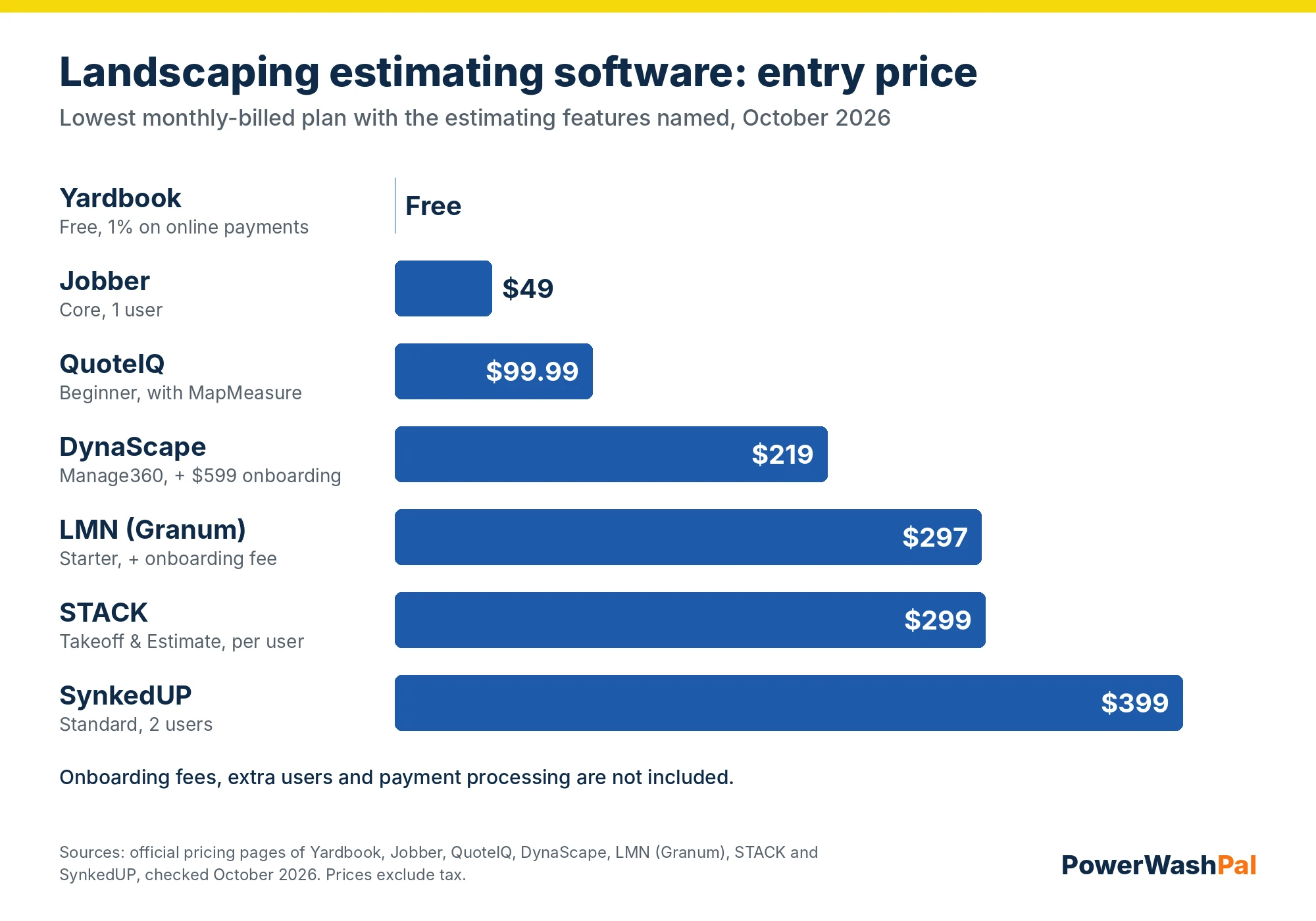
| Software | Best for | Entry price (monthly billing) | Free trial |
|---|---|---|---|
| Jobber | Lawn care and small landscape companies | $49/mo ($29 billed yearly) | 14 days, no card |
| QuoteIQ | Measuring lawns and lots from satellite images | $99.99/mo for MapMeasure (Essentials $29.99 without it) | 14 days, card required |
| LMN (Granum) | Budget-based estimating with overhead recovery | $297/mo + onboarding fee | Demo only |
| SynkedUP | Design-build job costing | $399/mo ($359 billed yearly) | Not listed |
| DynaScape Manage360 | Companies that also design in DynaScape | $219/mo + $599 onboarding | Demo only |
| STACK | Takeoffs from plans for commercial bids | From $299/user/mo; free version | Free version |
| Yardbook | Free estimating and invoicing | $0 (1% fee on online payments) | Free |
What landscaping estimating software should do
- Measure without a site visit. Satellite measuring of turf, beds and hardscape saves a trip on small jobs.
- Price from your real costs. Materials with your markup, labor hours at a burdened rate, equipment, overhead and profit.
- Templates and kits for jobs you price often, like a mulch install or a spring cleanup.
- Good-better-best options so customers can pick a package or add-ons.
- Online approval and e-signature, ideally with a deposit.
- Estimate-to-job tracking so you can compare estimated hours to actual hours and fix your pricing.
The best landscaping estimating software
1. Jobber: best for lawn care and small landscape companies
Jobber isn’t a dedicated estimating platform, but for most small lawn and landscape companies it does enough: quotes from a phone with your saved line items, photos and optional add-ons, online approval through the client hub, and the approved quote becomes the job and the invoice. Job costing and optional line items start on Grow.
Pricing: Core $29/month billed yearly or $49 monthly (one user). Connect from $99/$139, Grow from $149/$199, Plus from $399/$499 for five users. Extra users $29. 14-day free trial with no card.
- Pros: estimating, scheduling, invoicing and payments in one app; easy for crews; affordable.
- Cons: no built-in satellite measuring or material takeoffs; not built for large design-build budgets.
2. QuoteIQ: best for satellite measuring
QuoteIQ’s MapMeasure Pro lets you outline a lawn, bed or driveway on a satellite image and price it on the spot, which suits lawn care, fertilization, pressure washing and other per-square-foot work.
Pricing: Essentials $29.99/month (no MapMeasure), Beginner $99.99 (2 users, MapMeasure), Pro $199.99 (4 users, adds QuickBooks), Elite $299.99 (10 users, adds route optimization), Max $699.99 (20 users). Extra users $25. Annual billing saves two months. 14-day trial, card required.
- Pros: fast measuring and quoting for service work, CRM and scheduling included.
- Cons: measuring needs Beginner or higher, QuickBooks needs Pro, card required for the trial.
3. LMN (Granum): best for budget-based estimating
LMN is built around one idea: price every job so it recovers your overhead. You set a yearly budget (labor, equipment, overhead, profit goal), and LMN turns it into labor rates and markups for every estimate. It includes material and labor calculators, customizable price lists and automated proposals and job plans.
Pricing: Starter $297/month billed monthly plus a one-time onboarding fee (1 office/crew lead license and 5 crew licenses, for companies under 10 employees). Professional $648/month (3 office and 15 crew licenses) adds real-time job costing. Enterprise is quoted. No free trial is listed.
- Pros: the strongest overhead and budget model here, made for landscape companies.
- Cons: costly for a solo operator, onboarding fee, demo before you can try it.
4. SynkedUP: best for design-build job costing
SynkedUP combines budgeting, estimating and job costing for landscape and design-build companies, with templates, quoted, time-and-materials and per-visit pricing, and e-signature proposals with automated follow-ups.
Pricing: Standard $399/month ($359 billed yearly) with 2 users; PRO $599 ($539 yearly) with 5 users. Extra users $20 a month. Monthly billing has a $1,000 activation fee, waived on annual billing.
- Pros: estimating tied directly to job costing and timesheets, QuickBooks integration.
- Cons: expensive for small companies, activation fee on monthly plans.
5. DynaScape Manage360: best if you also design
DynaScape is best known for landscape design software. Its Manage360 sales and estimating package fits companies that draw designs in DynaScape and want estimates and proposals built from them.
Pricing: Sales & Estimating $219/month or $2,497/year (first-year discount), plus $599 onboarding and training. DynaScape Design is $158/month or $1,599/year and runs on Windows.
- Pros: design and estimating in one ecosystem.
- Cons: onboarding fee, Windows-based design tool, more than a maintenance company needs.
6. STACK: best for takeoffs from plans
STACK is a construction takeoff tool: you upload plans and measure areas, lengths and counts to build material and labor quantities. It suits landscape contractors who bid commercial or new-construction work from site plans.
Pricing: Takeoff & Estimate from $299 per user per month. STACK also offers a free version.
- Pros: accurate takeoffs from PDFs and plans, free version to start.
- Cons: no scheduling, crew app or invoicing for maintenance work; priced per user.
7. Yardbook: best free option
Yardbook is free, web-based landscaping software supported by ads. It covers estimates, invoices, scheduling, routing and satellite lot measuring. Online customer payments carry a 1% Yardbook fee plus Stripe’s fees on non-premium accounts, and premium plans for larger companies are priced on request.
- Pros: free, includes measuring and routing.
- Cons: ads, simpler proposals, extra 1% on online payments.
How to price a landscaping job (the basics any tool needs)
Software only helps if the numbers you put in are right. Every estimate should cover five things:
- Materials at your cost plus a markup that covers pickup, waste and warranty.
- Labor hours times a burdened labor rate (wage plus payroll taxes, workers’ comp and benefits).
- Equipment at an hourly rate that covers ownership, fuel and repairs.
- Overhead: insurance, office, software, trucks and your own salary, spread across billable hours.
- Profit on top, as a separate line in your math.
The most useful habit is comparing estimated hours to actual hours after every job. Jobber (Grow and up), LMN Professional and SynkedUP all track that; with simpler tools, a spreadsheet works. If you also offer pressure washing or soft washing, our pricing guide and estimate calculator cover per-square-foot rates for those services.
How to choose
- Mowing, cleanups and small installs: Jobber, or QuoteIQ if you want satellite measuring built in.
- Just starting, no budget: Yardbook.
- Five to fifty employees, want every job to recover overhead: LMN.
- Design-build with real job costing: SynkedUP, or DynaScape if you already design in it.
- Bidding commercial work from plans: STACK for takeoffs, plus a field service app for running the jobs.
For scheduling, crews and invoicing across the whole business, see our best field service management software for small business and field service invoice software guides.
Related guides
- Landscaping CRM software compared
- Best field service management software for small business
- Best field service invoice software
- Jobber review
- Jobber pricing
- Jobber alternatives
- Best time tracking software for landscaping
FAQ
What is the best landscaping estimating software?
For small lawn care and landscape companies, Jobber is the easiest all-in-one choice. QuoteIQ is best for measuring from satellite images, LMN for budget-based pricing that recovers overhead, and SynkedUP for design-build job costing.
Is there free landscaping estimating software?
Yardbook is free and includes estimates, invoices and satellite measuring, with a 1% fee on online payments. STACK has a free version for takeoffs. Jobber, QuoteIQ and others offer 14-day free trials.
How much does landscape estimating software cost?
From free (Yardbook) to about $50 to $300 a month for small-business tools like Jobber and QuoteIQ, and roughly $300 to $650 a month for landscape-specific platforms like LMN and SynkedUP, often with an onboarding fee.
Can I measure a lawn from satellite images?
Yes. QuoteIQ (Beginner plan and up) and Yardbook both include satellite measuring. Always check measurements on site for large or complex jobs, since trees and shadows can hide edges.
Do I need estimating software or is a spreadsheet enough?
A spreadsheet works for your first season. Software pays off once you send several estimates a week, want online approval and deposits, or need to compare estimated and actual hours across many jobs.