Disclosure: PowerWashPal may earn a commission if you buy through links on this page, at no extra cost to you. We don’t accept payment for rankings. Read how we make money.
Updated October 2026. Pricing and features checked on housecallpro.com on October 7, 2026.
Housecall Pro is one of the two names that come up in every pressure washing Facebook group when someone asks “what software do you use?” The other is Jobber. Both are good. The real question is whether Housecall Pro fits the way your exterior cleaning business runs.
Our verdict: Housecall Pro is the better value for US crews of three to five people, because its Essentials plan includes five users for one flat price. It’s strongest at getting you reviews and keeping your schedule full. Solo operators on a tight budget, or companies outside the US and Canada, will usually do better with Jobber.
Try Housecall Pro free for 14 days
Housecall Pro at a glance
| Starting price | $59/mo billed annually ($79 monthly) |
|---|---|
| Free trial | 14 days, no credit card required |
| Users | 1 on Basic, 5 on Essentials, 8 on Max (+$35 per extra user) |
| Availability | United States and Canada only |
| Best for | Residential exterior cleaning crews of 2 to 8 people |
| Watch out for | QuickBooks sync and route tools aren’t on the entry plan |
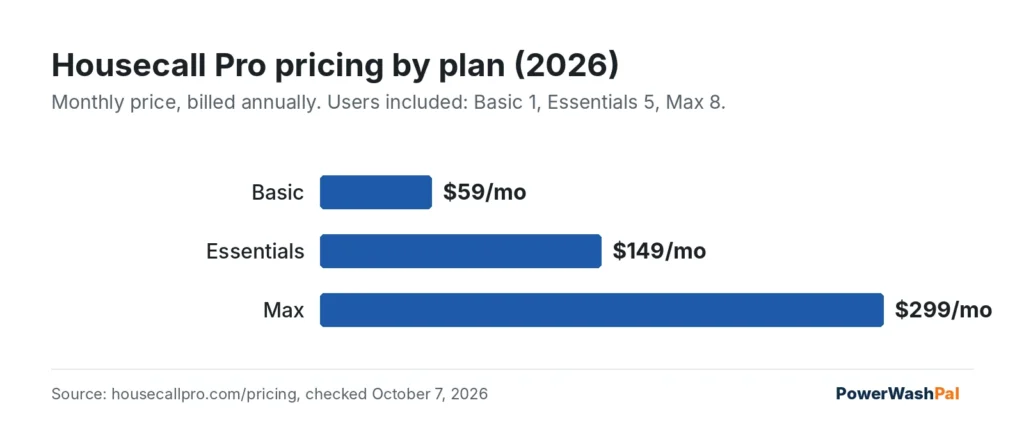
Housecall Pro pricing (2026)
| Plan | Annual | Monthly | Users | What it adds |
|---|---|---|---|---|
| Basic | $59/mo | $79/mo | 1 | Scheduling, dispatch, estimates, invoices, online booking, payments and financing, price book, job costing, review management |
| Essentials | $149/mo | $189/mo | 5 | Routes, flat-rate pricing, checklists, photo reports, GPS tracking, commissions, QuickBooks Online sync |
| Max | $299/mo | $329/mo | 8 | Sales proposals, recurring service plans, route optimization, open API, dedicated onboarding |

What Housecall Pro does well for exterior cleaning
1. Reviews on autopilot, even on the cheapest plan
Review management is included on every plan. When a job is marked done, the customer gets a request to leave a review. That matters a lot in this trade. In BrightLocal’s 2026 consumer survey, 85% of US consumers said positive reviews make them more likely to use a business, and 74% look for reviews from the last three months. A steady trickle of fresh Google reviews after every driveway and house wash is one of the cheapest ways to win more local jobs. (More on that in our guide to getting pressure washing customers.)
2. Five users for one price
Essentials includes five users at $149 a month. With Jobber, every user after the first costs $29. If you’ve got an owner, an office helper and three techs, Housecall Pro is usually the cheaper bill. See our Jobber pricing breakdown for the side-by-side math.
3. Photo reports that protect you
Essentials adds photo reports with annotations. Take before-and-after shots on the job and they’re attached to the customer record. If a homeowner later claims you etched their concrete or stripped paint, you’ve got time-stamped proof. For soft washing, where chemical overspray complaints happen, that’s real peace of mind.
4. Recurring service plans (Max)
Max lets you sell recurring plans, like an annual house wash or quarterly storefront cleaning, with automatic scheduling and billing. Commercial window and flatwork accounts are where steady revenue comes from, and this feature is built for them.
5. Consumer financing
Financing is available from the Basic plan. Most driveway jobs don’t need it, but a $2,000 roof soft wash plus gutter and deck package is a lot easier to close when the homeowner can pay monthly.
Where Housecall Pro falls short
- QuickBooks sync starts at $149. Basic users have to export to their bookkeeper by hand.
- Route optimization is Max-only. Essentials has routes, but true optimization of a day’s stops is in the $299 plan.
- US and Canada only. If you operate in the UK or Australia, it’s not an option.
- Solo pricing is higher. At $59 a month, Basic costs twice as much as Jobber Core for a one-person business.

Housecall Pro vs. Jobber: quick comparison
| Housecall Pro | Jobber | |
|---|---|---|
| Entry price (annual) | $59/mo, 1 user | $29/mo, 1 user |
| 5-person crew | $149/mo (Essentials) | $215/mo (Connect + 4 users) |
| Review requests | All plans | Marketing Suite add-on ($99/mo), included on Plus |
| QuickBooks Online | From Essentials ($149) | From Connect ($99) |
| Optional line items on quotes | Sales proposals on Max | From Grow ($149) |
| Countries | US, Canada | US, CA, UK, AU, NZ, IE, ZA |
| Free trial | 14 days | 14 days |
For the full feature-by-feature breakdown, read Jobber vs Housecall Pro for pressure washing, or see how both stack up against QuoteIQ, GorillaDesk and others in our best pressure washing software roundup.
Who should choose Housecall Pro?
- Pick it if you’re a US or Canadian residential company with 2 to 8 people, you want reviews handled automatically, and you’d rather pay one flat price than per user.
- Skip it if you’re a solo operator watching every dollar (start with Jobber Core), or you work outside North America.
Start your Housecall Pro trial Compare with Jobber
FAQ
How much does Housecall Pro cost per month?
$59 to $299 a month billed annually, or $79 to $329 billed monthly, as of October 2026. Max includes eight users, and each extra user is $35 a month.
How much is Housecall Pro Max?
Max is $299 a month billed annually or $329 billed monthly. It includes eight users, route optimization, recurring service plans, sales proposals and dedicated onboarding. Extra users are $35 a month each.
Does Housecall Pro have a free trial?
Yes. It’s 14 days, with no credit card required.
Is Housecall Pro good for pressure washing?
Yes, especially for residential crews. Built-in review requests, photo reports and financing all fit how exterior cleaning jobs are sold and delivered.
Is Housecall Pro better than Jobber?
Neither is better for everyone. Housecall Pro is usually cheaper for teams of three to five. Jobber is cheaper for solo operators and works in more countries.
Does Housecall Pro work with QuickBooks?
Yes, QuickBooks Online sync is included on the Essentials and Max plans.
Sources: Housecall Pro pricing and Jobber pricing, checked October 7, 2026; BrightLocal Local Consumer Review Survey 2026. This review is based on the vendors’ published plans and features; we don’t accept payment for rankings.